OPE_
__CLOSE
............... .................. ........
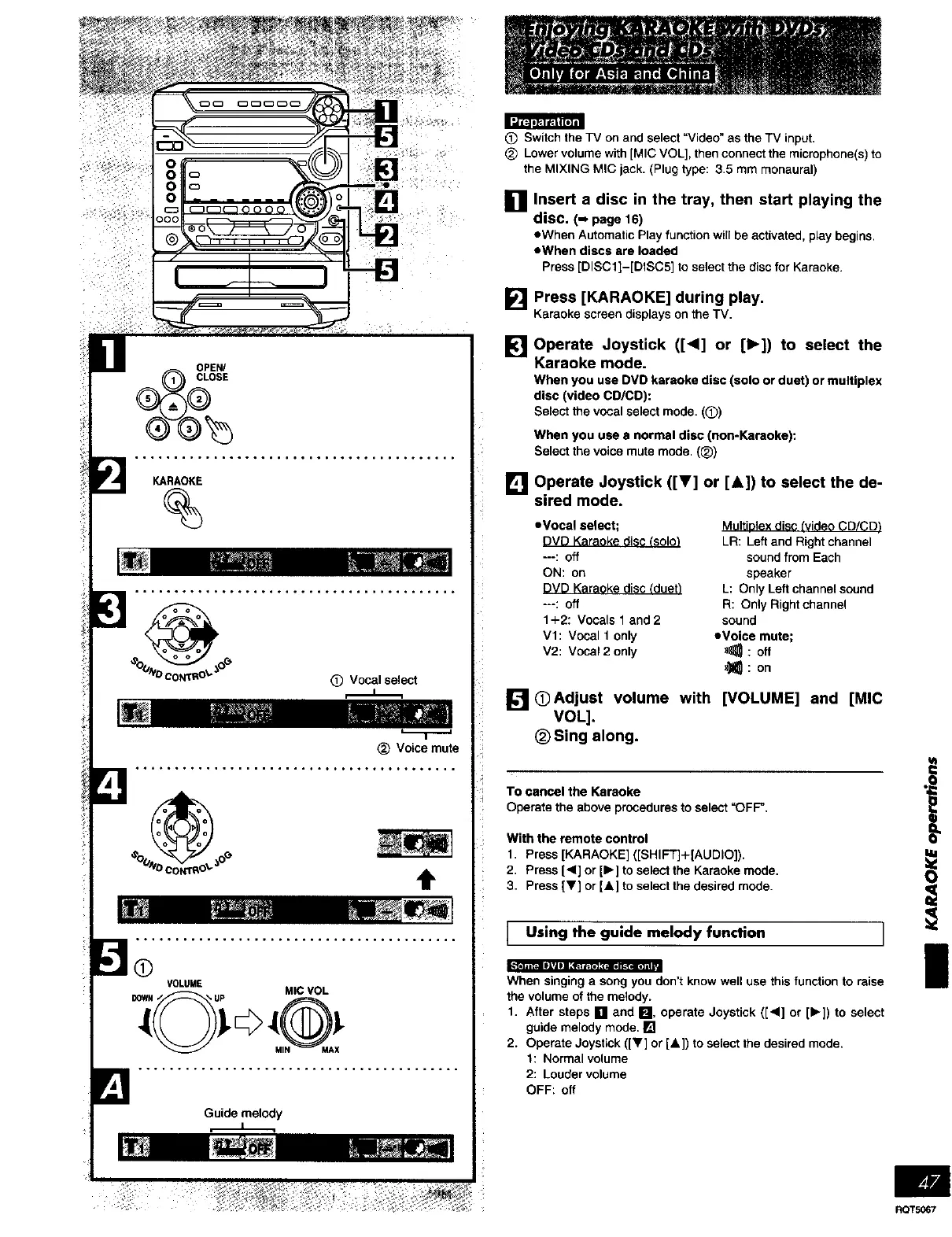
KARAOKE
%
(_) Vocalselect
_) Voice mute
t
O
.1Q311E".elBA_ I I i_=l_. [gJ_=IO I _.*[_ll ]=II
VOLUME
DOWH• • UP MICVOL
MIN MAX
(_ Switch the TV on and select "Video" as the TV input.
Lower volume with [MIC VOL], then connect the microphone(s) to
the MIXING MIC jack. (Plug type: 3.5 mm monaural)
Insert a disc in the tray, then start playing the
disc. (- page16)
eWhen Automatic Play function will be activated, play begins
eWhen discs are loaded
Press [DISCll-[DtSC5] to select the disc for Karaoke.
[] Press [KARAOKE]. during play.
Karaokescreendisplays onthe TV.
[] Operate Joystick ([<1] or [1_]) to select the
Karaoke mode.
Whenyou useDVD karaoke disc (solo or duet) or multiplex
disc (video CD/CD):
Selectthevocal select mode (Q)
When you use a normal disc (non-Karaoke):
Select the voice mute mode. (_)
[] Operate Joystick ([V] or [&]) to select the de-
sired mode.
• Vocal select;
DVD Karaoke disc (solo_
---: off
ON: on
DVD Karaoke disc (duet_
---: Off
1+2: Vocals f and2
VI: Vocal 1 only
V2: Vocal 2 only
MultiDleX disc (video CD/CD_
LR: Left and Right channel
sound from Each
speaker
L: Only Left channel sound
R: Only Right channel
sound
eVoice mute;
_: oft
_: on
[] O Adjust volume with [VOLUME] and [MIC
VOL].
(_)Sing along.
TO cancel the Keraoke
Operate the above procedures to select "OFF'
With the remote control
1 Press [KARAOKE] ([SHIF'r]+[AUDIO])
2 Press [<1] or [1_] to select the Karaoke mode
3 Press [V] or [&] to select the desired mode
I Using the guide melody function ]
When singing a song you don't know well use this function to raise
the volume of the melody
1 After steps [] and m, operate Joystick ([4] or [1_]) to select
guide melody mode []
2 Operate Joystick ([Y] or [&]) to select the desired mode
1: Normal volume
2: Louder volume
OFF: off
I
I
RQT5067















 To Next Page