[]
I(ARAOKE
EFRECT
%
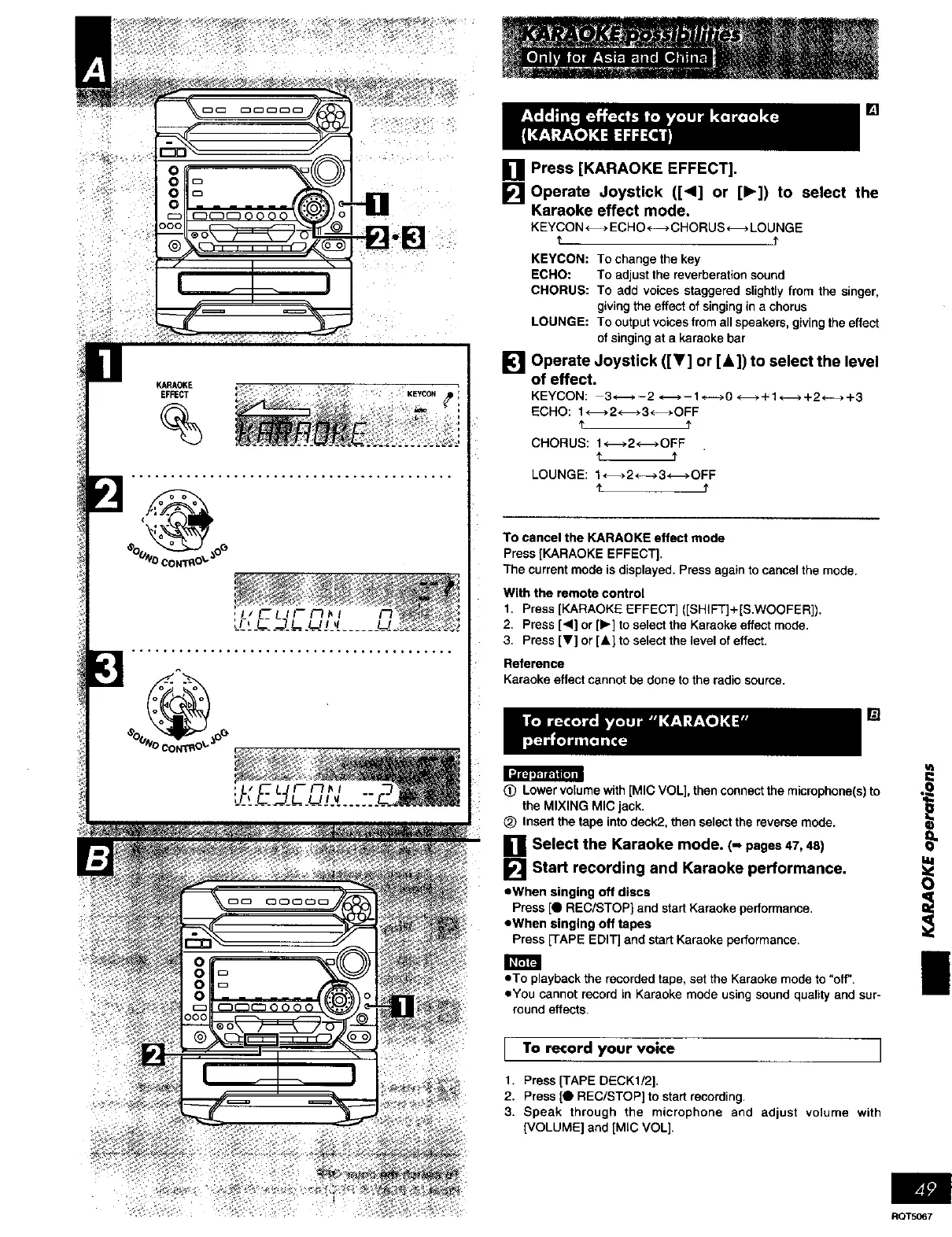
[] Press [KARAOKE EFFECT].
[]
Operate Joystick ([<1] or [1_]) to select the
Karaoke effect mode.
KEYCON H ECHO<----_ CHORUS _ LOUNGE
1' 1"
KEYCON: To change the key
ECHO: To adjust the reverberation sound
CHORUS: To add voices staggered slightly from the singer,
giving the effect of singing in a chorus
LOUNGE: To output voices from all speakers, giving the effect
of singing at a karaeke bar
[] Operate Joystick ([_'] or [A]) to select the level
of effect.
KEYCON: 3-_ - 2 <-m, - 1._-_ 0 _ ÷ 1*-m, + 2 <---_+ 3
ECHO: 1<-_. 2 <---_3 <-_.OFF
t
CHORUS: 1<-_>2<-_ OFF
t J'
LOUNGE: 1H 2*---->3<-_*OFF
¢ t
To cancel the KARAOKE effect mode
Press [KARAOKE EFFECT].
The current mode is displayed. Press again to cancel the mode.
With the remote control
1. Press [KARAOKE EFFECT] ([SHIFT]+[S.WOOFER]).
2. Press [4] or [1_] to select the Karaoka effect mode.
3. Press [V] or [&] to select the level of effect.
Reference
Karaoke effect cannot be done to the radio source.
[]
(_) Lower volume with [MIC VOL], then connect the microphone(s) to
the MIXING MIC jack.
Insert the tape into deck2., then select the reverse mode.
]Select the Karaoke mode. (- pages47,48)
[] Start recording and Karaoke performance.
oWhen singing off discs
Press [O REC/STOP} and start Karaoke performance.
eWhen singing off tapes
Press [TAPE EDIT] and start Karaoke performance
• To playback the recorded tape, set the Karaoke mode to "off'.
• You cannot record in Karaoke mode using sound quality and sur-
round effects•
To record your voice I
1. Press [TAPE DECK1/2].
2. Press [0 REC/STOP] to start recording.
3. Speak through the microphone and adjust volume with
[VOLUME] and [MIC VOL],
I
Ii
RQT5067















 To Next Page