I _11I'_ i[+:_JtLi] i +.+t
€
II
RQTS067
- _1 le,- -
vTUNF.41NaADJ
cl.cc_
TIMER
%
..,,..... ..... .. .... .*........,..,, .... ,,
-91 Iw.- -
_/T_E ADJ
CLOCK/
%
..*...... ..... . ...... • .... ..* .... ,.,.....
I, 171 I CIJ I L_ _
, t, LIL "--')Lr_3 ,I ',
_)PLAYI I (_
_C
eSwitch on the power.
• Make sure that you have completed "Setting the time" on page 13.
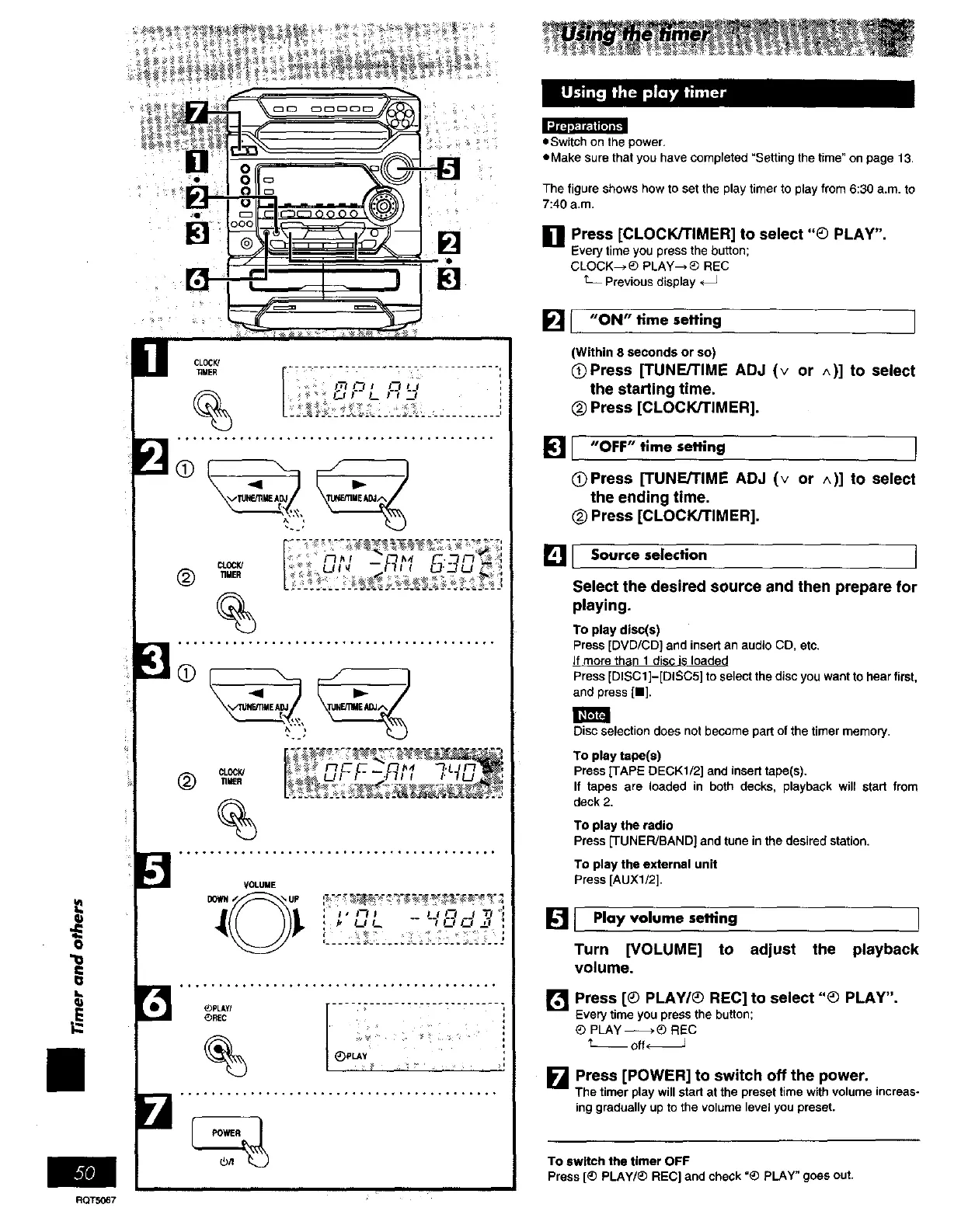
The figure shows how to set the play timer to play from 6:30 a.m. to
7:40 a.m.
[] Press [CLOCK/TIMER] to select "_) PLAY".
Every time you press the button;
CLOCK-->_) PLAY--,_ REC
t_ Previous display
[] I "ON" time setting
(Within 8 seconds or so)
QPress [TUNE/TIME ADJ (v or ^)] to select
the starting time.
(_ Press [CLOCK/TIMER].
_1[ "OFF" time setting
OPress [TUNE/TIME ADJ (v or ^)] to select
the ending time.
_) Press [CLOCK/TIMER].
_Jl Source selection
Select the desired source and then prepare for
playing.
To play disc(s)
Press [DVD/CD} and insert an audio CD, etc.
If more than 1 disc is loaded
Press [DISC1 ]-[DISCS] to select the disc you want to hear first,
and press [11].
Disc selection does not become part of the timer memory.
To play tape(s)
Press [TAPE DECK1/2] and insert tape(s).
If tapes are loaded in both decks, playback will start from
deck 2.
To play the radio
Press [TUNER/BAND] and tune in the desired station.
To play the external unit
Press [AUX1/2].
[] I Play volume setting !
Turn [VOLUME] to adjust the playback
volume.
[] Press [_) PLAY/_ REC] to select "_) PLAY".
Every time you press the button;
PLAY-_*_ REC
_---off_
[] Press [POWER] to switch off the power.
The timerplaywillstartat the presettimewithvolumeincreas-
inggraduallyup tothe volumelevelyou preset.
To switch the timer OFF
Press [_) PLAY/_) REC] and check =_) PLAY" goes out.















 To Next Page