[!
o
0
[]
• Switch on the power.
oMake sure that you have completed "Setting the time" on page 13.
Set the timer at least 2 minutes before you want to start recording.
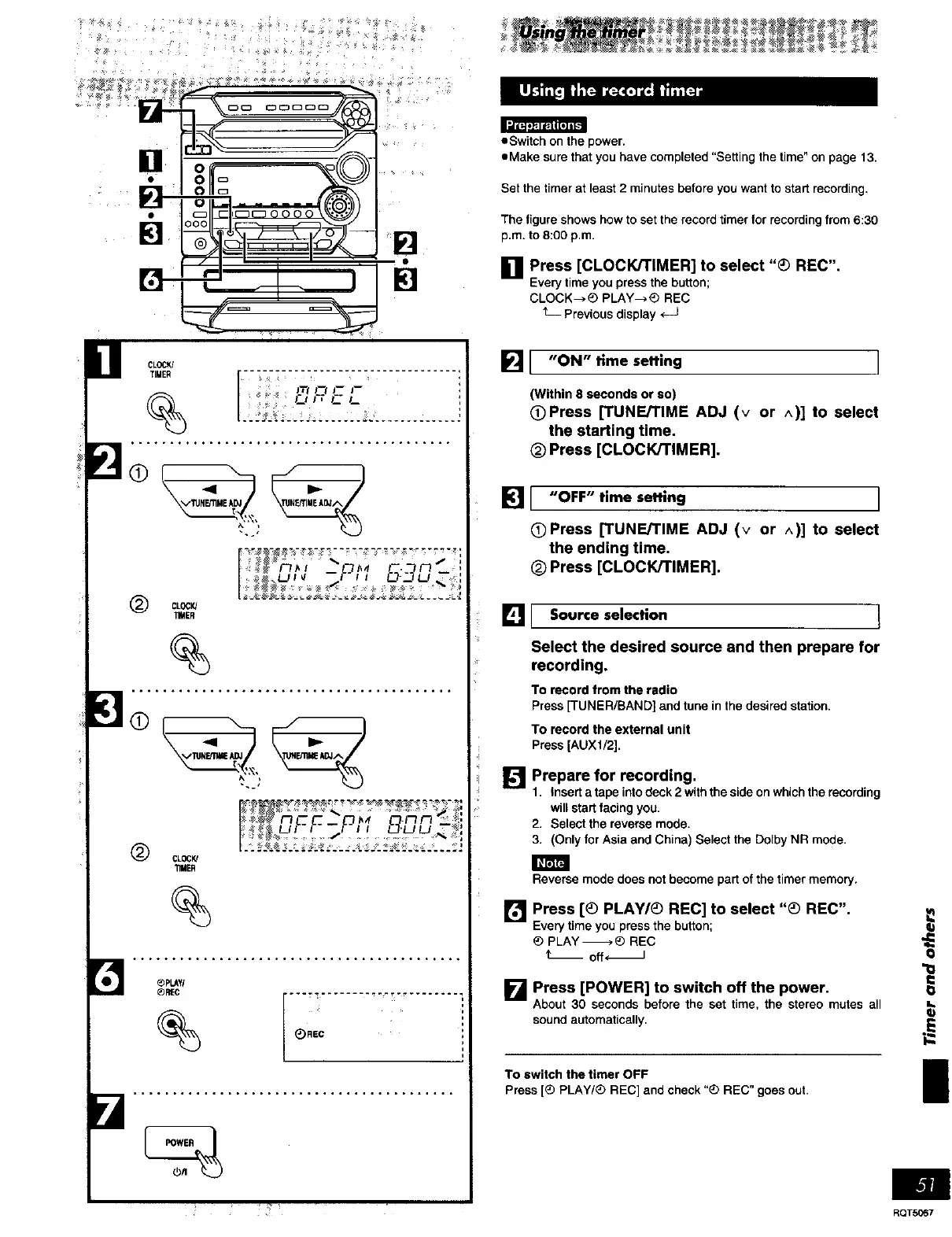
The figure shows how to set the record timer for recording from 6:30
p.m. to 8:00 p.m.
I1 Press [CLOCK/TIMER] to select "_) REC".
Everytime youpressthe button;
CLOCK-->_ PLAY--_ REC
L Previousdisplay _J
CLOCK/
TIMER i _i _ •
J'TiJ'-_J-- i--
-ql _ -
VTUNErnME ADJ
1
(_ CLOCK/
11MER
%
_<1 l=,'- -
V'IUNF.qWEAOJ
(_ CLOCK!
TIMER
%
_PLAY/
_)R'EC
%
_)REC
s
i
i
_1 "ON" llme setting I
(Within 8 secondsor so)
OPress [TUNE/TIME ADJ (v or A)] to select
the starting time.
_) Press [CLOCK/TIMER].
]1 "OFF" time setting
OPress [TUNE/TIME ADJ (v or ^)] to select
the ending time.
(_ Press [CLOCK/TIMER].
[] I Source selection t
Select the desired source and then prepare for
recording.
To record from the radio
Press [TUNER/BAND] and tune in the desired station.
To record the external unit
Press [AUX1/2],
[]
Prepare for recording.
1, Insert a tape into deck 2 with the side on which the recording
will start facing you.
2. Select the reverse mode,
3. (Only for Asia and China) Select the DolPy NR mode.
Reverse mode does not become part of the timer memory.
[] Press [_ PLAY/_ REC] to select "_ REC".
Everytime youpressthe button;
_) PLAY-_,_ REC
t" off_
I_'_ Press [POWER] to switch off the power,
About 30 seconds before the set time, the stereo mutes all
sound automatically.
To switch the timer OFF
Press [_ PLAY/_ REC] and check "_ REC" goes out.
! •
RQTS067















 To Next Page