5
USB operations
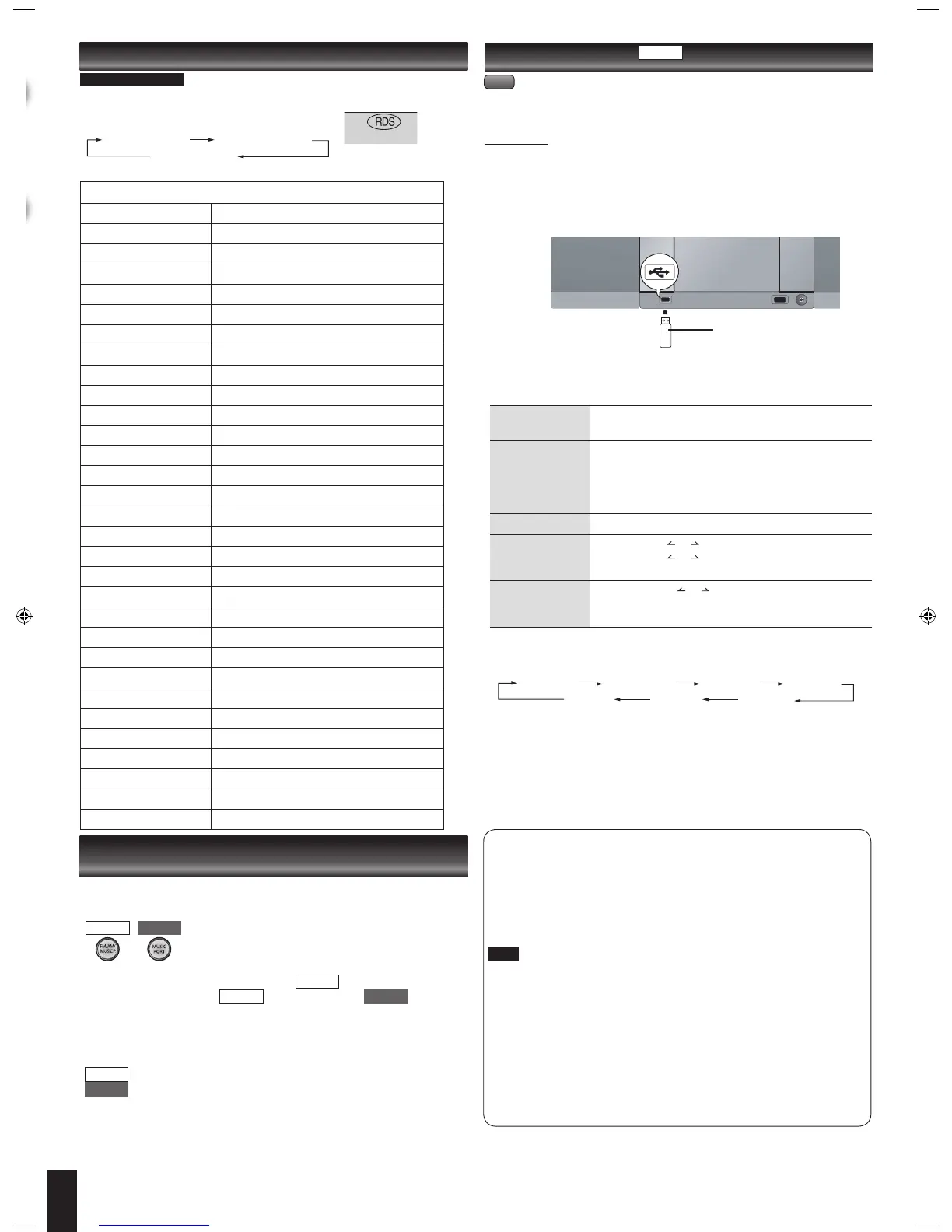
The USB connectivity enables you to connect and play MP3 tracks from USB mass
storage class. Typically, USB memory devices (Bulk only transfer).
Preparation
Before connecting any USB mass storage device to the unit, ensure that the data
stored therein has been backed up.
It is not recommended to use a USB extension cable. The device connected via the
cable will not be recognised by this unit.
Reduce the volume and connect the USB mass storage device.
Press [USB q/h] to start play.
To pause play
Press [USB q/h].
Press again to resume play.
To stop play
Press [g].
“RESUME” is displayed. The position is memorized.
Press [USB q/h] to resume play.
OR
Press [g] again to clear the position.
To skip track
Press [2/u] or [1/i].
To skip album Press [ALBUM or ] in the play mode.
Press [ALBUM or ] once and then the numbered
buttons in the stop mode.
Direct access play
(Play starts with the
track you select.)
Press [ALBUM or ] to select the album.
Press [1/i] once and then press the numbered buttons
to
select the desired track.
g Display function
Press [DISPLAY] repeatedly during play or pause.
Elapsed time Remaining time Album name Track name
ID3 (Artist) ID3 (Track) ID3 (Album)
For other operating functions, they are similar as those described in “Discs Operations”
(➡ page 3 and 4).
To remove the USB mass storage device
Select a source other than “USB”.
Removing the USB mass storage device with it selected as a source can damage the
data stored in the device.
Program type displays
NEWS News
AFFAIRS Current affairs
INFO Information
SPORT Sport
EDUCATE Education
DRAMA Drama
CULTURE Culture
SCIENCE Science
VARIED Varied
POP M Pop music
ROCK M Rock music
M.O.R.M Middle of the road Music
LIGHT M Light classical
CLASSICS Serious classical
OTHER M Other music
WEATHER Weather information
FINANCE Finance
CHILDREN Children
SOCIAL A Social affairs
RELIGION Religion
PHONE IN Phone in
TRAVEL Travel
LEISURE Leisure
JAZZ Jazz music
COUNTRY Country music
NATIONAL National music
OLDIES Oldies
FOLK M Folk music
DOCUMENT Documentary
TEST Test broadcast
ALARM Emergency announcement
g Compatible device
Devices which are defined as USB mass storage class:
USB devices that support bulk only transfer.
USB devices that support USB 2.0 full speed.
g Supported Format
Files must have the extension “.mp3” or “.MP3”.
CBI (Control/Bulk/Interrupt) is not supported.
A device using NTFS file system is not supported [Only FAT 16/32 (File Allocation
Table 16/32) file system is supported].
Depending on the sector size, some files may not work.
This unit can access up to 255 albums and 2500 tracks.
The maximum number of tracks in a folder are 999 tracks.
Only one memory card will be selected when connecting a multiport USB card
reader. Typically the first memory card inse
rted.
Disconnect the USB card reader from the unit when you remove the memory
card. Failure to do so may cause malfunction to the device.
When you connect your digital audio player to the USB jack, it charges all the time
except in standby mode.
•
•
•
•
•
•
•
•
•
•
RDS broadcasts
Enable you to display the name of a broadcasting station or a program type.
“RDS” lights while RDS signals are being received.
Press [DISPLAY] to display.
Station Name (PS) Program Type (PTY)
Frequency display
RDS displays may not be available if reception is poor.
SC-EN35
For continental Europe
Note
➡
Page 2 for the position of
remote control buttons.
USB enabled device
(not included)
MP3
The remote control and main unit are factory-set to “REMOTE 1” mode.
If your remote control affects other equipment during operation, you can switch to
operate in “REMOTE 2” mode.
To switch to “REMOTE 2” mode
Press [FM/AM/MUSIC P.] to select “AM”. ( )
(While pressing and hold [FM/AM/MUSIC P.] / [MUSIC
PORT] on the main unit)
Press and hold [2] until “REMOTE 2” appears on the main unit display.
Press and hold [ENTER] and [2] for at least 2 seconds.
The main unit and remote control are now set to operate in “REMOTE 2” mode.
To return to “REMOTE 1” mode
Perform steps 1 to 3 but use [1] instead of [2] for steps 2 and 3.
Perform steps 2 and 3 above but use [1] instead of [2] for both steps.
(“REMOTE 1” appears on the main unit during step 2.)
The remote control cannot work with the main unit if their modes are different.
“REMOTE 1” or “REMOTE 2” appears on the main unit when you operate the remote
control.*
* If “REMOTE 1” appears (The main unit is in “REMOTE 1” mode.)
Press and hold [ENTER] and [1] on the remote control for at least 2 seconds.
If “REMOTE 2” appears (The main unit is in “REMOTE 2” mode.)
Press and hold [ENTER] and [2] on the remote control for at least 2 seconds.
SC-EN35 SC-EN33
SC-EN35 SC-EN33
Changing the main unit and remote control
mode
SC-EN35
SC-EN35
SC-EN33


 To Next Page