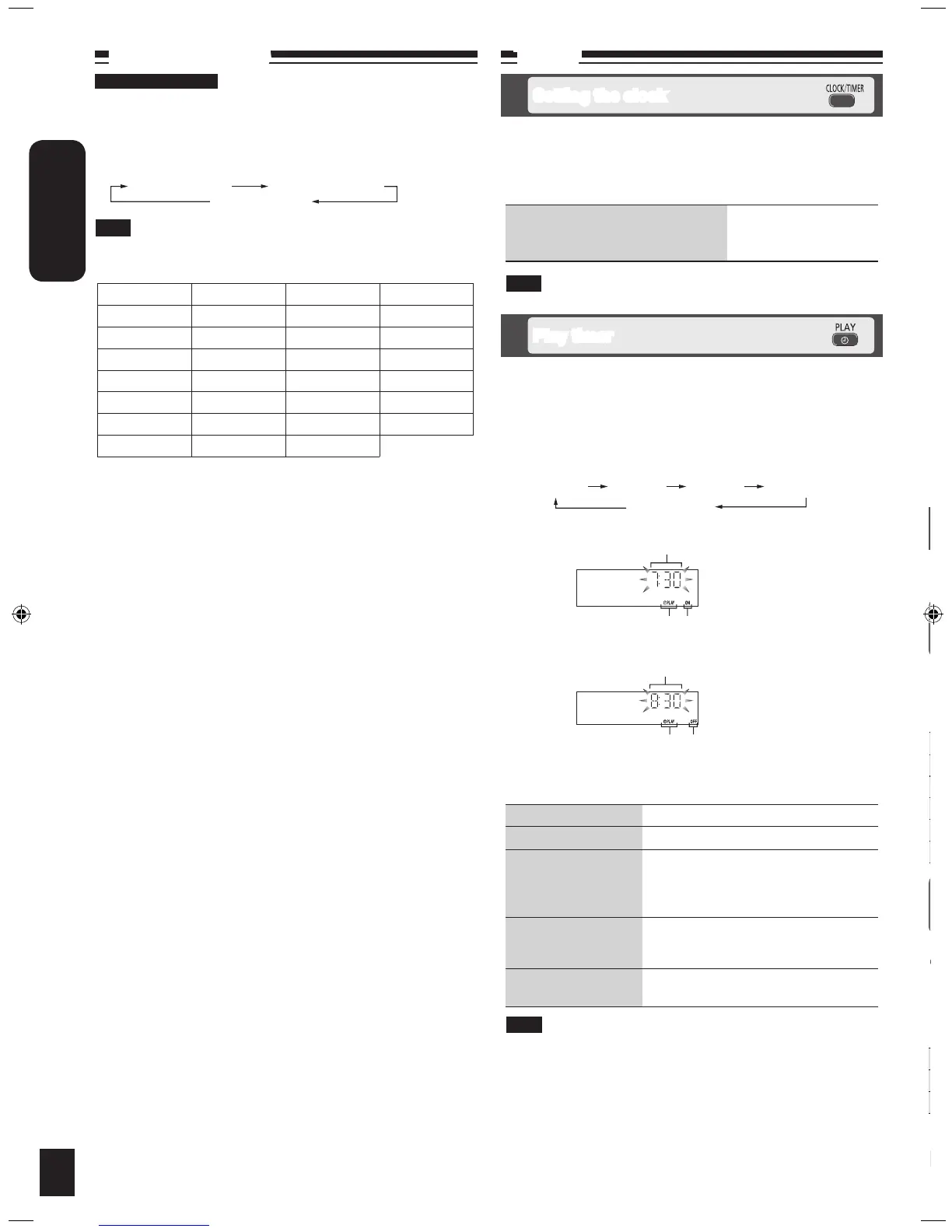
RDS broadcasts
Enable you to display the name of a broadcasting station or a program
type.
“RDS” lights while RDS signals are being received.
Press [DISPLAY] to display.
Station Name (PS) Program Type (PTY)
Frequency display
RDS displays may not be available if reception is poor.
Note
Timer
This is a 24-hour clock.
Press [CLOCK/TIMER] to set the clock.
Press [u/t] or [y/i] to select the time within 5 seconds.
(Press and hold to change the time faster.)
Press [CLOCK/TIMER] again.
g To display the clock for few
seconds when the unit is on or in
standby mode
Press [CLOCK/TIMER]
Reset the clock regularly to maintain accuracy.
10
Program type displays
NEWS VARIED FINANCE COUNTRY
AFFAIRS POP M CHILDREN NATIONAL
INFO ROCK M SOCIAL A OLDIES
SPORT M-O-R- M* RELIGION FOLK M
EDUCATE LIGHT M PHONE IN DOCUMENT
DRAMA CLASSICS TRAVEL TEST
CULTURE OTHER M LEISURE ALARM
SCIENCE WEATHER JAZZ
* M-O-R- M = Middle-of-the-Road music
Setting the clock
Play timer
Sound adjustment
Note
Enables you to enjoy lower or higher pitch sound.
Press [BASS/TREBLE] repeatedly to select your desired setting.
Setting Effect
BASS For lower pitch sound
TREBLE For higher pitch sound
Press [u/t] or [y/i] to adjust the level.
The tone level can be varied within -4 to +4.
You can change the sound effect by selecting Preset EQ or adjusting the
bass or treble effect.
Selecting sound effects
Press [PRESET EQ] repeatedly to select your desired setting.
Setting Effect
HEAVY Adds punch to rock
CLEAR Clarifies higher frequencies
SOFT For background music
VOCAL Adds gloss to vocals
FLAT No effect
Preset EQ
Bass or treble
To Action
change the settings Repeat steps 1 to 4 and 6.
change the source or
volume
Press [z, PLAY] to clear zPLAY
indicator from the display.
Make changes to the source or volume.
Perform steps 5 and 6.
check the settings
(when the unit is on or
in standby mode)
Press [CLOCK/TIMER] repeatedly to
select zPLAY 1, zPLAY 2 or zPLAY 3.
cancel
Press [z, PLAY] to clear the timer
indicator from the display.
The timer will start at the preset time, with the volume increasing
gradually to the preset level.
The timer comes on at the set time every day if the timer is on.
The unit must be in the standby mode for the timer to function.
If you turn the unit off and on again while the timer is functioning, the
finish time setting will not be activated.
When external unit is selected as the source when the timer comes
on, the system turns on and engages external unit as the source. If
you wish to playback from the portable audio equipment, activate the
equipment’s play mode and increase the volume. (See the portable
audio equipment’s instruction manual.)
•
•
•
•
•
Note
Note
For Continental Europe
You can set the timer to come on at a certain time to wake you up.
This unit offers 3 optional play timers.
Preparation:
Turn the unit on and set the clock. (➡ see above)
Prepare the music source (disc, radio, iPod, AUX or USB) and set
the volume.
Press [CLOCK/TIMER] repeatedly to select play timer.
Within 5 seconds, press [u/t] or [y/i] to set the starting
time.
Press [CLOCK/TIMER] to confirm.
Repeat steps 2 and 3 to set the finishing time.
To activate the timer
Press [z, PLAY] repeatedly to turn on your desired play timer.
Press [^] to turn off the unit.
•
•
Play timer indicator
Start time
Finish time
CLOCK
zPLAY 1 zPLAY 2 zPLAY 3
Original display
Play timer indicator
“ON” is displayed
“OFF” is displayed



 To Next Page