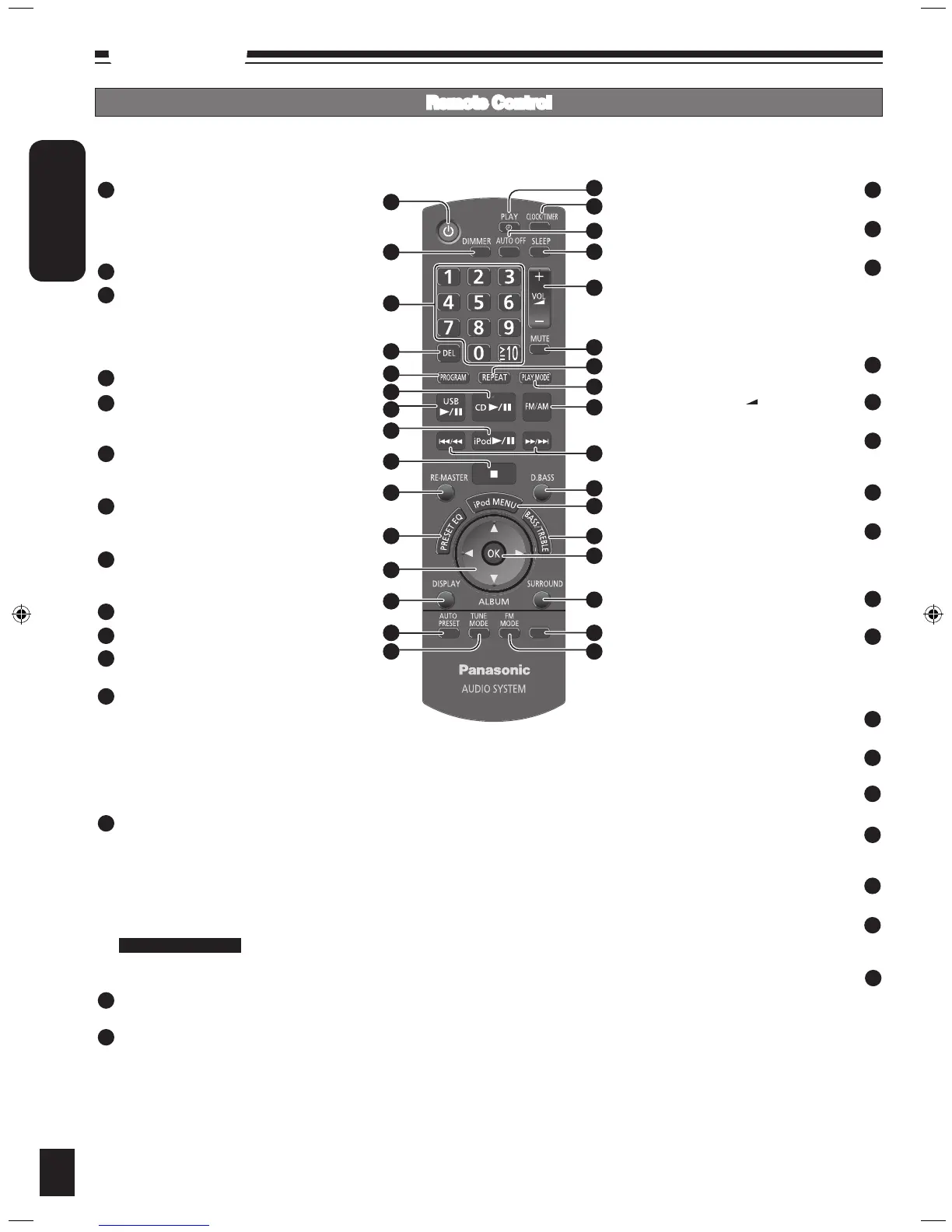
Control guide
Standby/on switch [^], [8] (8, 10)
Press to switch the unit from on to standby
mode or vice versa.
In standby mode, the unit is still consuming a
small amount of power.
[DIMMER] Dims the display panel
Numeric buttons [1-9, 0,
≧
10] (8, 9, 13)
To select a 2-digit number
e.g. 16: [
≧
10] [1] [6]
To select a 3-digit number
e.g. 226: [
≧
10] [
≧
10] [2] [2] [6]
[DEL] Delete last programmed track (8)
[PROGRAM] (8, 9)
CD/MP3 Program
Tuner Preset (Manual)
[CD q/h] (8)
Selector switch to CD
Direct CD Play/CD Pause
[USB q/h] (13)
Selector Switch to USB
Direct USB Play/USB Pause
[iPod q/h] (12)
Selector switch to iPod
Direct iPod Play/iPod Pause
[g] Stop button (8, 12, 13)
[RE-MASTER] Re-master on/off (11)
[PRESET EQ] (11)
Preset EQ mode selector
[e, r, ALBUM] (8, 12, 13)
Album/track selection
iPod menu browsing
[w, q]
Track skip/search
Tune/preset channel selection
Time adjustment
Bass/treble adjustment
[DISPLAY] (8, 10, 13)
CD: CD Display (Elapsed play time/
Remaining play time)
MP3: MP3 Display (Elapsed play time/Album
name/Track name)
USB: USB Display (Elapsed play time/
Remaining play time/Album name/Track
name)
RDS: RDS Display (Station Name/Program
Type/Frequency)
[AUTO PRESET] (9)
Tuner Preset (Auto)
[TUNE MODE] (9)
Tune mode on/off
Selector switch to Manual/Preset
1
2
9
8
7
6
5
4
3
10
11
12
13
14
15
16
17
18
19
20
21
22
23
24
25
(10) [z, PLAY]
Play timer on/off
(10) [CLOCK/TIMER]
Clock and Timer setting
[AUTO OFF]
This function allows you to turn off the unit in
disc mode or USB mode only after the unit
is left unused for 10 minutes. The setting is
maintained even if the unit is turned off.
Press again to cancel this function.
(11) [SLEEP]
Sleep timer setting
(8, 10, 12, 13) [VOL +, –], [–VOLUME+]
To adjust the volume
[MUTE]
Mutes the sound
Press again to cancel muting
(9) [REPEAT]
Repeat on/off
(8, 9, 11) [PLAY MODE]
Play mode button
Tuner: Lowest/Current
Adjusting level in AUX mode to Normal/High
(9) [FM/AM]
FM/AM selection
(8, 9, 10, 11, 12, 13) [
u/t], [y/i]
Track skip/search
Tune/preset channel selection
Time adjustment
Bass/treble adjustment
(11) [D.BASS]
D.BASS on/off
(12) [iPod MENU]
To display iPod menu
(11) [BASS/TREBLE]
Bass/Treble selection
(8, 12, 13) [OK]
Disc play
Confirm selection
(11) [SURROUND]
Surround mode on/off
(8, 13) [MP3 INFO]
MP3: MP3 Display [ID3 (Album)/ID3 (Track)/
ID3 (Artist)/Elapsed play time]
(9) [FM MODE]
FM mode on/off
Selector switch to Mono/Stereo
26







 To Next Page