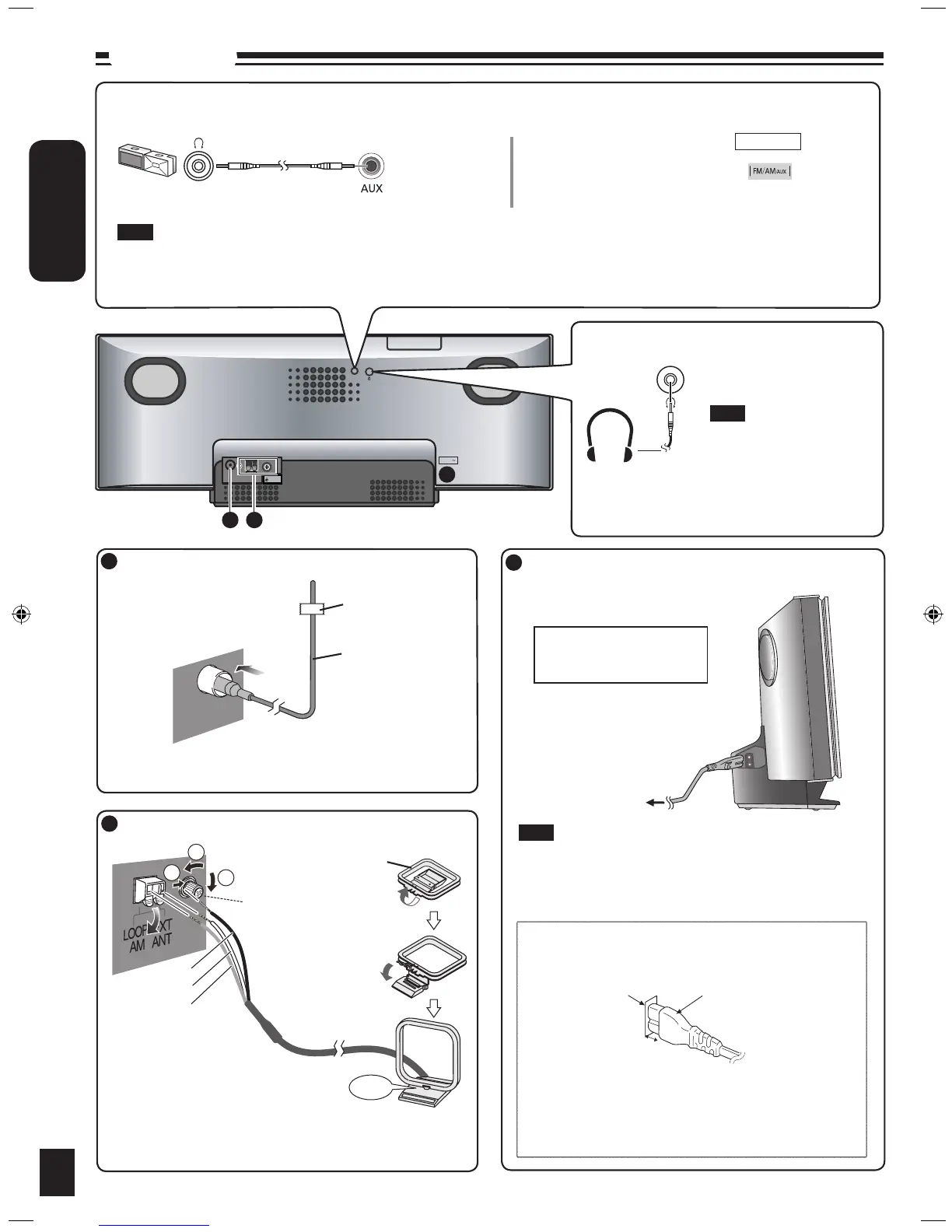
Headphones (not included)
Reduce the volume level and
connect the headphones.
Plug type: Ø3.5 mm stereo.
Note
Portable audio equipment (Cords and equipment not included)
Portable audio player
Plug type:
Ø3.5 mm stereo
➡
Start playback from the
portable audio source.
Note
MAIN UNIT
Avoid listening for prolonged
periods of time to prevent
hearing damage.
Excessive sound pressure
from earphones and
headphones can cause
hearing loss.
•
•
Adjust the volume and sound quality of this unit and the other equipment. Reduce the level of input signal (for example, by switching
off the equalizer or reducing the volume) of the other equipment before connection. High levels of input signal will distort the sound.
For details, refer to the instruction manual of the other equipment.
•
•
Connections
4
Connect the AM loop antenna.
Connect the FM indoor antenna.
Connect the AC mains lead.
To household AC
mains socket
Note
Tape the antenna to a wall or column, in a position with the least
amount of interference.
Keep the loose antenna cord away from other wires and cords.
Do not screw too tightly. Otherwise, the screwdriver goes around
in circle and cannot be fixed.
1
2
3
Connect the AC mains lead
after all other connections
are complete.
Adhesive tape
FM indoor antenna
Insertion of connector
Appliance inlet
Connector
Approx. 6 mm
Even when the connector is perfectly inserted, depending on
the type of inlet used, the front part of the connector may jut
out as shown in the drawing. However there is no problem
using the unit.
Stand the antenna
up on its base.
Click!
Use a Phillips-head
screwdriver, etc.
Black
Red
White
AM indoor antenna
To save power when the unit is not to be used for a long time,
unplug it from the household AC mains socket. You will need to
reset some memory items after plugging in the unit.







 To Next Page