EasyManua.ls Logo

Panasonic SC-HT990 - User Manual

Panasonic SC-HT990
40 pages
Print Icon
To Next Page IconTo Next Page
Loading...
RQT8596-1B
E
GCS GC GCT GS
Operating Instructions
DVD Home Theater Sound System
Model No. SC-HT540/SC-HT990
Region number
The player plays DVD-Video marked with labels containing the region
number orALL”.
Example: [Continental[Europe]
Before connecting, operating or adjusting this product,
please read the instructions completely.
Please keep this manual for future reference.
Region Number
Continental Europe, the Middle East, South Africa,
Saudi Arabia and Kuwait
2
Southeast Asia and Thailand 3
2 ALL
3
5
2
Advanced
progressive scan
Provides a smoother
and sharper image.
page
11
Compatible with a variety
of media formats
DVD-RAM, DVD-Audio,
DVD-Video, DivX and more.
page
14
High-performance
sound effects
Sound quality enhancement,
Bass enhancement and more.
page
30
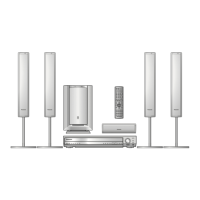
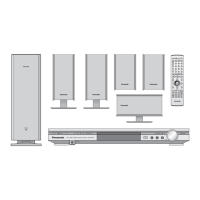
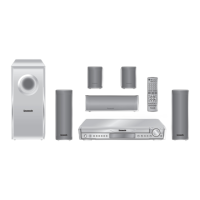
The illustration shows SC-HT540 for Continental Europe.
8596En_p01-02.fm Page 1 Wednesday, April 12, 2006 6:04 PM

Table of Contents

Other manuals for Panasonic SC-HT990

Questions and Answers

  • C
    Christopher StoneAug 15, 2025
    What to do if my Panasonic SC-HT990 Home Theater System has no picture or sound?
    • M
      Melissa BonillaAug 15, 2025
      If your Panasonic Home Theater System isn't producing picture or sound, and the buttons aren't responding, it might be due to an external factor like lightning or static electricity. Try turning the unit off and then back on. Also, condensation may have formed; wait 1 to 2 hours for it to evaporate. Ensure the batteries in the remote are not depleted, and replace them if needed. Verify that the disc is compatible and has recorded content. As a last resort, you can initialize the unit by pressing and holding the stop button on the main unit and S10 on the remote until 'Initialized' disappears from the screen (while stopped and DVD/CD is the source).
  • T
    thomassandovalAug 18, 2025
    Why does my Panasonic SC-HT990 Home Theater System display “NO PLAY” or “NO DISC”?
    • J
      Jacqueline KnightAug 18, 2025
      If your Panasonic Home Theater System displays “NO PLAY” or “NO DISC”, it could be due to several reasons. You might have inserted a disc the unit cannot play, a blank disc, or a disc that hasn't been finalized. Ensure you insert a disc that is compatible. Also, check if you have inserted a disc correctly. If the disc is dirty, wipe it clean. If none of these steps work, there may have been an error; try turning the unit off and then back on.
  • V
    victoria55Aug 21, 2025
    What to do if the picture is not displayed correctly on my Panasonic Home Theater System?
    • T
      Thomas ShannonAug 21, 2025
      If the picture on your television is not displayed correctly when using your Panasonic Home Theater System, it could be due to a few reasons. The unit and television might be using different video systems; use a multi-system or NTSC television. If the disc system doesn't match your TV, the unit can convert NTSC signals to PAL 60 via the “NTSC Disc Output” setting in the “Video” tab. Also, keep other appliances and cables away from the main unit, as mobile telephone chargers can cause disturbance. You can also try changing “Source Select” in the Picture Menu. If the picture stops and you're playing DivX files larger than 2 GB, restore the zoom ratio to “k1.00” using “Manual Zoom” in the Display Menu.
  • S
    Sarah GreenAug 25, 2025
    How to fix ghosting when progressive output is on Panasonic SC-HT990?
    • G
      Gary LeeAug 25, 2025
      If you're experiencing ghosting with progressive output on your Panasonic Home Theater System, it's likely due to the DVD-Video's editing method or material. Setting “Video Output Mode” in the Picture Menu to “480i” or “576i” should correct this. You can also press and hold [CANCEL] to switch to “480i” or “576i”.
  • M
    Mary GreenAug 28, 2025
    Why is there distorted sound or noise from my Panasonic Home Theater System?
    • A
      Amanda GalvanAug 28, 2025
      If you're experiencing distorted sound or noise from your Panasonic Home Theater System, try the following: Adjust the position of the FM or AM antenna. Use an outdoor antenna. Turn the television off or move it away from the unit. Also, separate the antenna from other cables.
  • A
    ann24Aug 31, 2025
    Why does my Panasonic Home Theater System say “This disc may not be played in your region”?
    • R
      raymondmontgomeryAug 31, 2025
      This message appears on your Panasonic Home Theater System because you are trying to play protected group or content, which you cannot play. You may be trying to display incompatible group or content. If you are trying to play DivX VOD content purchased with a different registration code, you cannot play the content on this unit.
  • B
    Bradley LawrenceSep 3, 2025
    What to do if my Panasonic SC-HT990 has no power?
    • R
      Robert HermanSep 4, 2025
      If your Panasonic Home Theater System has no power and is automatically switched to standby mode, it may be because the Sleep timer was working and reached the set time limit. In this case, insert the AC mains lead securely.
  • Y
    yballardSep 7, 2025
    Why is Point B automatically set on my Panasonic Home Theater System?
    • B
      Brenda BaileySep 7, 2025
      Point B is automatically set because the end of an item becomes point B when it is reached.
  • R
    Robert DoyleSep 10, 2025
    Why is the subtitle position wrong on my Panasonic SC-HT990?
    • M
      Michelle LaneSep 10, 2025
      Subtitles may not be displayed depending on the disc. Adjust the position using the “Subtitle Position” setting in the Display Menu.

Summary

Product Overview and Accessories

Accessories

Lists all included accessories with the home theater system for verification.

Safety Precautions and Cautions

Caution for AC Mains Lead

Important safety instructions and procedures for handling and replacing the AC mains lead fuse.

General Safety Guidelines

Covers essential safety guidelines regarding placement, voltage, foreign matter, and service.

DivX VOD Content Information

Information on DivX VOD content, registration codes, and playback limitations.

Initial Setup: Speaker Assembly and Positioning

STEP 1: Assembling the Speakers

Step-by-step guide for assembling the speakers, including stands and wall mounting options.

STEP 2: Positioning the Speakers

Guidelines for optimal speaker placement to achieve the best sound field and prevent TV interference.

Initial Setup: Connections and Configuration

STEP 3: Speaker Connections

Diagram and instructions for connecting all speakers to the main unit.

STEP 4: Audio and Video Connections

Guides for connecting audio and video sources for basic and improved picture quality.

STEP 5: Radio and AC Mains Lead Connections

Instructions for connecting AM/FM antennas and the AC power cord.

STEP 6: Preparing the Remote Control

How to insert batteries into the remote control and basic usage guidelines.

STEP 7: Performing QUICK SETUP

Walkthrough for initial setup using the on-screen QUICK SETUP menu.

Playback Operations and Media Handling

Control Reference Guide

Overview of the remote control buttons and their functions with page references.

Discs Supported and Cautions

Details on playable disc formats, disc handling precautions, and maintenance.

Glossary

Definitions of technical terms and formats used in the manual.

Basic Playback and Remote Control Usage

Instructions for starting playback, using the main unit, and operating the remote control.

Convenient Playback Functions and Data Discs

Using features like group/program play, navigation menus, and playing various file types.

On-Screen Menus and Player Settings

Navigating menus for playback, audio, video, subtitle, and other player configuration.

Speaker Delay Time Adjustment

Adjusting speaker delay times for optimal multi-channel audio listening.

Radio and Sound Enhancement

Using the Radio Tuner

Instructions for selecting FM/AM stations, automatic presetting, and manual tuning.

RDS Broadcasting and Antenna Usage

Information on RDS text display and using optional antennas for better reception.

Sound Effects and Adjustments

Enhancing sound using Center Focus, Sound Field Control, Dolby Pro Logic II, H.BASS, and speaker levels.

Additional Functions and Troubleshooting

Useful Functions: Headphones and Music Port

Connecting headphones and external devices for music playback.

Enjoying Karaoke and Operating Other Equipment

Instructions for karaoke playback and operating connected televisions.

Troubleshooting Guide

Common problems and solutions for power, response, picture, sound, and playback issues.

System Specifications

Component Specifications

Technical details of the amplifier, disc playback, tuner, video output, and speaker systems.

General Power and Environmental Details

Details on power supply, consumption, operating conditions, and mass.

Panasonic SC-HT990 Specifications

General IconGeneral
RMS rated power1000 W
Audio output channels5.1 channels
Satellite speakers RMS power4 W
Analog signal format systemNTSC
I/O ports-Scart Terminal; -Component Video Out; -S-Video Out; -Video Out; -Music Port; -Audio In;
Weight3350 g
Dimensions (WxDxH)430 x 354 x 60 mm
Surround speaker weight3700 g
Surround speaker dimensions (WxHxD)252 x 234 x 1123 mm
Optical disc player typeDVD player
Weight and Dimensions IconWeight and Dimensions
Subwoofer weight4000 g
Center speaker weight1250 g
Subwoofer dimensions (WxDxH)183 x 267 x 396 mm
Center speaker dimensions (WxDxH)252 x 1123 x 234 mm

Related product manuals