RQTV0188
12
DAB (continued)
Display
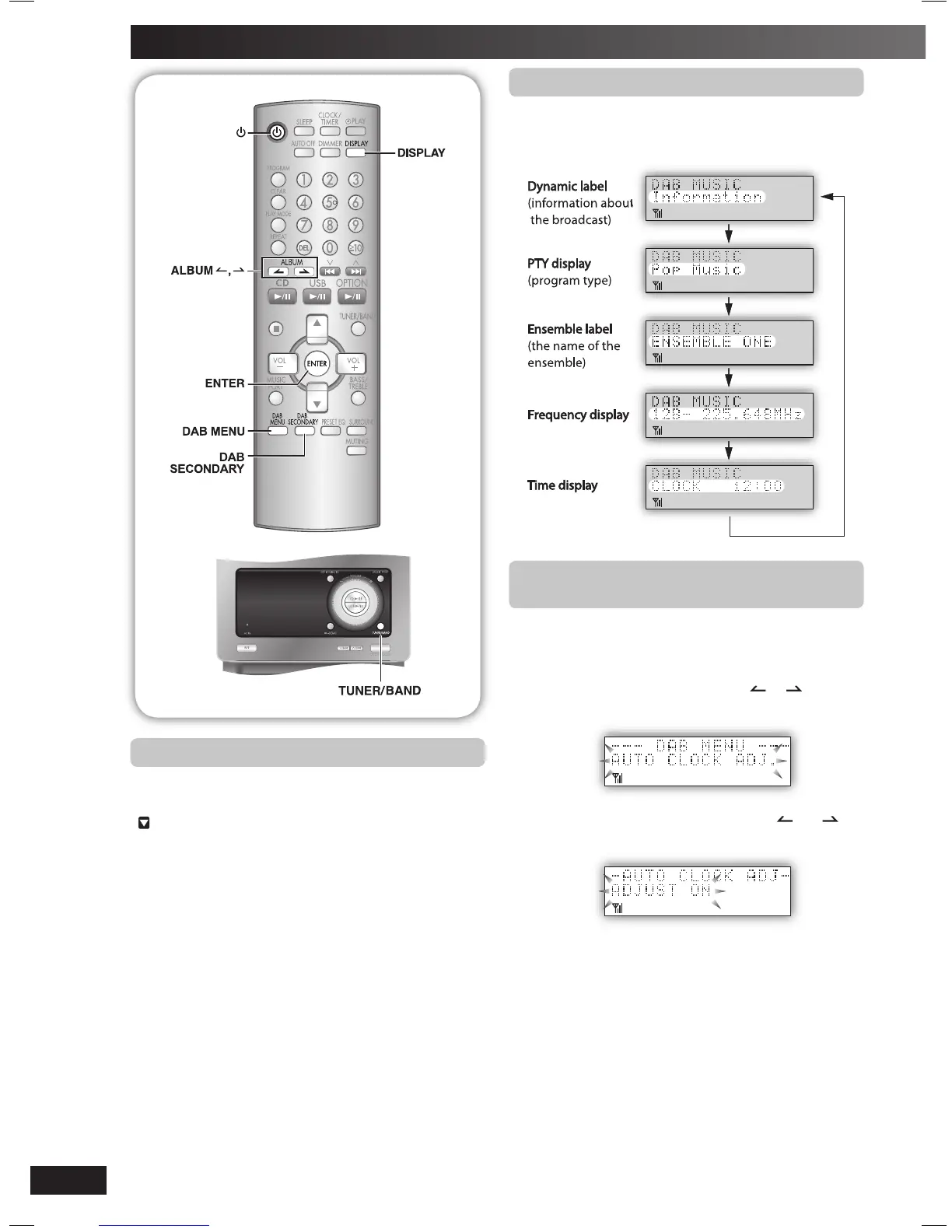
Press [DISPLAY] to select the display.
The information scroll through the display.
Each time you press the button:
Turning automatic clock adjustment
Turning automatic clock adjustment
function on
To adjust the time information during DAB broadcasting and
automatic time adjustment.
1
Press [DAB MENU] to enter menu mode.
2
Within 10 seconds, press [ALBUM or ] to select
“AUTO CLOCK ADJ.” and then press [ENTER].
3
Within 10 seconds, press [ALBUM or ] to
select “ADJUST ON” and then press [ENTER].
Select “ADJUST OFF” to turn the automatic clock adjustment
function off.
To exit
Press [DAB MENU] again.
Listening to the secondary service
Listening to the secondary service
Press the [DAB SECONDARY] to select the secondary
service.
“
” is displayed if there is a secondary service broadcast.
The secondary services are selected each time the button
is pressed. The primary service is returned to after the last
secondary service.
NS55DB_EB_EN.indd 12NS55DB_EB_EN.indd 12 4/2/07 12:15:52 PM4/2/07 12:15:52 PM


 To Next Page