Using the sleep timer
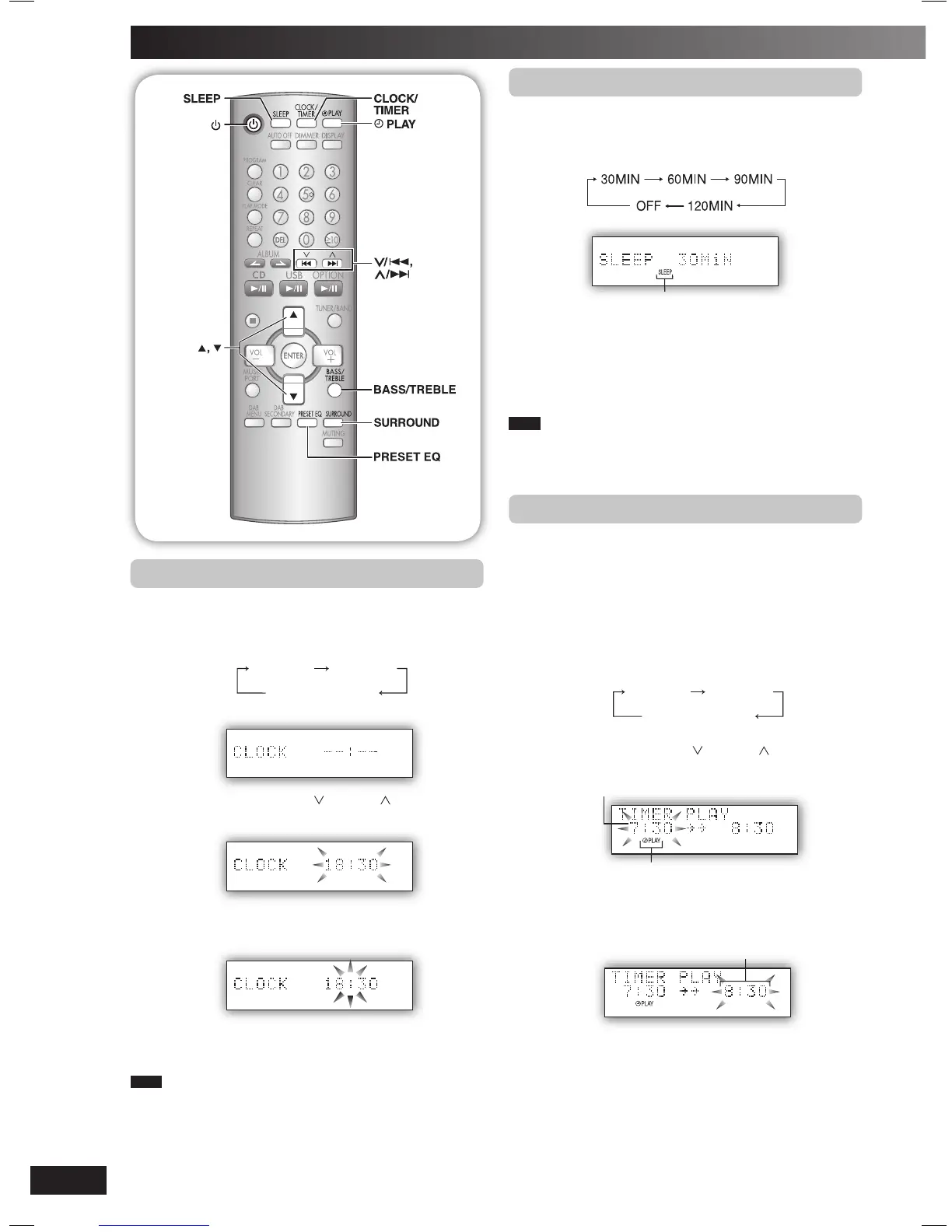
This function enables you to turn off the unit automatically
after the set time.
Press [SLEEP] repeatedly to select your desired time.
Sleep timer indicator
To cancel
Press [SLEEP] to select “OFF”.
Changing the remaining time
Press [SLEEP] to show the remaining time, and press
[SLEEP] again to select your desired time.
Note
• The play and sleep timer can be used together.
• The sleep timer always has priority. Be sure not to overlap timer
settings.
Using the play timer
You can set the play timer to come on at a certain time to
wake you up.
Preparation
Turn the unit on and set the clock.
Prepare the music source you want to listen to; disc, radio,
USB, music port or option port source, and set the volume.
1
Press [CLOCK/TIMER] repeatedly to select play
timer.
Original display
CLOCK
˚ PLAY
2
Within 5 seconds, press
[ /4] or [ /¢]
to set the
starting time.
Play timer indicator
Start time
3
4
Press [CLOCK/TIMER] to confirm.
Repeat steps 2 and 3 to set the finishing time.
Finish time
To activate the timer
5
Press [˚PLAY] to turn on the timer.
“˚PLAY” is displayed.
6
Press [y] to turn off the unit.
The unit must be off for the timer to operate.
Setting the clock
This is a 24-hour clock.
1
Press [CLOCK/TIMER] to select “CLOCK”.
Each time you press the button:
Original display
CLOCK
˚ PLAY
2
Within 5 seconds, press
[ /4] or [ /¢]
to set the
time.
3
Press [CLOCK/TIMER] again to confirm.
Displaying the clock
Press [CLOCK/TIMER] to display the clock for few seconds.
Note
The clock may lose or gain minutes over a period of time. Readjust
as necessary.
NS55DB_EB_EN.indd 14NS55DB_EB_EN.indd 14 4/2/07 12:15:58 PM4/2/07 12:15:58 PM


 To Next Page