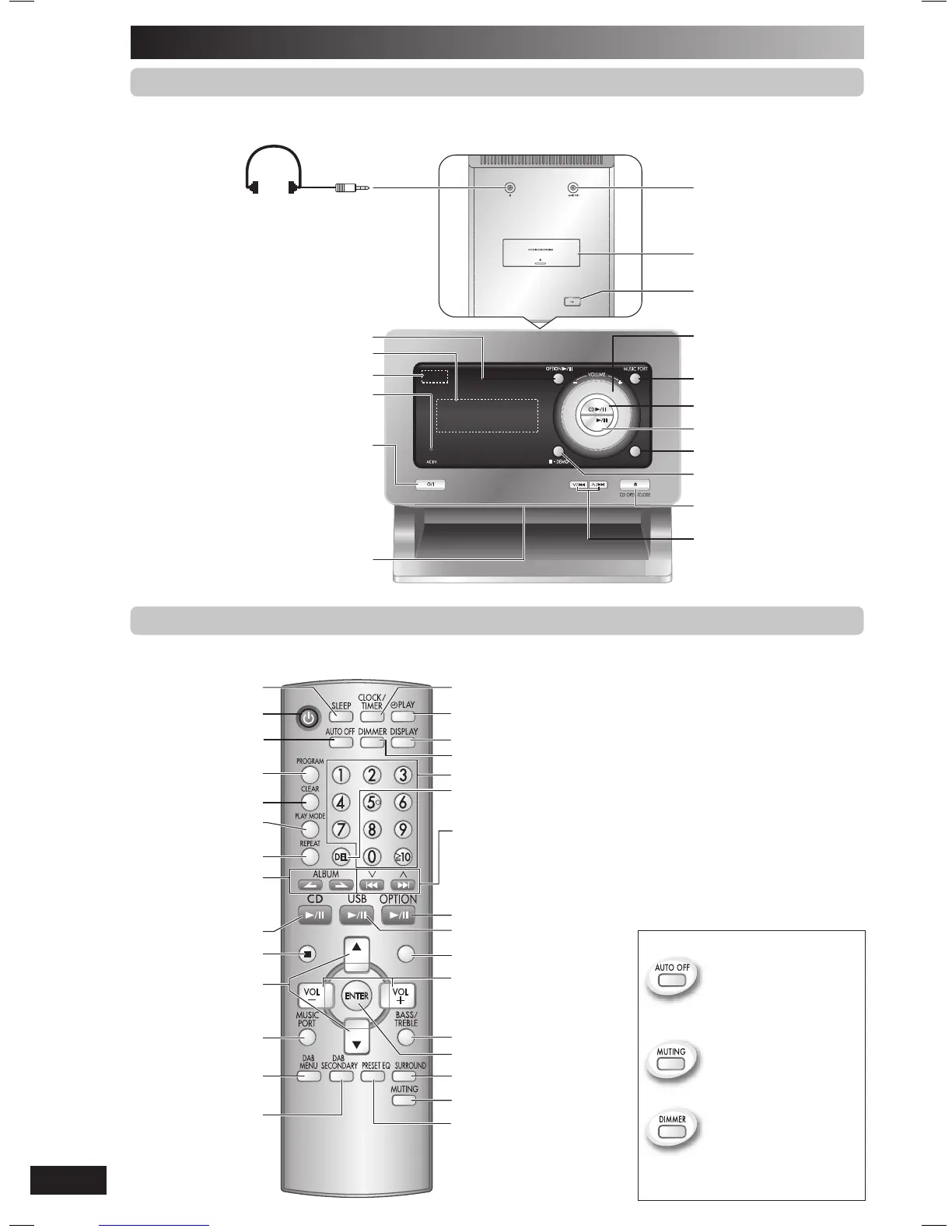
/l) (7, 14)
Press to switch the unit from on to standby mode
or vice versa. In standby mode, the unit is still
consuming a small amount of power.
Disc tray
3 Volume control
5 Disc play/pause (7, 8)
Disc tray open/close (7)
Track skip/search,
tune/preset channel
selection, time adjustment
Stop/Demo (5, 7, 8, 16, 17)
AC supply indicator (AC IN)
This indicator lights when the unit is
connected to the AC mains supply.
7 Tuner/Band selection (9, 11)
Display panel
6 USB play/pause (16)
1 Option play/pause (17)
Music port jack (17)
Headphone jack (
l
)
Avoid listening for prolonged periods of
time to prevent hearing damage.
Plug type: Ø3.5
mm stereo (not included)
Top of unit
Docking Mechanism (17)
USB jack (16)
Remote control sensor
Overview of controls
This function allows you to
turn off the unit in disc or
USB mode only after left
unused for 10 minutes.
The setting is maintained
even if the unit is turned off.
Mutes the sound.
Dims the display panel.
• Press the button to activate.
• Press again to cancel.
Remote control
Buttons such as 1 function the same as the controls on the main unit.
2
Clock/Timer (14, 15)
Play timer (14, 15)
Numeric (7, 8, 9, 11, 16, 17)
Delete (8)
Track skip/search, tune/
preset channel selection,
time adjustment
(7, 8, 9, 11, 14, 16, 17)
Program (8, 9)
Clear (8)
Play mode (7, 9)
Repeat (8)
Stop (7, 8, 16, 17)
4
DAB Menu (12, 13)
Sleep timer (14)
Surround (15)
Muting
1
Bass/treble
adjustment (15)
/1 ,É
Display (7, 9, 12, 16)
Dimmer
6
7
3
Bass/Treble selection (15)
Auto off
Album selection
(7, 8, 12, 13, 16)
5
Enter (8, 12, 13, 17)
Preset EQ (15)
DAB Secondary (12)
NS55DB_EB_EN.indd 6NS55DB_EB_EN.indd 6 4/2/07 12:15:41 PM4/2/07 12:15:41 PM


 To Next Page