EasyManua.ls Logo

Panasonic SC-PM200 - User Manual

Panasonic SC-PM200
64 pages
Print Icon
To Next Page IconTo Next Page
Loading...
Operating Instructions
Instrukcja obsługi
Návod k obsluze
Инструкция по эксплуатации
Інструкція з експлуатації
CD Stereo System
Zestaw stereo z CD
Stereosystém s CD
CD-cтереосистема
CD-стереосистема
Model No.
SC-PM200
Panasonic Corporation
Web Site: http://panasonic.net
EU
Pursuant to at the directive 2004/108/EC, article 9(2)
Panasonic Testing Centre
Panasonic Marketing Europe GmbH
Winsbergring 15, 22525 Hamburg, Germany
RQT9547-1R
L0511LL1061
UrRuPoEn ArCz
EP
Dear Customer
Thank you for purchasing this system.
For optimum performance and safety, read these instructions fully
before you connect, operate or adjust this system.
Keep this manual for future reference.
Your system and the illustrations can look differently.
Drogi Kliencie
Dziękujemy za zakupienie tego zestawu.
W celu zapewnienia optymalnej jakości odbioru i bezpieczeństwa,
przed podłączeniem, uruchomieniem lub zmianą ustawień
urządzenia należy dokładnie zapoznać się z niniejszą instrukcją
obsługi.
Prosimy o zachowanie niniejszej instrukcji obsługi.
Zakupione urządzenie może różnić się od przedstawionego na
ilustracjach.
Niniejsza instrukcja została opracowana na podstawie oryginalnej
publikacji firmy Panasonic Corporation.
Vážený Zákazníku
Děkujeme za zakoupení tohoto systému.
Pro optimální využití a bezpečnost si před připojováním, používáním
nebo nastavováním tohoto systému tento návod pečlivě přečtěte.
Uschovejte si prosím tento návod k obsluze.
Váš systém a obrázky se mohou lišit.
Уважаемый Покупатель
Благодарим Вас за покупку данной системы.
Для обеспечения оптимальных
характеристик и безопасности внимательно
прочтите эти инструкции перед
подключением, работой или настройкой
данной системы.
Сохраните инструкцию для дальнейших
справок.
Ваша система может отличаться от
представленных иллюстраций.
Шановний Покупцю
Дякуємо за придбання цієї системи.
Для отримання оптимальних характеристик
роботи пристрою та гарантування безпеки
роботи повністю прочитайте ці інструкції до
того, як ви підєднаєте, почнете експлуатацію
або налаштування цієї системи.
Збережіть даний посібник для майбутнього
використання.
Фактичний вигляд вашої системи й ілюстрації
системи в цій інструкції можуть відрізнятися.
PM200_EP1_1gb.indd 1PM200_EP1_1gb.indd 1 6/28/2011 1:52:17 PM6/28/2011 1:52:17 PM

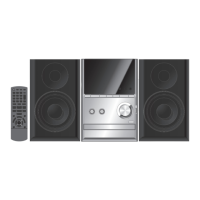
Table of Contents

Questions and Answers

  • B
    bsantiagoAug 17, 2025
    What does 'ERROR' mean on my Panasonic SC-PM200 and how to fix it?
    • W
      William CampbellAug 17, 2025
      If your Panasonic Stereo System displays 'ERROR', it means an incorrect operation was performed. Please read the instructions carefully and try again.
  • M
    Michael RuizAug 20, 2025
    What does 'NODEVICE' mean on my Panasonic SC-PM200 Stereo System and how to fix it?
    • W
      William KingAug 20, 2025
      If your Panasonic Stereo System displays 'NODEVICE', it indicates that the USB mass storage device is not connected. Examine the connection to ensure it is properly connected.
  • B
    Brandy VillegasAug 22, 2025
    Why does my Panasonic SC-PM200 say 'NO PLAY' and how to fix it?
    • S
      Stacy JohnsonAug 22, 2025
      Your Panasonic Stereo System might display 'NO PLAY' because: * The content is in an unsupported format. Ensure you are only playing supported formats. * There are more than 255 albums or folders (audio and non-audio) on the USB mass storage device. Alternatively, reformat the USB mass storage device and save these music albums prior to saving the other non-audio folders. To resolve this, transfer the music albums to another USB mass storage device.
  • J
    Joel DawsonAug 26, 2025
    What to do if my Panasonic SC-PM200 Stereo System displays '--:--'?
    • G
      George SparksAug 26, 2025
      If your Panasonic Stereo System displays '--:--,' it means you have either connected the AC mains lead for the first time or there was a recent power failure. Set the clock on your system.
  • M
    Mrs. Kristen HodgeAug 28, 2025
    What does 'NOT MP3/ERROR' mean on my Panasonic Stereo System and how to fix it?
    • K
      Kelsey GravesAug 28, 2025
      If your Panasonic Stereo System displays 'NOT MP3/ERROR', it means the system is encountering an unsupported MP3 format. The system will skip the problematic track and proceed to play the next one.
  • I
    iwhitakerAug 30, 2025
    Why is my Panasonic Stereo System showing 'NO DISC'?
    • C
      Christopher CharlesAug 30, 2025
      The Panasonic Stereo System shows 'NO DISC' because either no disc has been inserted, or the inserted disc is of a format that the system cannot play.
  • L
    Laura JimenezSep 2, 2025
    Why does my Panasonic SC-PM200 Stereo System say 'ADJUST CLOCK'?
    • L
      leonard68Sep 2, 2025
      Your Panasonic Stereo System displays 'ADJUST CLOCK' because the clock has not been set. Adjust the clock accordingly.
  • M
    Mrs. Danielle GlennSep 5, 2025
    Why does my Panasonic SC-PM200 say 'ADJUST TIMER'?
    • C
      cameronjohnsonSep 5, 2025
      Your Panasonic Stereo System displays 'ADJUST TIMER' because the play timer has not been set. Adjust the play timer accordingly.
  • K
    kimberlyvasquezSep 8, 2025
    Why is my Panasonic Stereo System not reading my USB mass storage device?
    • C
      Christian HunterSep 8, 2025
      Your Panasonic Stereo System may not be reading the USB mass storage device because: * The format of the USB mass storage device or its contents is not compatible with the system. * USB mass storage devices with a storage capacity of more than 32 GB may not work in some conditions.
  • K
    Kristina WaltersSep 10, 2025
    Why is my Panasonic SC-PM200 Stereo System running slowly with my USB device?
    • M
      Mr. Brendan BeardSep 12, 2025
      The Panasonic Stereo System might be operating slowly with the USB mass storage device because a large content size or large memory USB mass storage device takes longer to read.

Summary

Safety Warnings and Disposal

Safety Precautions

Essential warnings and cautions for safe operation and use of the system.

Disposal and Recycling

Guidelines for environmentally responsible collection and disposal of used products and batteries.

Safety and Operational Guidelines

Installation and Usage Precautions

Advice on proper placement, voltage, and AC lead handling for safe operation.

Foreign Matter and Service

Precautions against foreign objects, liquids, and instructions for professional servicing.

Supplied Accessories

Setup and Connections

Remote Control and Speakers

Instructions for preparing the remote and placing the speakers for optimal performance.

Making Connections

Step-by-step guide to connect the system components and power.

Power Conservation

Tips on reducing power consumption when the system is not in use.

Overview of Controls

Discs

Basic Disc Operations

How to insert, play, stop, pause, and skip tracks on a CD.

Playback Modes

Explanation of different disc playback options like playmode and program playback.

Additional Functions

Instructions for repeat playback and viewing disc information on the display.

USB

Compatible Devices and Formats

Information on supported USB devices, file formats, and system compatibility.

Radio

Tuning, Sound, and Presets

Details on manual tuning, sound quality adjustments, and station presetting for the radio.

Radio Operations

Radio Tuning and Settings

Advanced radio operations including manual tuning, preset selection, AM allocation, and RDS.

Clock and Timers

Setting Clock and Timers

Guide to setting the system clock, sleep timer, and play timer functions.

Sound Effects and External Equipment

Sound Adjustments

How to change audio settings like bass, treble, surround, EQ, and D.BASS.

Connecting External Devices

Instructions for connecting portable audio players and headphones.

Remote Control Code

Troubleshooting Guide

General and Media Issues

Troubleshooting common problems related to system operation and media playback.

Error Messages

Explanation of error codes displayed by the unit and their solutions.

Maintenance

Specifications

Panasonic SC-PM200 Specifications

General IconGeneral
KaraokeNo
Impedance6 Ω
Bass reflexYes
Speaker type2-way
RMS rated power20 W
Number of speakers2
Total Harmonic Distortion (THD)10 %
TypeHome audio micro system
Product colorBlack, Silver
Number of optical discs1 discs
Disc types supportedCD, CD-R, CD-RW
Playback disc formatsCD audio
Audio formats supportedMP3
Tuner typeDigital
Supported radio bandsAM, FM
Preset stations quantity45
Display typeLCD
Speaker depth136 mm
Speaker width139 mm
Speaker height224 mm
SCART ports quantity0
Apple docking compatibilityNot supported
Headphone connectivity3.5 mm
USB 2.0 ports quantity1
Volume controlRotary
Equalizer bands quantity4
Power sourceAC
Input voltage220-240 V
Input frequency50 Hz
Weight and Dimensions IconWeight and Dimensions
Depth232 mm
Width153 mm
Weight1300 g

Related product manuals





