Before use
9
RQT5243
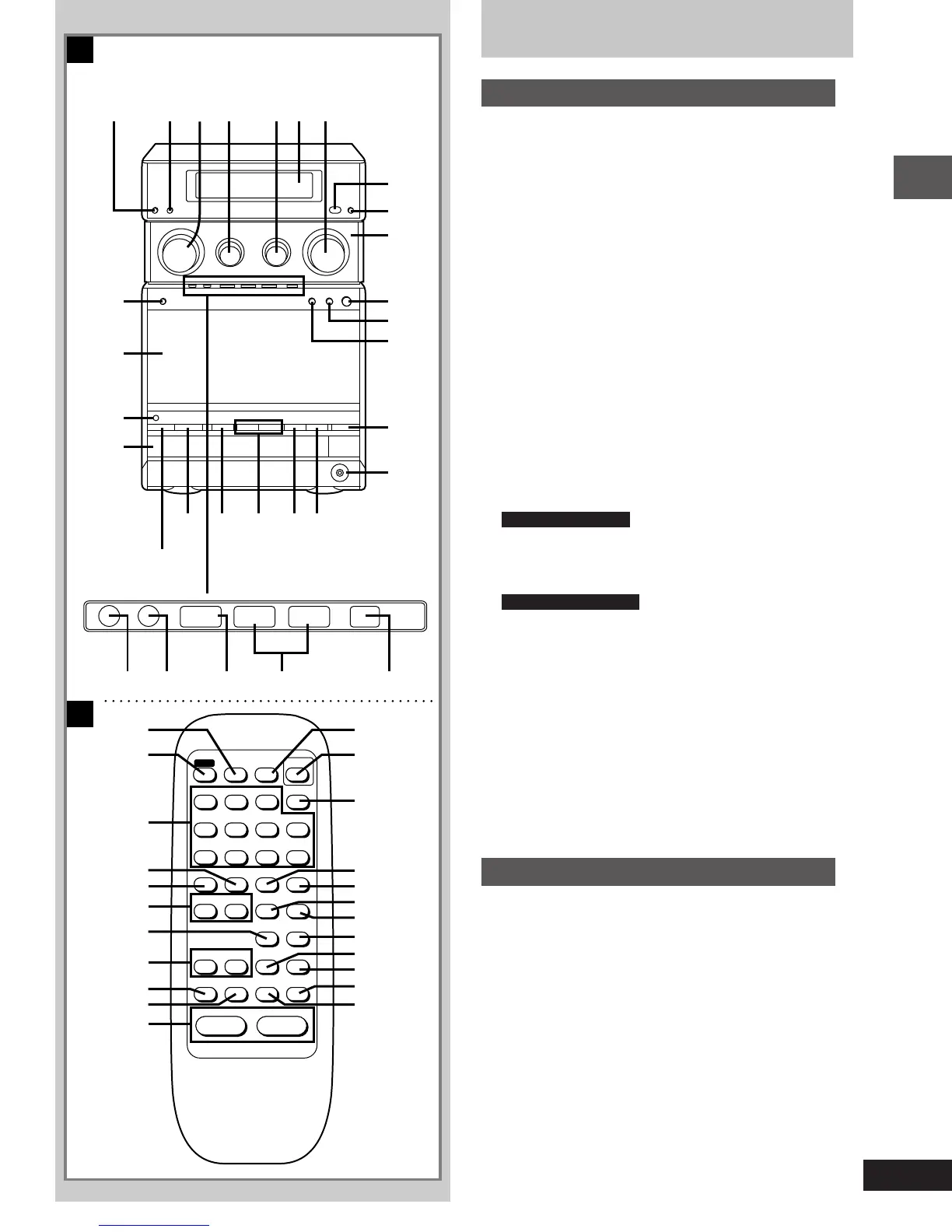
Front panel controls
Main unit
A
Number Name Page(s)
1 Play timer/recording timer button
(F PLAY/F REC) . . . . . . . . . . . . . . . . . . . . . . . . 24, 25
2 Clock/timer button (CLOCK/TIMER) . . . . . . 10, 24, 25
3 Tune/time adjust control
(TUNE/TIME ADJ) . . . . . . . . . . . . . . . . . . . . . . . . 10, 11
4 Bass control (BASS) . . . . . . . . . . . . . . . . . . . . . . . . 23
5 Treble control (TREBLE) . . . . . . . . . . . . . . . . . . . . . 23
6 Display
7 Volume control (VOLUME) . . . . . . . . . . . . . 12, 13, 16
8 Remote control signal sensor
9 Glide panel open/close button (OPEN/CLOSE) . . . . 8
: Glide panel
; Cassette holder open button (< OPEN) . . . . . . . . 16
< Cassette play/direction button (2 1) . . . . . . . . . . 16
= Cassette stop button (º) . . . . . . . . . . . . . . . . . . . . . 16
> CD tray open/close button (< OPEN/CLOSE) . . . . 13
? Headphone jack (è) . . . . . . . . . . . . . . . . . . . . . . . . . 23
@ CD play/pause button (1/;) . . . . . . . . . . . . . . . . . . 13
A CD stop button (º) . . . . . . . . . . . . . . . . . . . . . . . . . . 13
B Skip/search buttons (: 9) . . . . . . . . . . . . . . . 13
C CD edit button (CD EDIT) . . . . . . . . . . . . . . . . . . . . . 21
D Auto power-off button (AUTO OFF) . . . . . . . . . . . . 10
For United Kingdom
Standby/on switch (ê/I) . . . . . . . . . . . . . . . . . . . . . 10
Press to switch the unit from on to standby mode or vice versa. In
standby mode, the unit is still consuming a small amount of
power.
For Australia and N.Z.
Standby/on switch (POWERê/I) . . . . . . . . . . . . . . . 10
F CD tray
G AC supply indicator (AC IN)
This indicator lights when the unit is connected to the AC mains
supply.
H Cassette holder
I Tuner/band select button (TUNER/BAND) . . . . . . . 11
J Tuning mode select button (TUNE MODE) . . . . . . 11
K Memory button (MEMORY) . . . . . . . . . . . . . . . . . . . 11
L Record/record pause button
(´/´ ; REC/REC PAUSE) . . . . . . . . . . . . . . . . . 19, 20
M Fast forward/rewind/tape program sensor buttons
( ®REW FF) . . . . . . . . . . . . . . . . . . . . . . . . . . . . . . 17
N AUX button (AUX) . . . . . . . . . . . . . . . . . . . . . . . . . . 23
Remote control
B
Buttons such as 7 function in exactly same way as the controls on
the main unit.
Number Name Page(s)
O Display select button (DISPLAY) . . . . . . . . . . . 10, 17
P Repeat button (REPEAT) . . . . . . . . . . . . . . . . . . . . . 14
Q Random play button (RANDOM) . . . . . . . . . . . . . . . 14
R Reverse mode select button (REV MODE) . . . . 19, 20
S Tape counter reset button (COUNTER RESET) . . . 17
T Sound virtualizer button
(SOUND VIRTUALIZER) . . . . . . . . . . . . . . . . . . . . . . 23
U Muting button (MUTING) . . . . . . . . . . . . . . . . . . . . . 23
V FM mode/BP button (FM MODE/BP) . . . . . . . . . 12, 19
W Program button (PROGRAM) . . . . . . . . . . . . . . . . . 15
X Cancel button (CANCEL) . . . . . . . . . . . . . . . . . . . . . 15
Y Numeric buttons . . . . . . . . . . . . . . . . . . . . . . . . . 12, 14
Z Sleep timer button (SLEEP) . . . . . . . . . . . . . . . . . . 27
A
H
L
M
I
J
K
N
O
Y
X
W
V
B C D
U
T S Q P
Z ^][ \
R
E F G
TUNE MODE REC/REC PAUSE
MEMORY
-
_
-
AUX
¥/¥;
REW FF
SLEEP
1 2 3
4 5 6
7 8 9
MUTING
SOUND
VIRTUALIZER
COUNTER
RESET
REV MODE
VOLUME
+
–
0
L
DISPLAY
PROGRAM
RANDOMREPEAT
AUX
OPEN/CLOSE
CANCEL
REW FF
TAPE
TUNER
FM MODE/BP TUNER/BAND
H
21
: 9
1/;∫
∫
CD
Æ
m
Æ
y
≠
´
v
°
k
¨
®
©
™
¢
£
•
}
§
p
q
t
u
ß
¶
A
B
E
1-23e.p65 11/9/99, 4:34 PM9



 To Next Page
 Loading...









