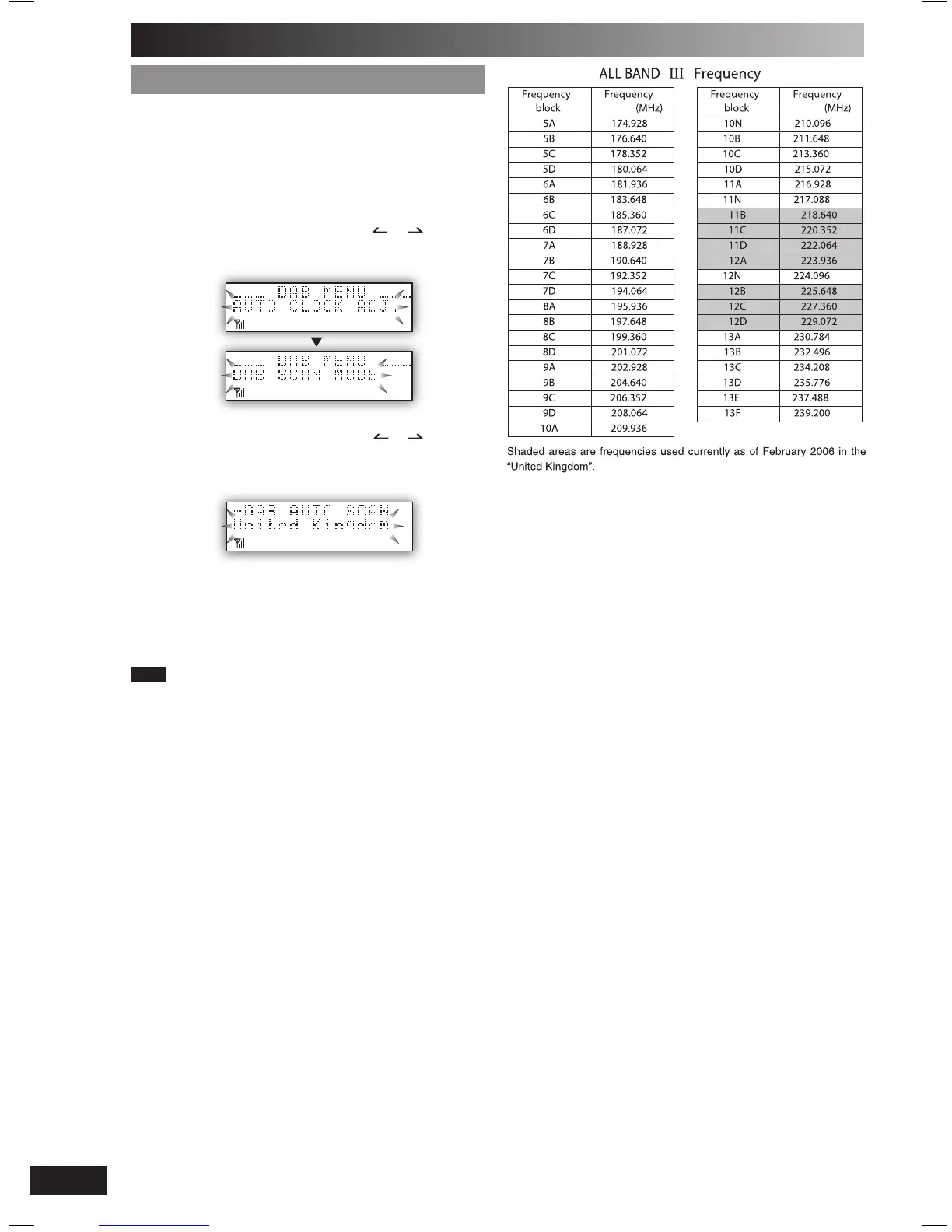
Changing the Auto scan frequency range
Only the frequencies currently used in the UK as of February
2006 on BAND III are Auto scanned (*United Kingdom’,
factory setting).
Select “ALL BAND III” when you want to store stations on
other frequencies to memory.
1
Press [DAB MENU] to enter menu mode.
2
Within 10 seconds, press [ALBUM or ] to select
“DAB SCAN MODE” and then press [ENTER].
3
Within 10 seconds, press [ALBUM or ] to select
“United Kingdom” or “ALL BAND III” and then press
[ENTER].
Auto scan begins automatically after the change has been
made.
To cancel
Press [DAB MENU] again
Note
When the “DAB SCAN MODE” is changed, the DAB preset channels
are erased and if the DAB play timer has been set the timer switches
to off.
DAB (continued)
PM32-33DB_EB_En.indd 16PM32-33DB_EB_En.indd 16 3/1/06 12:12:38 PM3/1/06 12:12:38 PM















 To Next Page