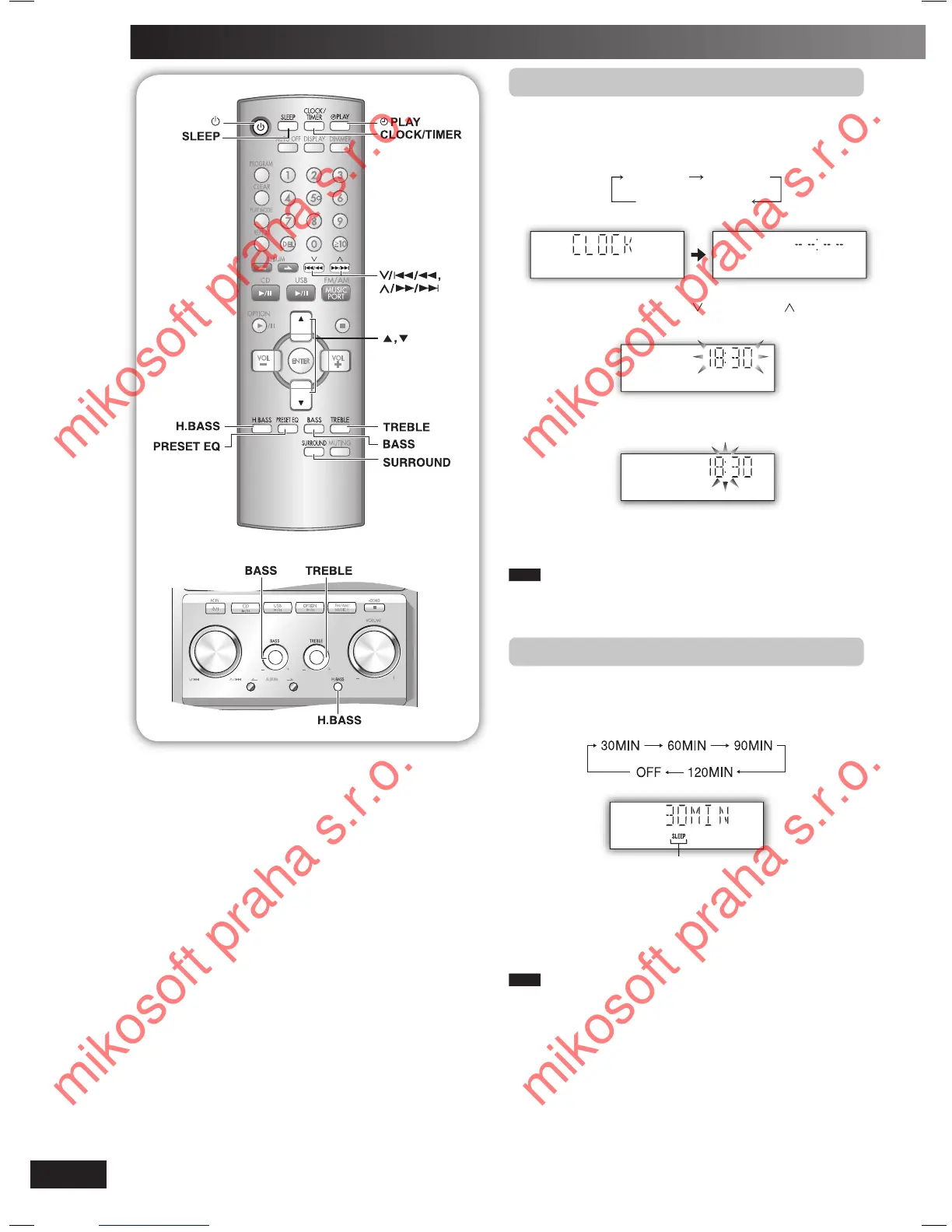
Setting the clock
This is a 24-hour clock.
1
Press [CLOCK/TIMER] to select “CLOCK”.
Each time you press the button:
CLOCK
˚ PLAY
Original display
2
Within 5 seconds, press
[ /4/1] or [ /¡/¢]
to set the time.
3
Press [CLOCK/TIMER] again to confirm.
Displaying the clock
Press [CLOCK/TIMER] to display the clock for few seconds.
Note
The clock may lose or gain minutes over a period of time. Readjust
as necessary.
Using the sleep timer
This function enables you to turn off the unit automatically
after the set time.
Press [SLEEP] repeatedly to select your desired time.
Sleep timer indicator
To cancel
Press [SLEEP] to select “OFF”.
Changing the remaining time
Press [SLEEP] to show the remaining time, and press
[SLEEP] again to select your desired time.
Note
• The play and sleep timer can be used together.
• The sleep timer always has priority. Be sure not to overlap timer
settings.
PMX2_E_EN.indd 10PMX2_E_EN.indd 10 3/7/07 2:56:21 PM3/7/07 2:56:21 PM
mikosoft praha s.r.o.
mikosoft praha s.r.o.
mikosoft praha s.r.o.
mikosoft praha s.r.o.








 To Next Page