RQTX0069
20
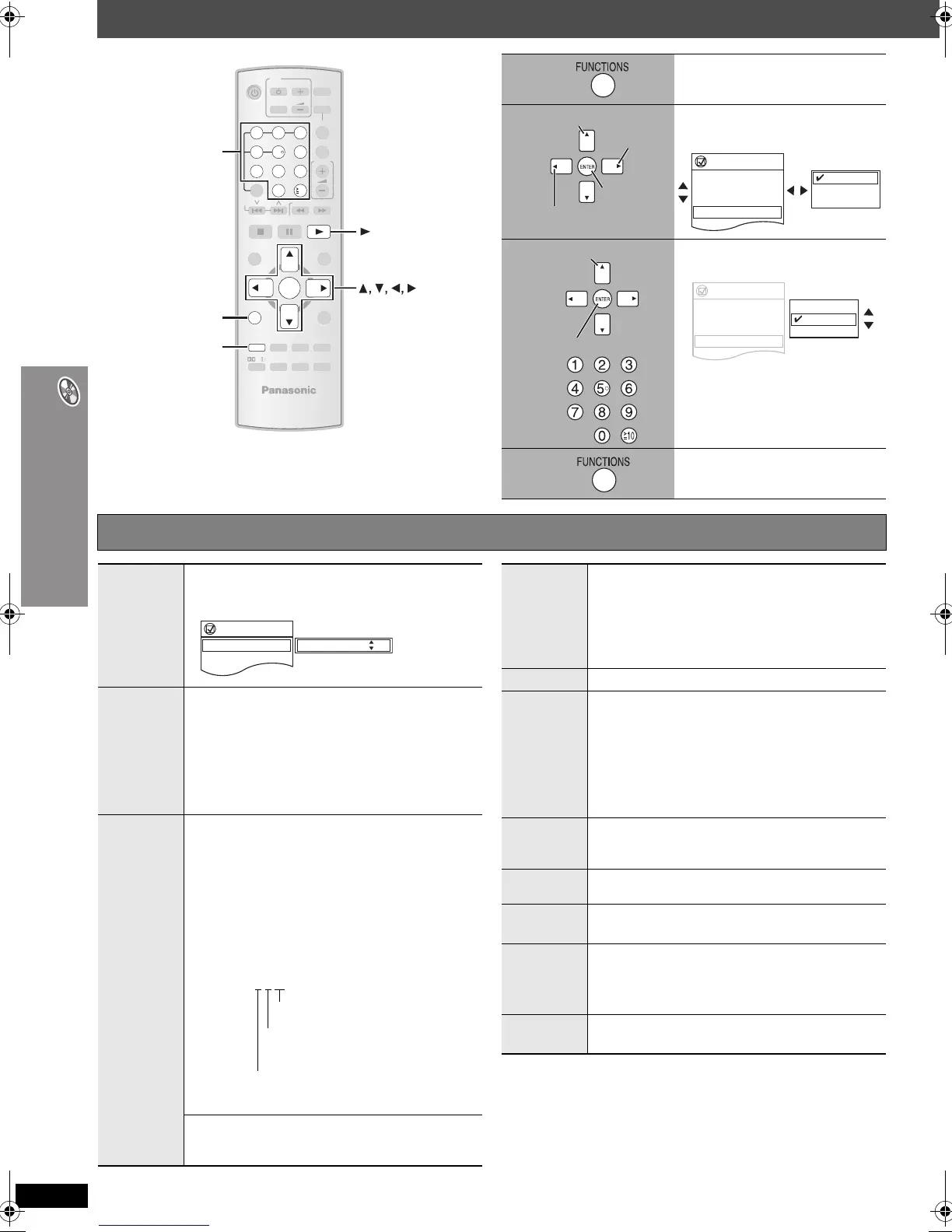
Using on-screen menus
Using on-screen menus
ENTER
SELECT
2ND
CANCEL
-
CD MODE
-
EQ
-
SLEEP
-
SW.LEVEL
MUTING
FL DISPLAY
PLAY MODE
-
CH SELECT
S.SRD
FUNCTIONS
TOP MENU
DIRECT
NAVIGATOR
-
SETUP
MENU
PLAY LIST
-
RETURN
SLOW/SEARCH
PLAYPAU SESTOP
SKIP
12
3
4
5 6
7
89
0
10
DISC
VOLU ME
ONE TOUCH PLAY
EXT-IN
TV/VIDEO
VOLUME
TUNER/BAND
TV
DVD
-
TEST
PL
, ENTER
CANCEL
FUNCTIONS
PLAY
Numbered
buttons
1
Show the Main menu.
2
Select the menu.
e.g. [DVD-V]
3
Make the settings.
e.g. [DVD-V]
4
Press to exit.
Go to the
next menu
Select
Register
Return to the
previous menu
Functions
Title
Chapter
Time
Audio
Subtitle
1/2
3/10
0:24:31
1 English
3 Spanish
1 English
2 French
3 Spanish
Select
Register
Functions
Title
Chapter
Time
Audio
Subtitle
Angle
Other Settings
1/2
3/10
0:24:31
1 English
3 Spanish
1/2
1 English
2 French
3 Spanish
Main menu Items shown differ depending on the type of disc.
Program
Group
Title
Chapter
Track
Playlist
Content
To start from a specific item
e.g. [DVD-VR] To select Program 12
Press the numbered buttons: [1] ➜ [2] ➜ [ENTER]
Time
(Time Slip does not work with iR/iRW discs.)
To skip incrementally or decrementally (Time Slip
for play only)
1Press [ENTER] twice to show the Time Slip indicator.
2 Press [
3
,
4
] to select the time and press [ENTER].
≥ To change the steps more quickly, press and hold
[3, 4].
To change remaining/elapsed time display
Audio
[DVD-V] (with multiple soundtracks)
To select audio soundtrack
[DVD-VR] [VCD]
To select “L”, “R” or “LR”
[DVD-V] (Karaoke disc)
To select “On” or “Off” for vocals
≥ Read the disc’s instructions for details.
Signal type/data
LPCM/PPCM/ÎDigital/DTS/MP3/MPEG: Signal type
kHz (Sampling frequency)/bit/ch (Number of channels)
e.g. 3
/2 .1ch
.1: Low frequency effect
.1: (not displayed if there is no signal)
.0: No surround
.1: Mono surround
.2: Stereo surround (left/right)
.1: Center
.2: Front leftiFront right
.3: Front leftiFront rightiCenter
[WMA] [MP3]
To display the current bitrate or sampling
frequency
Functions
Program
Time
Audio
Subtitle
2/16
0:34:15
L R
On
Program Search 12
Number
Select
[VCD] with playback control
To select number
While the disc menu is displayed
Press [3, 4] ➜ Press [ENTER]
≥ To change the numbers more quickly, press and hold
[3, 4].
Thumbnail
To show thumbnail images
Subtitle
[DVD-V] (with multiple subtitles) [VCD] (SVCD only)
To select subtitle language
≥ On iR/iRW, a subtitle number may be shown for
subtitles that are not displayed.
≥ [DVD-VR] “On” or “Off” appears only with discs that
contain subtitle on/off information (Subtitle on/off
information cannot be recorded using Panasonic
DVD Recorders).
Marker (VR)
[DVD-VR]
To recall a marker recorded on DVD-Video recorders
Press [3, 4] ➜ Press [ENTER].
Angle
(with multiple angles)
To select a video angle
Rotate
Picture
To rotate a picture
Slideshow
To turn slideshow on/off
On ,------. Off
To change the slideshow timing
1 (Fast) to 5 (Slow)
Other
Settings
(➜ page 21)
0069En_p14-25.fm Page 20 Tuesday, December 19, 2006 2:54 PM




 To Next Page