Muting the volume
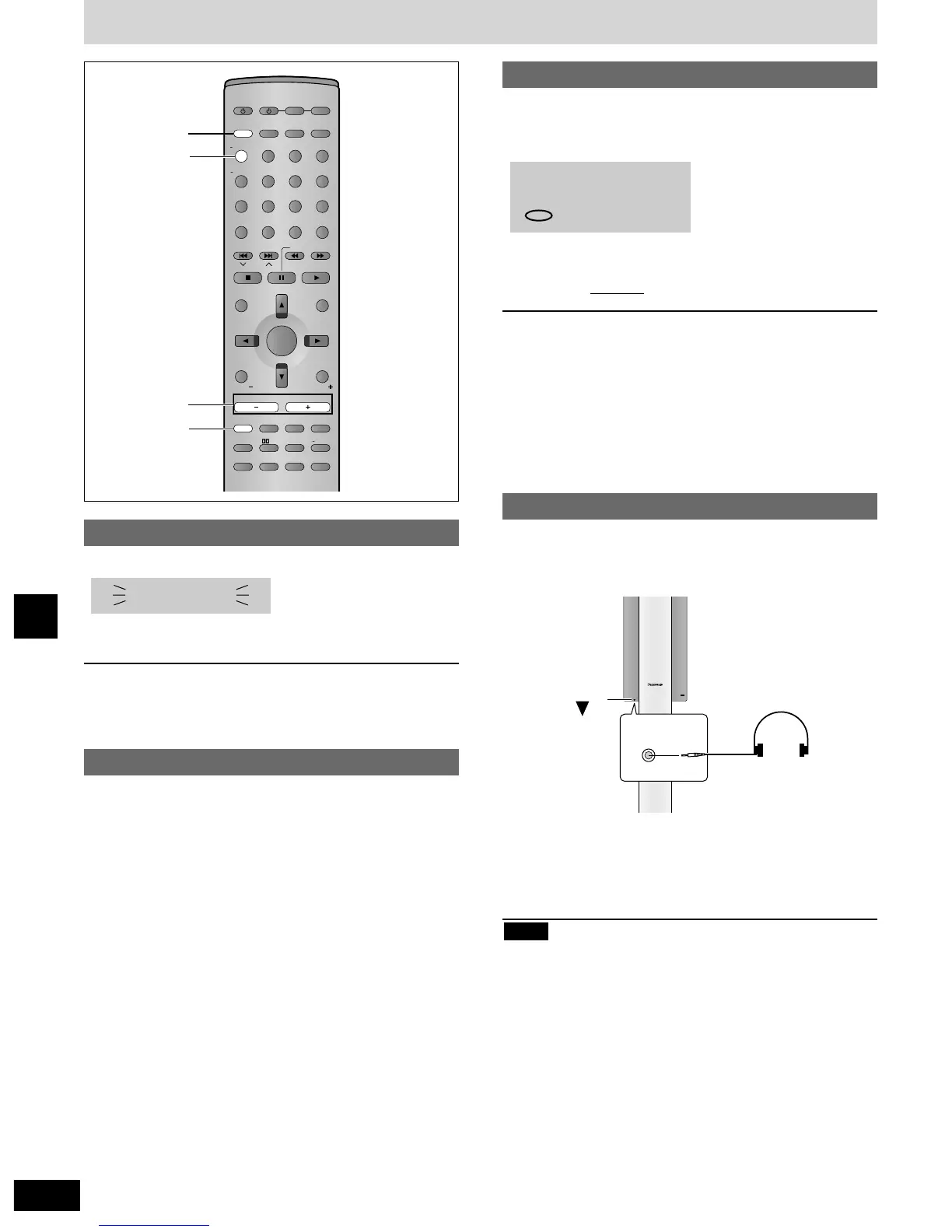
Press [MUTING].
Volume is reduced to minimum.
To cancel
Press [MUTING] again or reduce the volume to minimum (-- dB),
then raise it to the required level.
Muting is also canceled when you switch the unit to standby.
Dimming the display
Press and hold [–DIMMER].
To return to the original brightness, press and hold [–DIMMER]
again.
The display also returns to the original brightness when you switch
the unit to standby.
The sleep timer
This timer turns the unit off after a set time.
Press [SLEEP] to select the time
(minutes).
Each time you press the button:
SLEEP 30 / SLEEP 60 / SLEEP 90
SLEEP OFF , SLEEP 120
To cancel the timer
Press [SLEEP] to select “SLEEP OFF”.
To check the SLEEP setting
Press [SLEEP] once.
¡The time remaining appears.
To change the setting
Press [SLEEP] to display the remaining time, then press again to
select the required time.
/
,
Using headphones
1 Reduce the volume and connect the
headphones (not included).
Headphone plug type: 3.5 mm (1/8") stereo
2 Adjust headphone volume with
[VOLUME, –, +].
Audio is automatically switched to stereo (2-channel).
Avoid listening for prolonged periods of time to prevent hearing
damage.
Note


 To Next Page