RQT6924
26
Radio operations
[For[the[United[Kingdom,[Continental[Europe[and[Russia[
The unit can display the text data transmitted by the radio data sys-
tem (RDS) available in some areas.
If the station you are listening to is transmitting RDS signals, “RDS”
will light up on the display.
Displaying the text data
Press [RDS].
Each time you press the button:
PS>PTY>Frequency display
^-------------------------------}
§
“M.O.R.M”= Middle of the road music
Note
RDS displays may not be available if reception is poor.
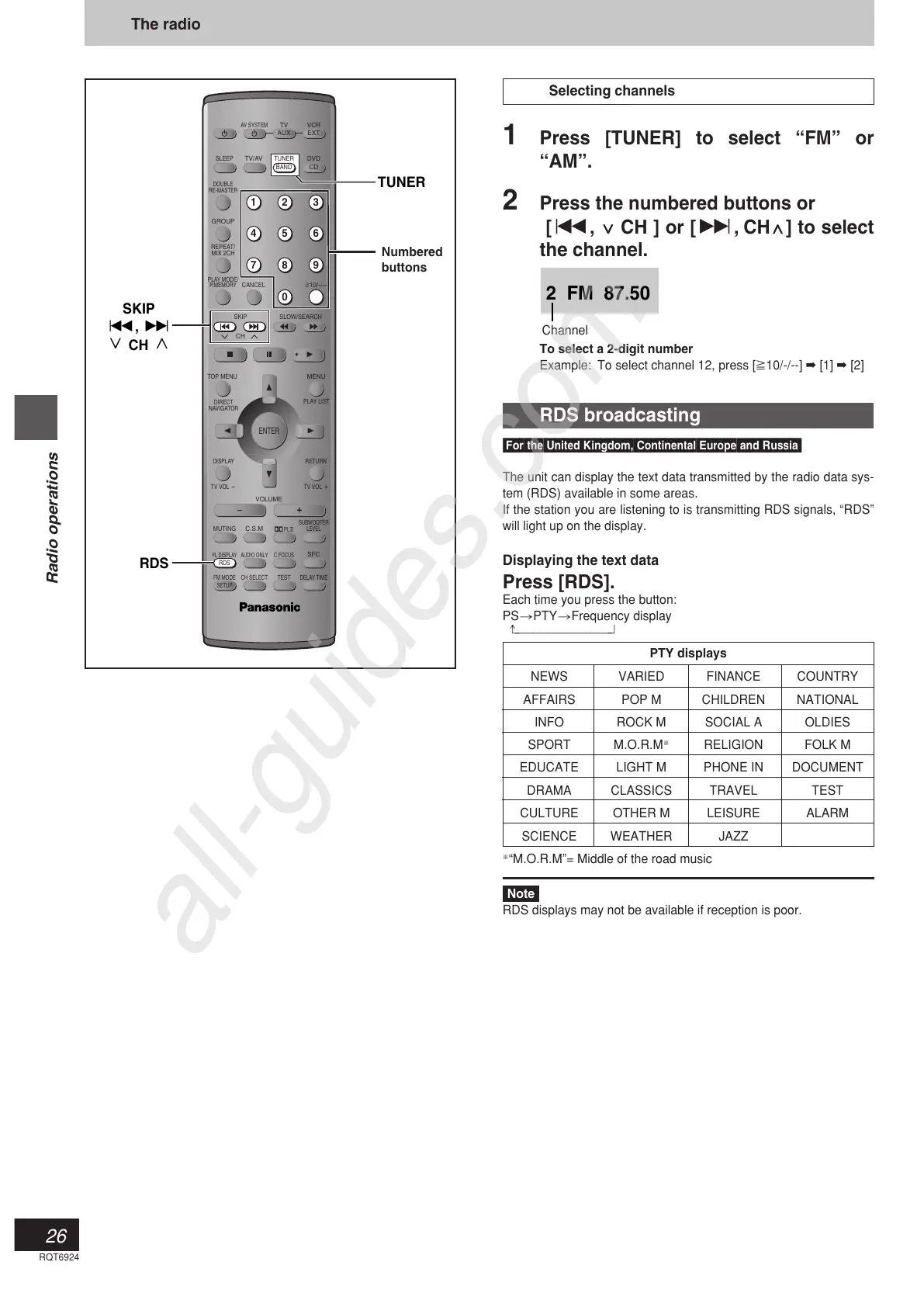
TUNER
AV SYSTEM
SLEEP
GROUP
REPEAT/
MIX 2CH
PLAY MODE/
P.MEMORY
CANCEL
SKIP
CH
TOP MENU
DISPLAY
VOLUME
MUTING
FL DISPLAY AUDIO ONLY C.FOCUS
C.S.M
SFC
SUBWOOFER
LEVEL
FM MODE
SETUP
CH SELECT
TEST
DELAY TIME
RETURN
TV VOL
s
TV VOL
r
DIRECT
NAVIGATOR
PLAY LIST
MENU
SLOW/SEARCH
S
10/
-
/
--
123
456
78
0
9
TV/AV DVD
TV VCR
CD
AUX EXT
ENTER
PL
RDS
DOUBLE
RE-MASTER
SKIP
:, 9
XW
CH
TUNER
BAND
RDS
Selecting channels
1 Press [TUNER] to select “FM” or
“AM”.
2 Press the numbered buttons or
[:,
XX
XX
X
CH ] or [9,
CH
WW
WW
W] to select
the channel.
To select a 2-digit number
Example: To select channel 12, press [S10/-/--] ➡ [1] ➡ [2]
The radio
Numbered
buttons
Channel
2 FM 87.50
RDS broadcasting
PTY displays
NEWS VARIED FINANCE COUNTRY
AFFAIRS POP M CHILDREN NATIONAL
INFO ROCK M SOCIAL A OLDIES
SPORT M.O.R.M
§
RELIGION FOLK M
EDUCATE LIGHT M PHONE IN DOCUMENT
DRAMA CLASSICS TRAVEL TEST
CULTURE OTHER M LEISURE ALARM
SCIENCE WEATHER JAZZ



 To Next Page