Section 8 – Trouble Shooting
38
Common Issues
Base Station lights Flash and nothing works.
Problem:
The Base Station light is flashing and nothing works?
Solutions:
A: Check that all connections are correct and no cables are swapped.
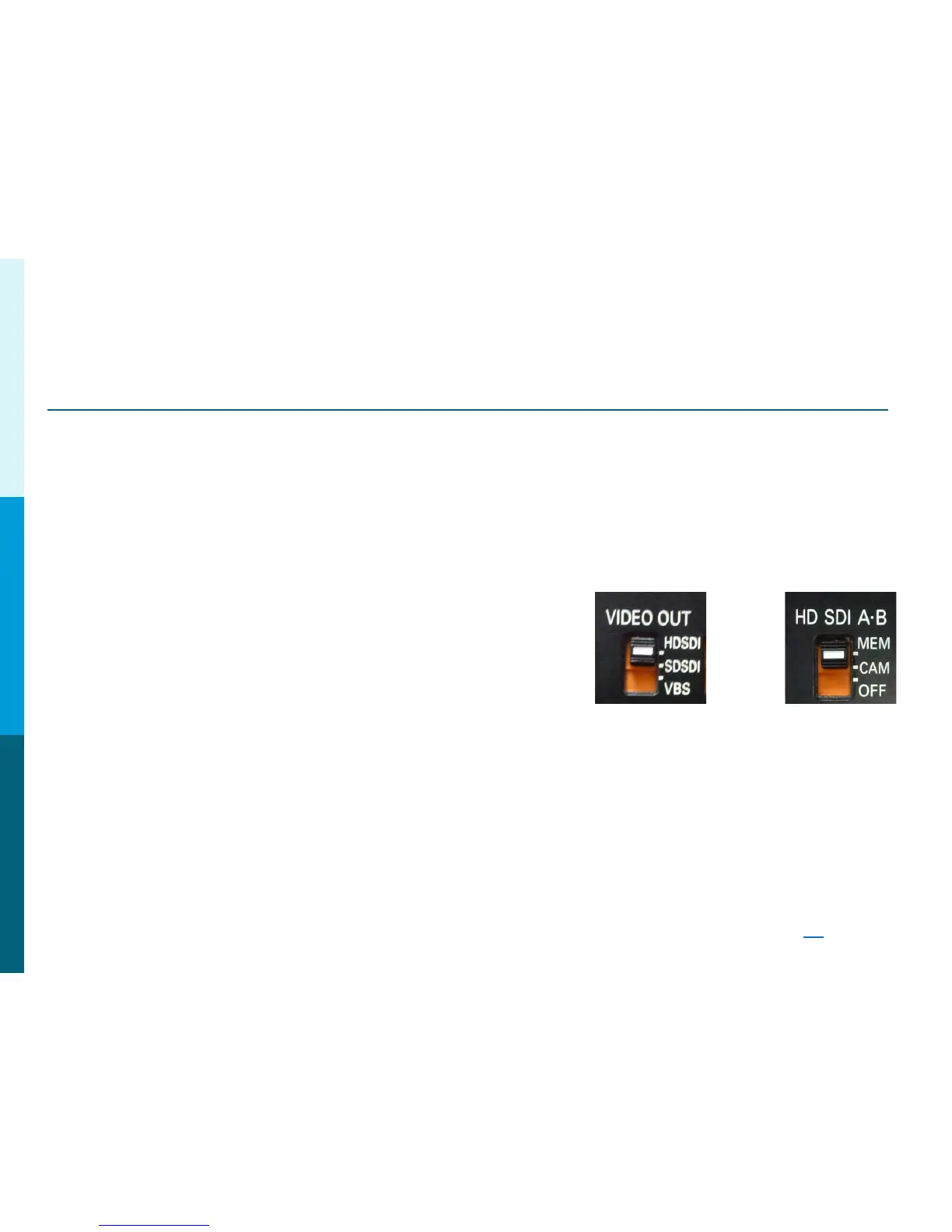
B: If using an AJ-HDX900, AJ-HPX2000 or AJ-HPX3000, check to make sure the Video Out
Switch is set to HD-SDI or SD-SDI respectively. If using an
AJ-HPX2700 or AJ-HPX3700, set SDI A-B to MEM or CAM.
If using an AG-HPX300, AG-HPX370 or AG-HPX500,
check the menu settings> OUTPUT SEL> SDI> AUTO
Return Button makes the lens zoom in.
Problem:
When pressing the Return button on the lens, the lens zooms in?
Solutions:
Check the lens internal dip switch settings and turn off Auto Cruise Zoom.
On Board Monitor is Low Resolution.
Problem:
The Camera is shooting in HD, but the on board monitor is in SD?
Solutions:
Check the Monitor GPI menu settings. GPI # 4 should be set to SDI or VF (see page 26
)
Panasonic Solutions Company
AJ-HDX900
AJ-HPX2000/3000
AJ-HPX2700/3700
SDI
Side
Switch



 To Next Page