
 To Next Page
M
Monica GillSep 3, 2025
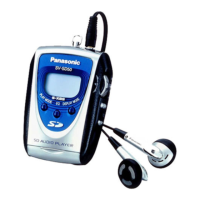
What does 'NoPLAY' mean on my Panasonic SV-SD50?
- WWhitney SmithSep 3, 2025
The 'NoPLAY' message on your Panasonic MP3 Player indicates that non-AAC, non-MP3, or non-WMA data is on the card.

What does 'NoPLAY' mean on my Panasonic SV-SD50?
The 'NoPLAY' message on your Panasonic MP3 Player indicates that non-AAC, non-MP3, or non-WMA data is on the card.
Why is there so much noise when using my Panasonic SV-SD50 MP3 Player?
If you experience a lot of noise with your Panasonic MP3 Player, consider whether you are using the unit near a television or mobile phone.
Why can't I start the software for my Panasonic SV-SD50?
If you cannot start the software for your Panasonic MP3 Player, ensure the software is installed on the hard disc, as it cannot be run from the CD-ROM. Also, ensure the computer meets the minimum memory space requirements.
What does 'HOLD' mean on my Panasonic SV-SD50 MP3 Player?
The 'HOLD' message on your Panasonic MP3 Player indicates that the hold function is on.
Why does my Panasonic SV-SD50 say 'No CARD'?
The 'No CARD' message on your Panasonic MP3 Player indicates that you haven’t inserted a card.
What to do if my Panasonic SV-SD50 MP3 Player displays 'ERROR'?
If your Panasonic MP3 Player displays 'ERROR', the card you inserted may not be an SD Memory Card. Remove and reinsert the card. If this doesn’t correct the display, turn the unit off and on. If this still does not correct the display, try removing and reinserting the battery.
What does 'LOW BATT U01' mean on my Panasonic MP3 Player?
If your Panasonic MP3 Player displays 'LOW BATT U01', it means the battery is dead.
What to do if my Panasonic SV-SD50 is not working?
If your Panasonic MP3 Player is not working, check if the hold function is on. Also, ensure that a card is inserted and that the battery is fresh. If the battery is fresh, try removing it and reinserting it.
Steps to install software and record music to the SD card.
Step-by-step guide to install the software and drivers.
How to connect the USB Reader/Writer and insert the SD Memory Card.
How to insert the battery and use the hold function.
Steps for inserting the SD Memory Card and playing music.
Steps to unlock and remove the SD Memory Card from the device.
Unit/card handling, listening cautions, battery care, and troubleshooting.
 Audio Specifications
| sampling rate | 32 kHz, 44.1 kHz, and 48 kHz |
|---|---|
| compression/decompression | AAC, MP3 and WMA |
| number of channels | Stereo, 2 channels |
| frequency response | 20 Hz to 20, 000 Hz (+0 dB, -6 dB) |
| output | 3.5 mW + 3.5 mW (16 Ω, M3 jack) |
 Power
Power| power supply | DC 1.5 V (one LR03, AAA, AM-4 battery) |
|---|---|
| approximate play times | 31 hours (Panasonic alkaline battery) |
 Weight and Dimensions
| maximum dimensions | 48.8 x 71.3 x 22.6 mm (1[15]/16” x 2[13]/16” x [7]/8”) |
|---|