TH-32F400A TH-32F400Z
9
5.1.5. Display of SOS History
SOS History (Number of LED blinking) indication.
From left side; Last SOS, before Last, three occurrence before, 2nd occurrence after shipment, 1st occurrence after shipment.
This indication except 2nd and 1st occurrence after shipment will be cleared by [Self-check indication and forced to factory
shipment setting].
5.1.6. Exit
1. Disconnect the AC cord from wall outlet.
5.1.7. Hotel Mode
1. Purpose
Restrict a function for hotels.
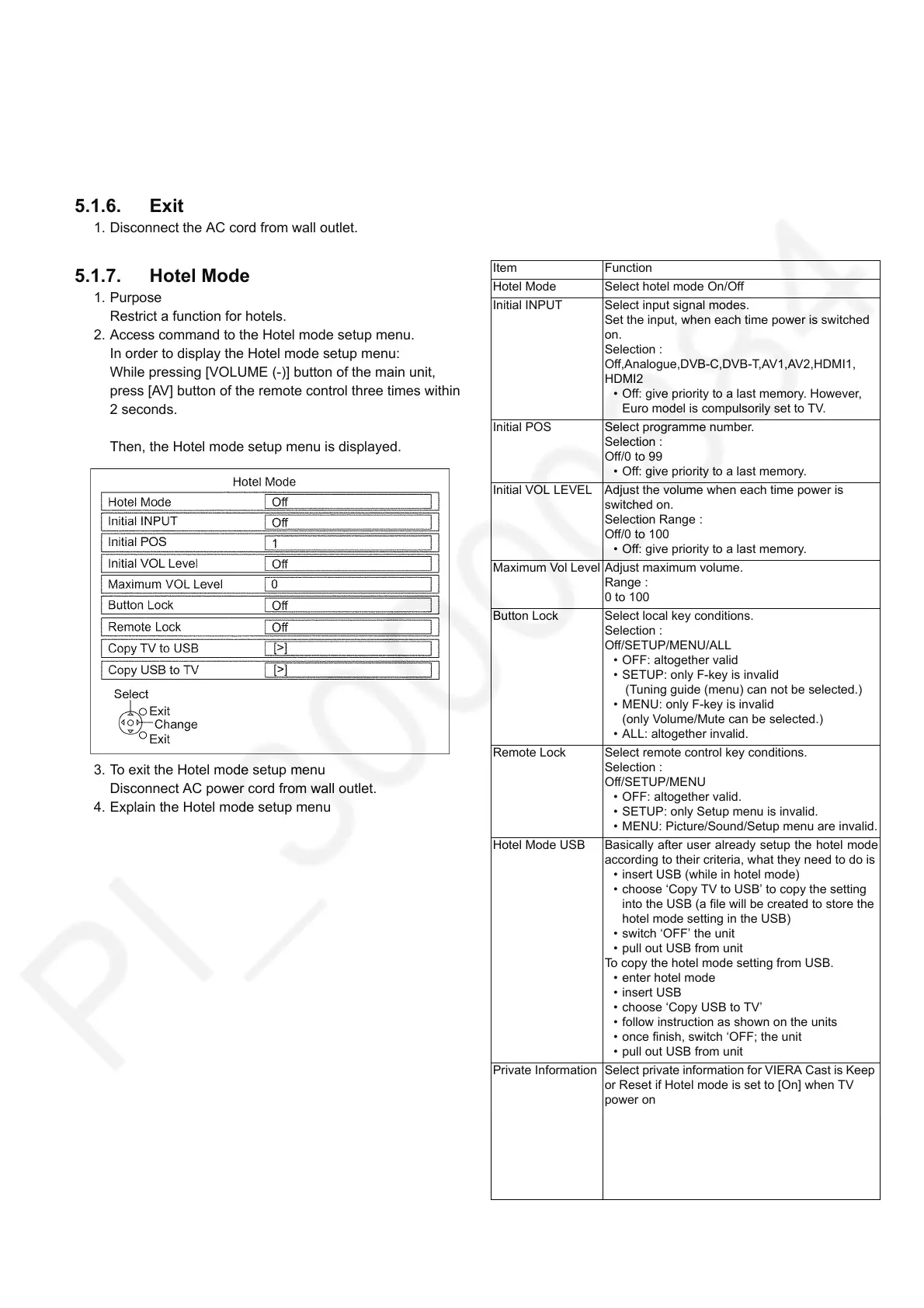
2. Access command to the Hotel mode setup menu.
In order to display the Hotel mode setup menu:
While pressing [VOLUME (-)] button of the main unit,
press [AV] button of the remote control three times within
2 seconds.
Then, the Hotel mode setup menu is displayed.
3. To exit the Hotel mode setup menu
Disconnect AC power cord from wall outlet.
4. Explain the Hotel mode setup menu
Item Function
Hotel Mode Select hotel mode On/Off
Initial INPUT Select input signal modes.
Set the input, when each time power is switched
on.
Selection :
Off,Analogue,DVB-C,DVB-T,AV1,AV2,HDMI1,
HDMI2
• Off: give priority to a last memory. However,
Euro model is compulsorily set to TV.
Initial POS Select programme number.
Selection :
Off/0 to 99
• Off: give priority to a last memory.
Initial VOL LEVEL Adjust the volume when each time power is
switched on.
Selection Range :
Off/0 to 100
• Off: give priority to a last memory.
Maximum Vol Level Adjust maximum volume.
Range :
0 to 100
Button Lock Select local key conditions.
Selection :
Off/SETUP/MENU/ALL
• OFF: altogether valid
• SETUP: only F-key is invalid
(Tuning guide (menu) can not be selected.)
• MENU: only F-key is invalid
(only Volume/Mute can be selected.)
• ALL: altogether invalid.
Remote Lock Select remote control key conditions.
Selection :
Off/SETUP/MENU
• OFF: altogether valid.
• SETUP: only Setup menu is invalid.
• MENU: Picture/Sound/Setup menu are invalid.
Hotel Mode USB Basically after user already setup the hotel mode
according to their criteria, what they need to do is
• insert USB (while in hotel mode)
• choose ‘Copy TV to USB’ to copy the setting
into the USB (a file will be created to store the
hotel mode setting in the USB)
• switch ‘OFF’ the unit
• pull out USB from unit
To copy the hotel mode setting from USB.
• enter hotel mode
•insert USB
• choose ‘Copy USB to TV’
• follow instruction as shown on the units
• once finish, switch ‘OFF; the unit
• pull out USB from unit
Private Information Select private information for VIERA Cast is Keep
or Reset if Hotel mode is set to [On] when TV
power on
Selection :
Keep/Reset
• Keep: private information for VIERA Cast is
keep
• Reset: private information for VIERA Cast is
reset




 To Next Page