25
TV
C
N
123
456
789
0
OK
Multi window
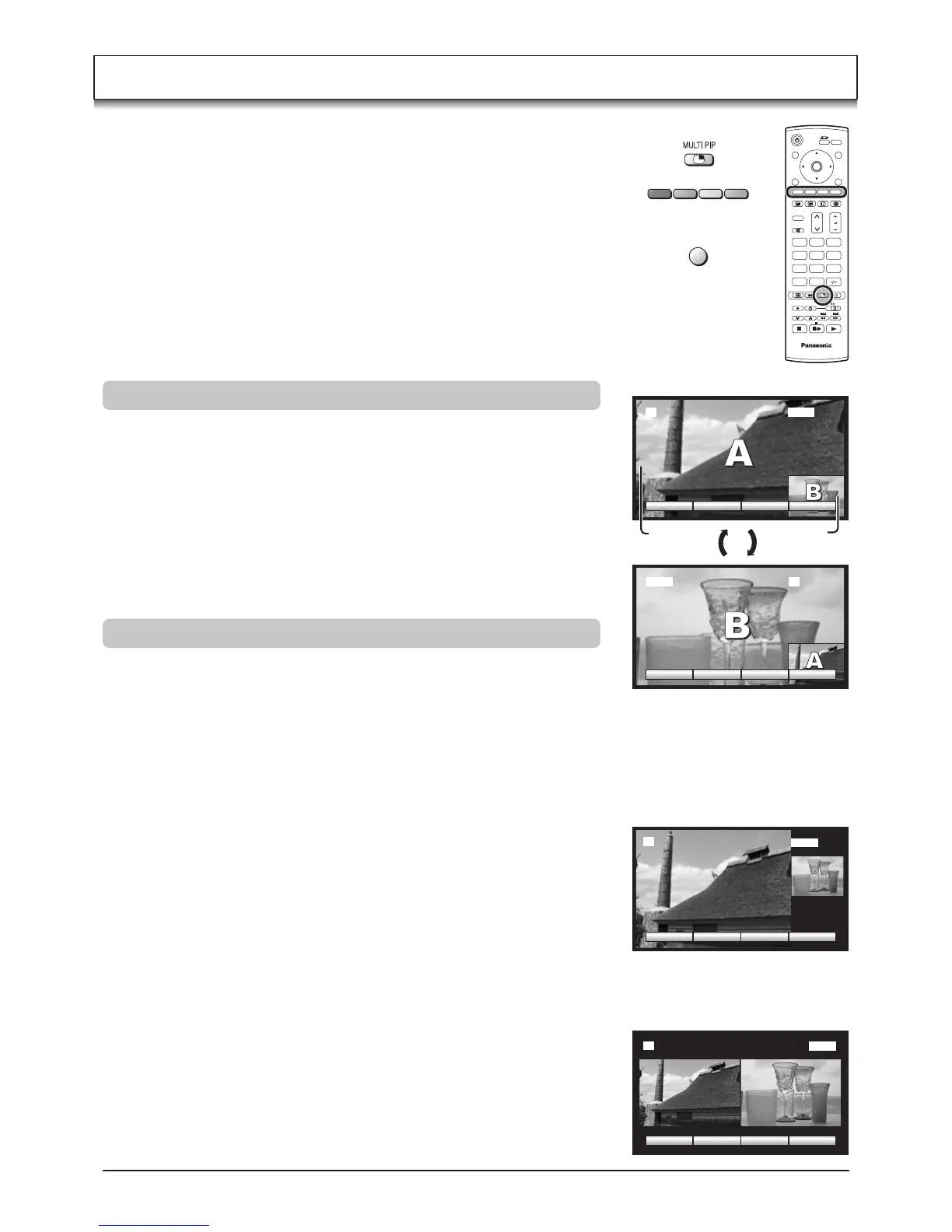
Press the MULTI PIP button. Whilst the on screen selector keys are displayed,
use the Red or Green buttons to move between the PIP (picture in picture)
feature, POP (picture out of picture) and PAP (picture and picture) feature.
Press the Blue button to swap the contents of the two windows.
The on screen selector keys that appear for the features clear after a few
seconds. If you want to select an operation when the keys are not shown,
press the MULTI PIP button again and the keys will reappear.
Press the MULTI PIP button (whilst the selector keys are displayed) to return
to normal viewing.
Note:
This operation cannot be made during PC mode and progressive signal, 1080i
signal input (Y, PB, PR).
sub
window
main
window
A
B
CHANGEPOP PAP
AV1
AV1 2
2
CHANGEPOP PAP
Press the Blue button.
Each time the main window and
the sub window are swapped.
Picture in picture mode
AV1
CHANGEPAP PIP
2
Picture out of picture mode
AV1
CHANGEPIP POP
2
Picture and picture mode
• Main window
Press the TV/AV button to switch between the TV and AV mode.
During the AV mode, press any coloured button. Whilst the on screen selector
keys are displayed, press coloured button to select the AV source.
• Sub window
Press the MULTI PIP button. Whilst the on screen selector keys are displayed,
press the TV/AV button to switch between the TV channel and all AV sources
in turn.
Changing the mode
• Main window
Press the Programme Number button on the remote control.
• Sub window
Press the MULTI PIP button. Whilst the on screen selector keys are displayed,
press the Programme Number button on the remote control.
Changing the channels
TV/AV
Ofrecido por www.electromanuales.com






 To Next Page