29
English
Note
●
Displays the signal name as set in [Input label]. (see
page 47)
●
Input will not be switched unless [Input lock] is set to
[Off]. (see page 59)
●
Image retention (image lag) may occur on the LCD
liquid crystal panel when a still picture is kept on
the panel for an extended period. To prevent such
a problem, using the screensaver and wobbling is
recommended. (see page 46, 50)
RECALL
It is possible to check the setting status of input label,
picture mode, etc.
Press <RECALL>.
Current setting status will be displayed.
10:00
1
2
3
4
5
PC
16:9
Memory name: MEMORY2
Off timer
90 min
1 Input label
2 Aspect mode (see page 31)
3 Profile name (see page 42)
4 Off timer remaining time (see page 30)
5 Clock / Mute (see page 30, 62)
●
When there is no video signal to the selected input,
[No signal] is displayed for about 30 seconds at the
end.
●
When a USB memory is not connected to the USB
terminal at the time of using the USB input, [No
external media] is displayed for about 30 seconds.
Even when a USB memory is connected, if it does not
contain any playable file, [No play file] is displayed at
all times.
●
When [No signal image settings] - [Display setting] is
set to [On] (see page 49), the message [No signal] /
[No external media] / [No play file] are not displayed.
Instead, the image set in [No signal image settings]
will be displayed.
●
To display the clock, set [Date and time] and then set
[Clock display] to [On]. (see page 52, 62)
Selecting the input signal
Select the signals input to the unit.
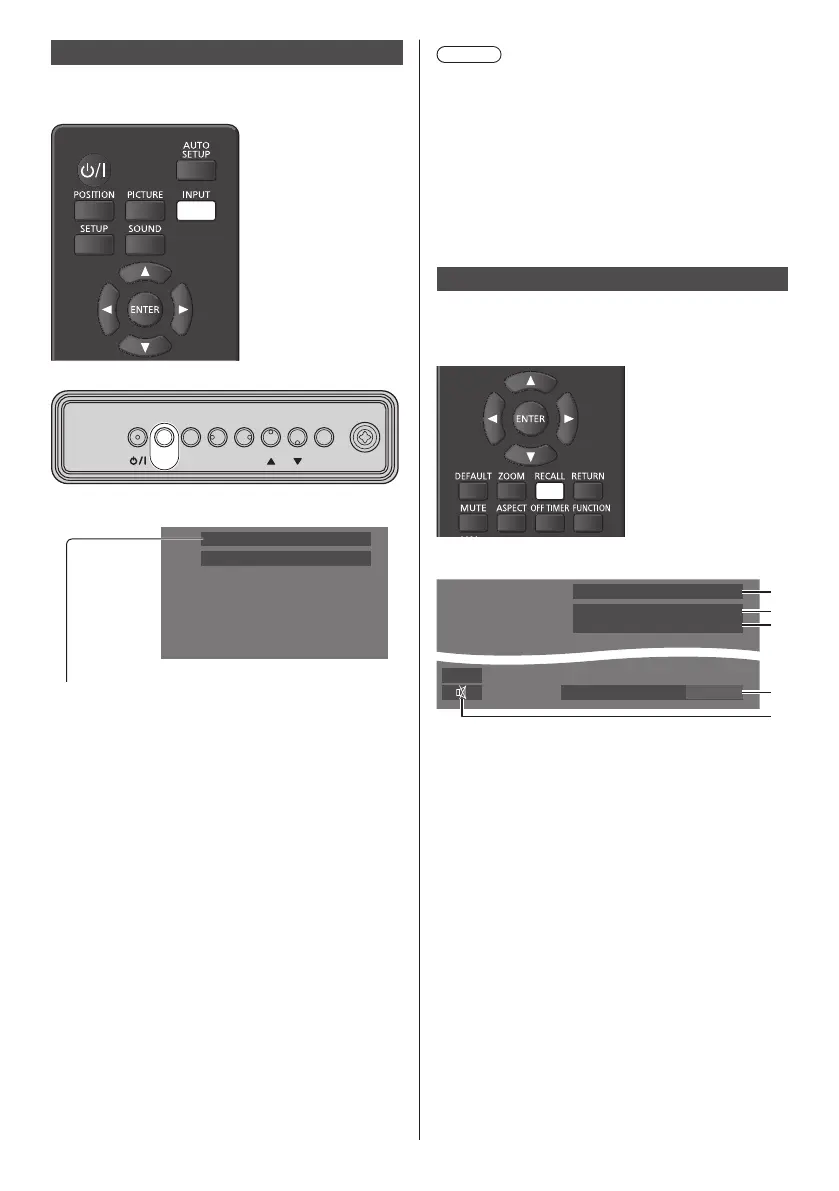
Press <INPUT> or <INPUT (Unit)>.
MENU ENTERINPUT
+
-
Unit
Switches input every time the buttons are pressed.
PC
16:9
[HDMI1] → [HDMI2] → [DVI-D] → [PC] → [VIDEO] →
[USB]
[HDMI1]:
HDMI 1 terminal, HDMI input
[HDMI2]:
HDMI 2 terminal, HDMI input
[DVI-D]:
DVI-D IN terminal, DVI-D input
[PC]:
PC IN terminal, PC input
[VIDEO]:
VIDEO terminal, composite video input
[USB]:
USB terminal, USB input






 To Next Page