25
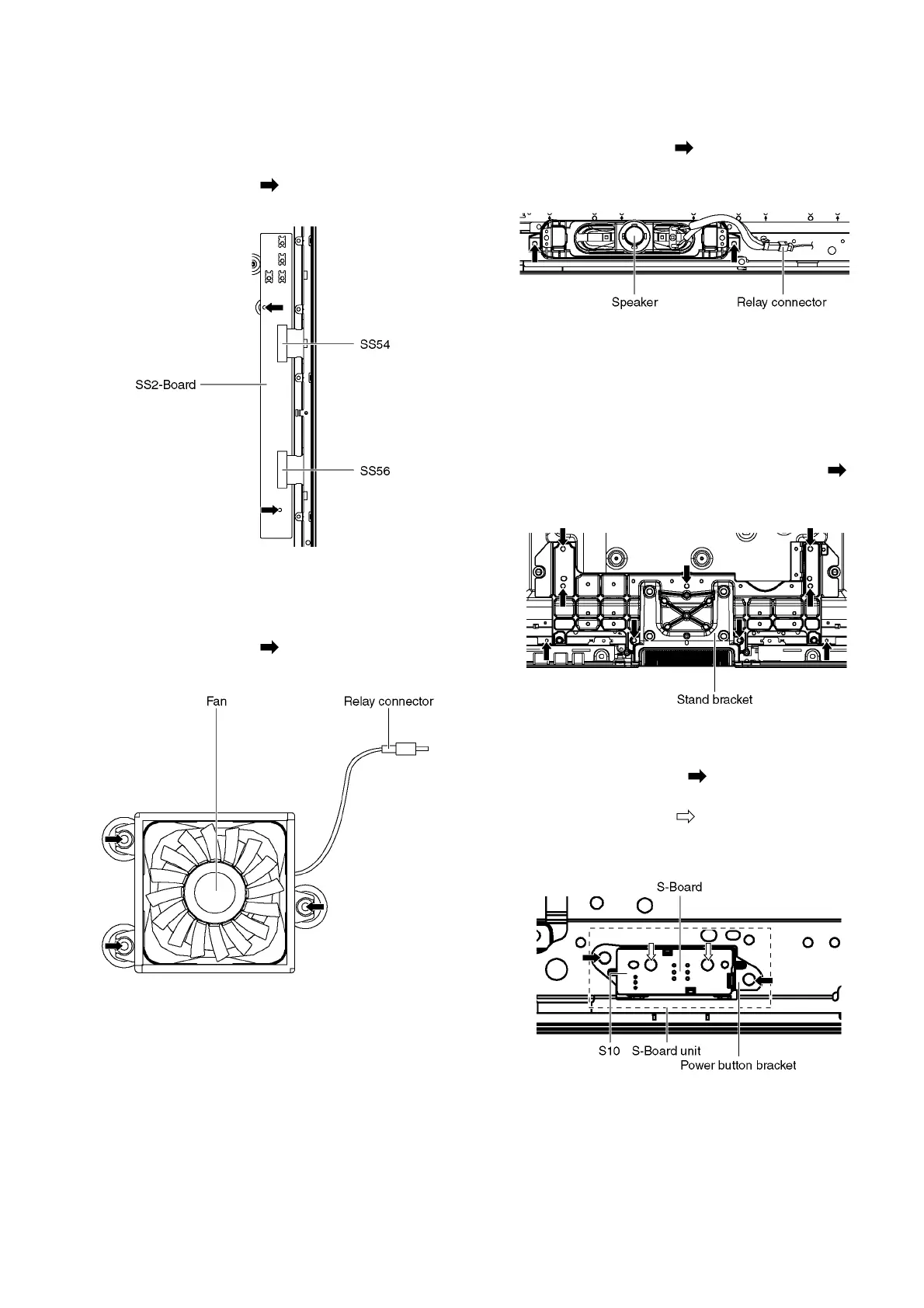
9.12. Remove the SS2-Board
1. Disconnect the Side terminal cover and the Shield metals
(See section 9.5.).
2. Remove the SS-Board (See section 9.11.).
3. Disconnect the flexible cables (SS54 and SS56).
4. Remove the screws (×2 ) and remove the SS2-Board.
9.13. Remove the Fan
1. Unlock the cable clampers to free the cable.
2. Remove the screws (×3 ).
3. Remove the Relay connector and remove the Fan.
9.14. Remove the Speakers
1. Unlock the cable clampers to free the cable.
2. Disconnect the Relay connector.
3. Remove the screws (×2 each) and remove the Speak-
ers (L, R).
9.15. Remove the Stand bracket
1. Remove the Plasma panel section from the servicing
stand and lay on a flat surface such as a table (covered
by a soft cloth) with the Plasma panel surface facing
downward.
2. Unlock the cable clampers to free cable.
3. Remove the Stand bracket fastening screws (×9 ) and
the Stand bracket.
9.16. Remove the S-Board
1. Remove the screws (×2 ) and remove the S-Board
unit.
2. Remove the screws (×2 ).
3. Disconnect the connector (S10) and remove the S-Board
from the Power button bracket.



 To Next Page