27
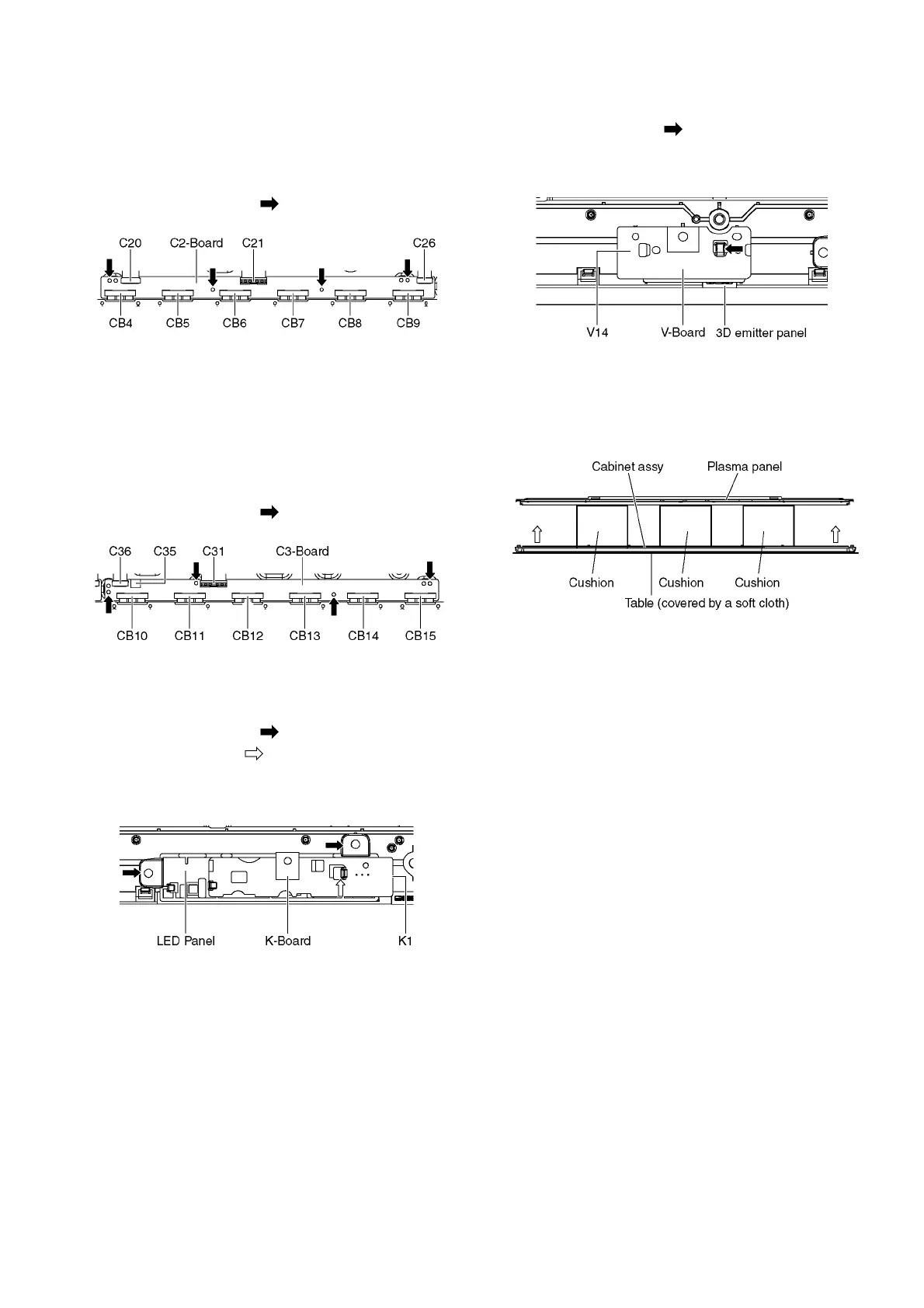
9.21. Remove the C2-Board
1. Remove the Bottom support metal and the Contact metal
bottom A. (See section 9.19.)
2. Disconnect the flexible cables (CB4, CB5, CB6, CB7,
CB8 and CB9).
3. Disconnect the flexible cables (C20, C21 and C26).
4. Remove the screws (×4 ) and remove the C2-Board.
9.22. Remove the C3-Board
1. Remove the Bottom support metal and the Contact metal
bottom A. (See section 9.19.)
2. Disconnect the flexible cables (CB10, CB11, CB12,
CB13, CB14 and CB15).
3. Disconnect the flexible cables (C31 and C36).
4. Disconnect the connector (C35).
5. Remove the screws (×4 ) and remove the C3-Board.
9.23. Remove the K-Board
1. Remove the Contact metal bottom B. (See section 9.17.)
2. Remove the screws (×2 ).
3. Remove the claw (×1 ).
4. Disconnect the connector (K1) and remove the K-Board
from the LED Panel.
9.24. Remove the V-Board
1. Remove the Contact metal bottom B. (See section 9.17.)
2. Remove the Claw (×1 ).
3. Disconnect the connector (V14) and remove the V-Board
from the 3D emitter panel.
9.25. Replace the Plasma panel
Caution:
Place the Plasma panel on a flat surface of a table (cov-
ered by a soft cloth) and a cushion.
A new Plasma panel itself without Contact metals is fragile.
To avoid the damage to new Plasma panel, carry a new
Plasma panel taking hold of the Contact metals.
1. Place a carton box packed a new Plasma panel on the
flat surface of the work bench.
2. Open a box and without taking a new Plasma panel.
3. Attach the Cabinet assy and each P.C.Board and so on,
to the new Plasma panel.



 To Next Page