5
INSTALLATION AND SET---UP
Further details of Audio/ Video connections can
be found on page 13.
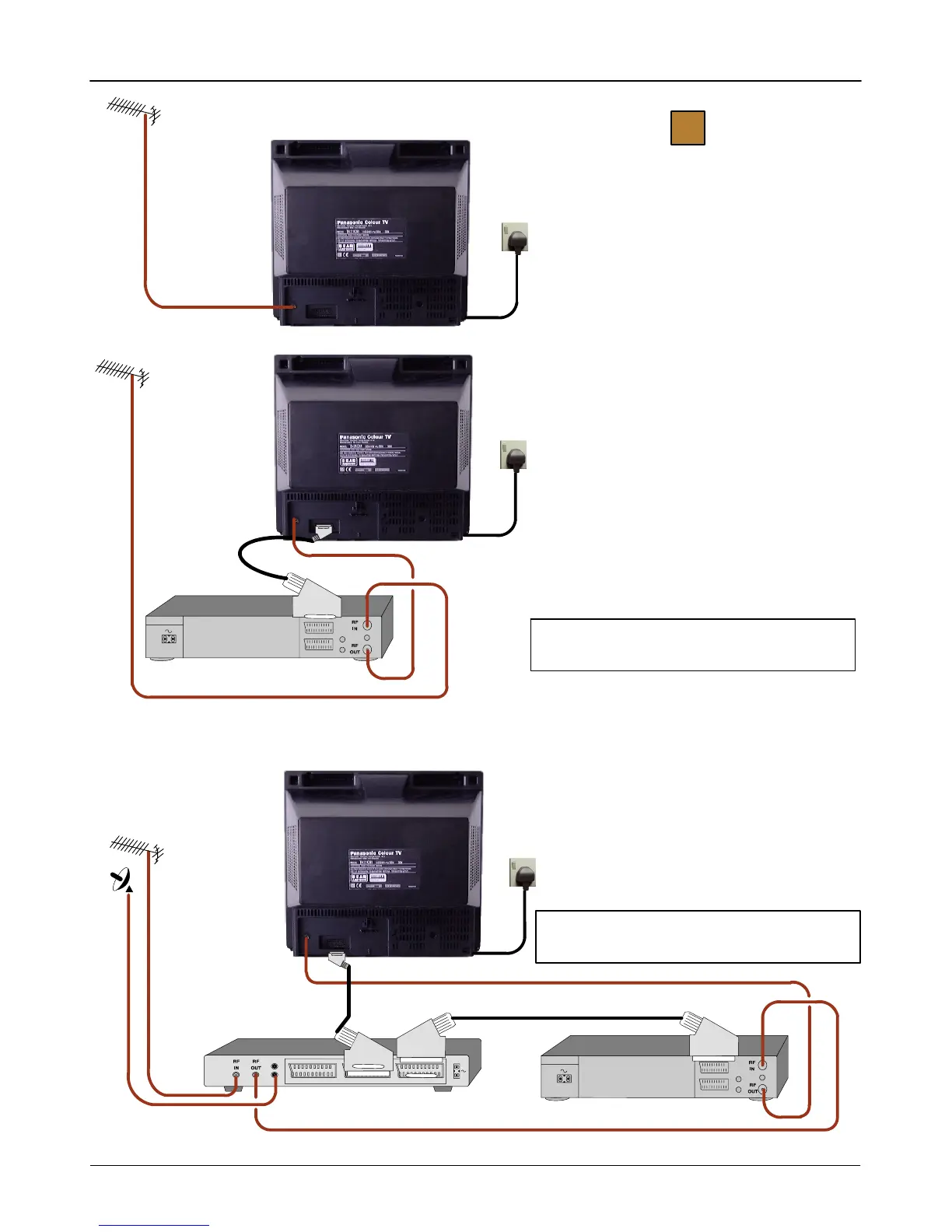
Connect Aerial co---axial cable direct to TV RF IN
socket.
OR
OR
Connect aerial co---axial cable to RF Input socket
of VCR and a RF co---axial cable from VCR RF
OutsockettoTVRFINsocket.
TheVCRcanalsobeconnectedtotheTVusing
aSCARTtoSCARTlead.
Connect aerial co---axial cable to RF Input socket
of VCR.
A further co---axial cable connects from the VCR
RF OUT socket to the TV RF IN socket.
The Satellite Receiver and VCR must be linked
by SCART to SCART lead.
Further information for VCR and Satellite Receiver
installation with this TV can be found on page 14.
USING A VCR
USING A VCR AND SATELLITE RECEIVER
TV only
1
VCR
Mains
Socket
Mains
Socket
VCR
SATELLITE RECEIVER
Ancillary equipment and leads are not supplied.
Mains
Socket



 To Next Page