9
MENU OPERATION
Tuning Menu
The Tuning menu provides access to both manual and automatic
tuning menus.
: Select
--- / + : A c c e s s
F : Previous Menu
N:Exit
Tuning Menu
Auto Setup
Manual Tuning
Shipping Condition
Swap
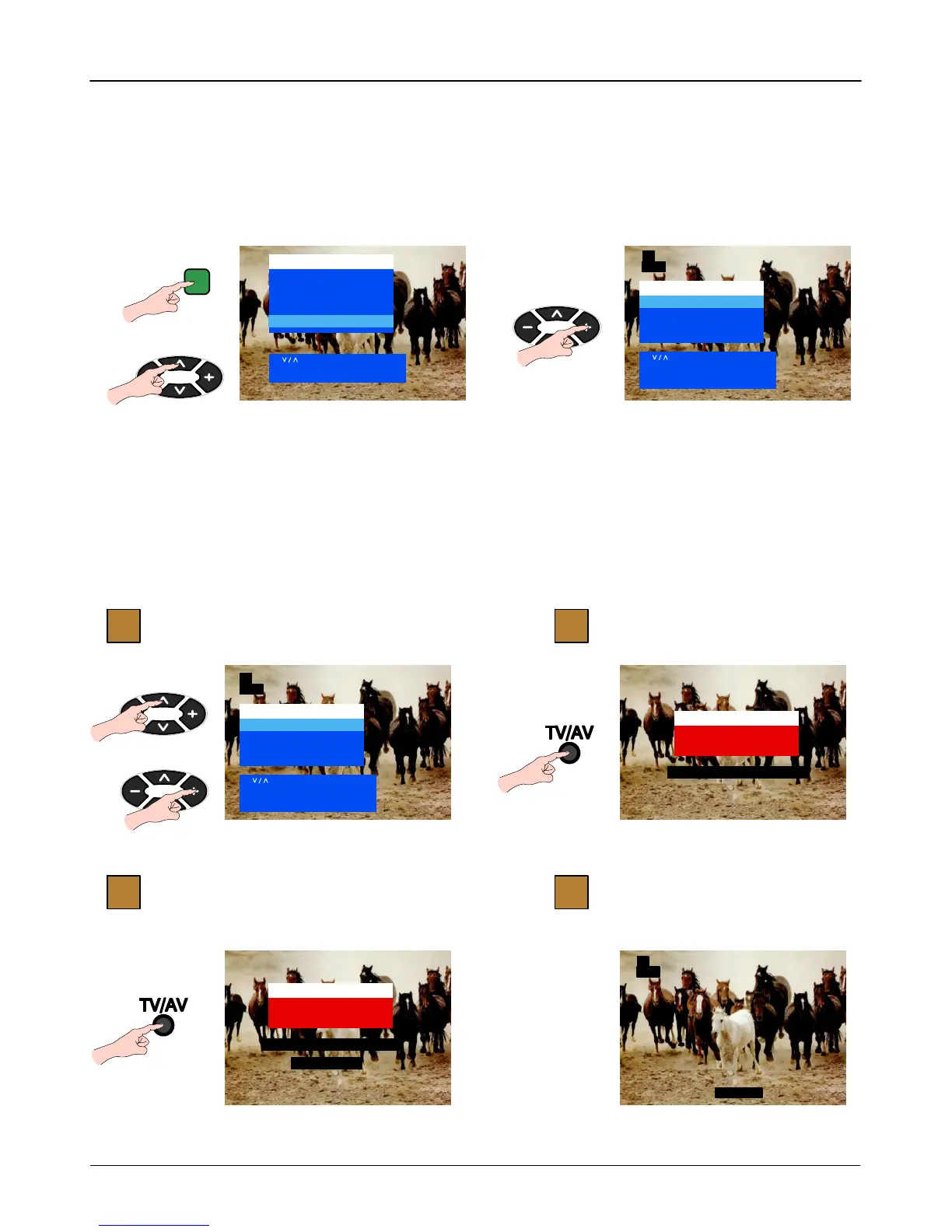
Display Menu and select “Tuning Menu” Access “Tuning Menu”
: Select
--- / + : A c c e s s
N:Exit
Main Menu
Contrast
Brightness
Colour
Sharpness
C --- A --- T --- S
Tuning Menu
1
CH44
F
Auto Setup
The Auto Setup menu allows you to automatically retune the TV,
particularly useful if you move to an area that is served by a
different transmitter.
First access the Tuning menu as described above.
Auto Setup
TV/AV : Start
F : Previous Menu
N:Exit
Tuning data will be Erased !
: Select
--- / + : A c c e s s
F : Previous Menu
N:Exit
Tuning Menu
Auto Setup
Manual Tuning
Shipping Condition
Swap
Auto Setup
TV/AV : Yes
F : Previous Menu
N:Exit
Tuning data will be Erased !
Are you sure ?
1
4
2
3
Access “Auto Setup” Start
Confirm Start Ready to go
TELETEXT
1
CH44
1
CH44



 To Next Page