3
QUICK START
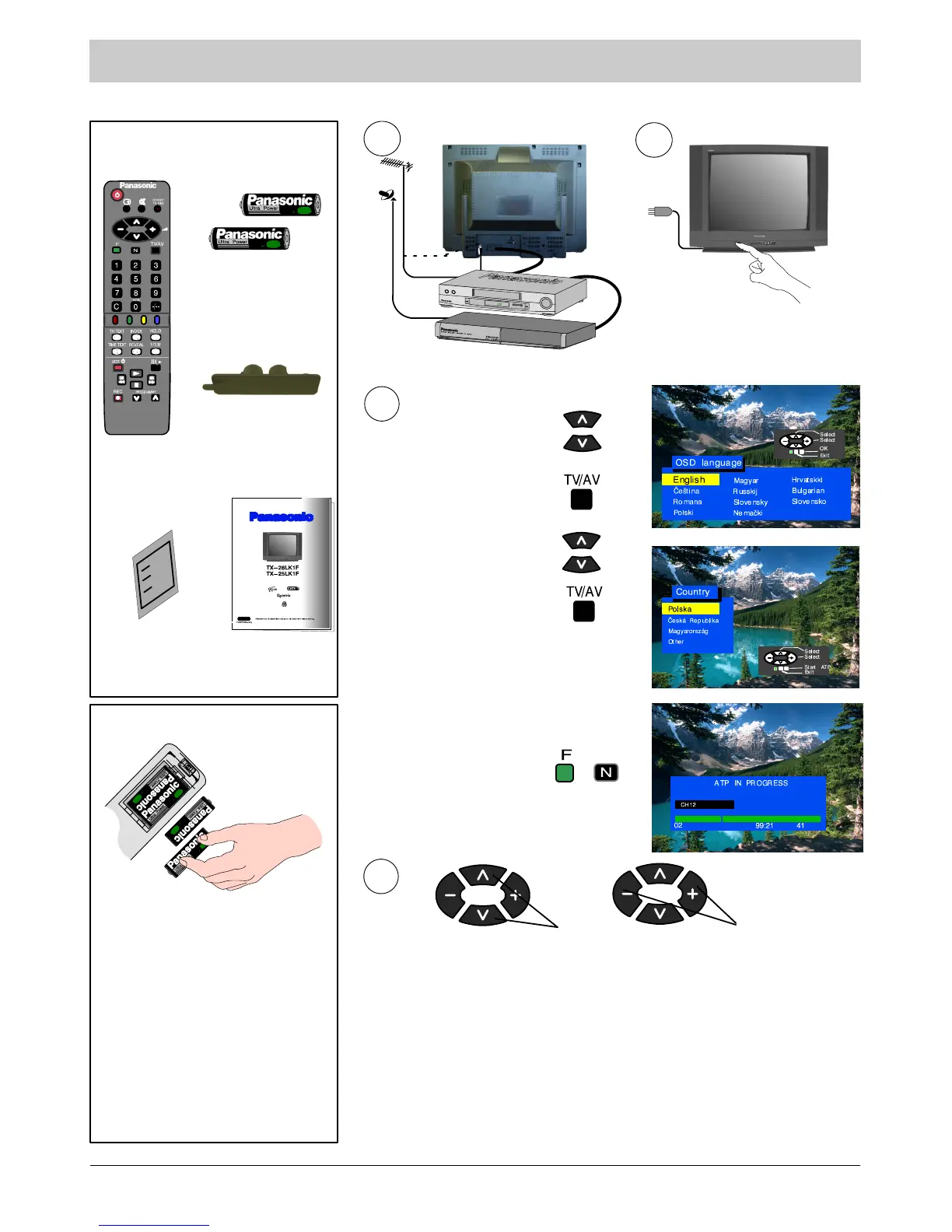
Check you have all the
components shown here:
EUR511310
remote control
unit
remote control
unit batteries
2xR6(UM3)
operation
manual
AV cover
TKK8E041
guarantee card
Remote control unit batteries
S Insert the batteries ensuring
correct polarity.
S Do not use old and new
batteries at the same time.
Used batteries should be
removed at once.
S Do not mix battery types. Do
n o t u s e N i --- C d b a t t e r i e s .
How To Start Up Quickly
1
2
OR
Connect the aerial and the additional devices.
Switch on the unit and the connected devices.
3
Select your language.
If the AV connector is connected to a
compatible VCR the programmed data
will be transmitted to the VCR via
Q --- L in k. S e e p a ge 1 3.
Press TV/AV button.
Select your country.
Press TV/AV button.
Automatic tuning will turn on, your
transmitting stations will be found, saved
in memory, and organised.
Press button “F” if you want to stop;
press button “N” if you want to
cancel the ATP sequence.
If you install a new Q---Link compatible VCR, you may switch it on. The
transmitted tuning data will match the data in the unit. If you use a new
NEXTVIEWLINK---compatible VCR, the data will have to be transmitted
manually. See details in the VCR operating manual.
D If the VCR has failed to receive the data transmitted from the television
unit you will probably have to find a way to transmit the data from the VCR
menu.
D If Q---Link does not work properly, check if t he SCART c able is
connected to AV1 connector on the unit and has all the 21 pins, and if the
VCR is compatible with Q---Link, NEXTVIEWLINK and similar techniques.
D You will find Information regarding Q---Link and connection on pages
13 and 18. Should you need more detailed information, contact your
dealer.
Volume adjustment
Channel selection
4
SCART



 To Next Page