English - 6 -
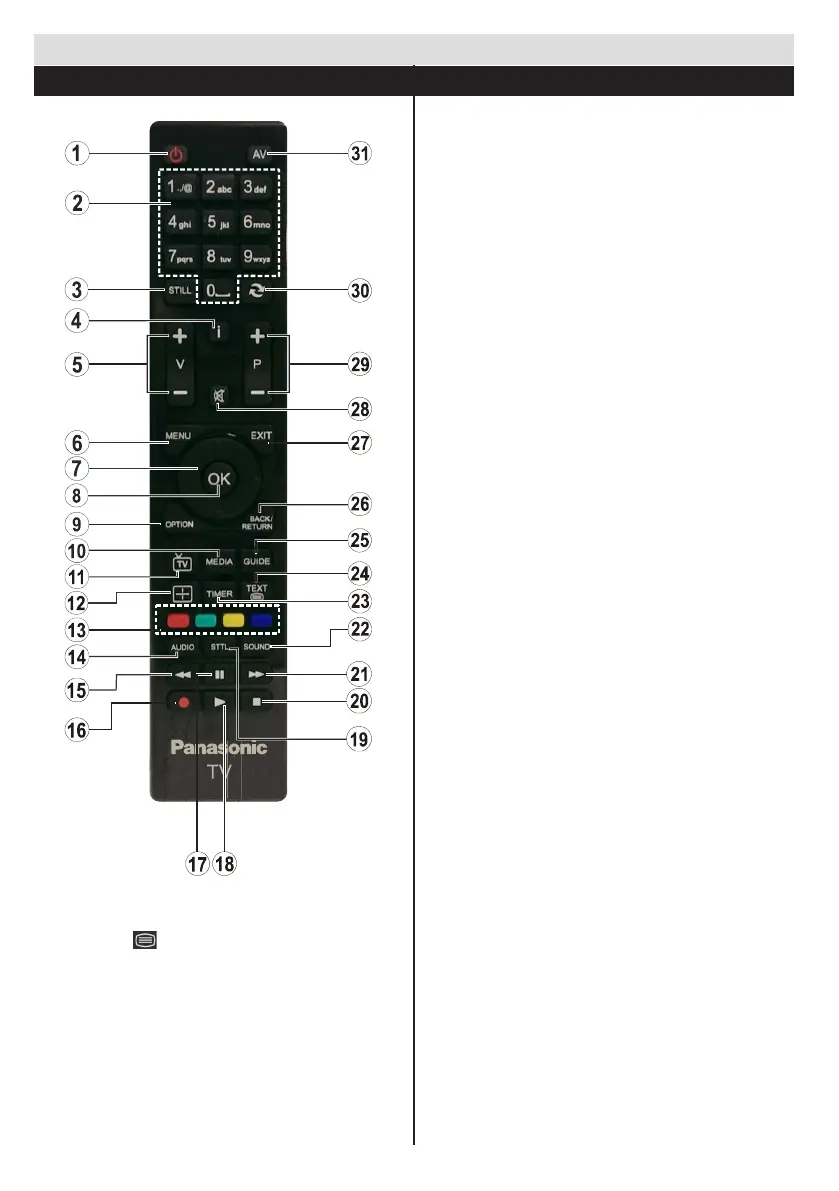
1. Standby / On
2. Numeric buttons
3. FreezeImage/Hold(inTXTmode)
4. Info/Reveal(inTXTmode)
5. Volume Increase / Decrease
6. Menu On / Off
7. Navigation buttons
8. Select/Conrm
9. Option Menu On / Off
10. Media Browser
11. TV Source / Channel list
12. Change Aspect Ratio
13. Coloured buttons (Red, Green, Yellow, Blue)
14. Mono- Stereo Dual I-II / Audio-Subtitle
Language
15. Fast Rewind (in media browser mode)
16. No function
17. Pause (in Media Browser mode)
18. Play (in media browser mode)
19. Subtitle On / Off (where available)
20. Stop (in media browser mode)
21. Fast Forward (in Media Browser mode)
22. Change equalizer mode
23. Set auto TV off timer
24. Teletext - Mix
25. Electronic Programme Guide
26. Return/Back/Indexpage(inTXTmode)
27. Exit
28. Mute
29. Programme Up / Down
30. Previous programme / Previous source
31. Inputs
Getting Started
Remote Control
Teletext
Press “TEXT - ” button to enter. Press again to
activate mix mode. Press once more to exit. Follow the
instructions displayed on digital teletext screen.
Downloaded from www.vandenborre.be









 To Next Page