System Information
How to access
1. While pressing [MENU] button on the remote control.
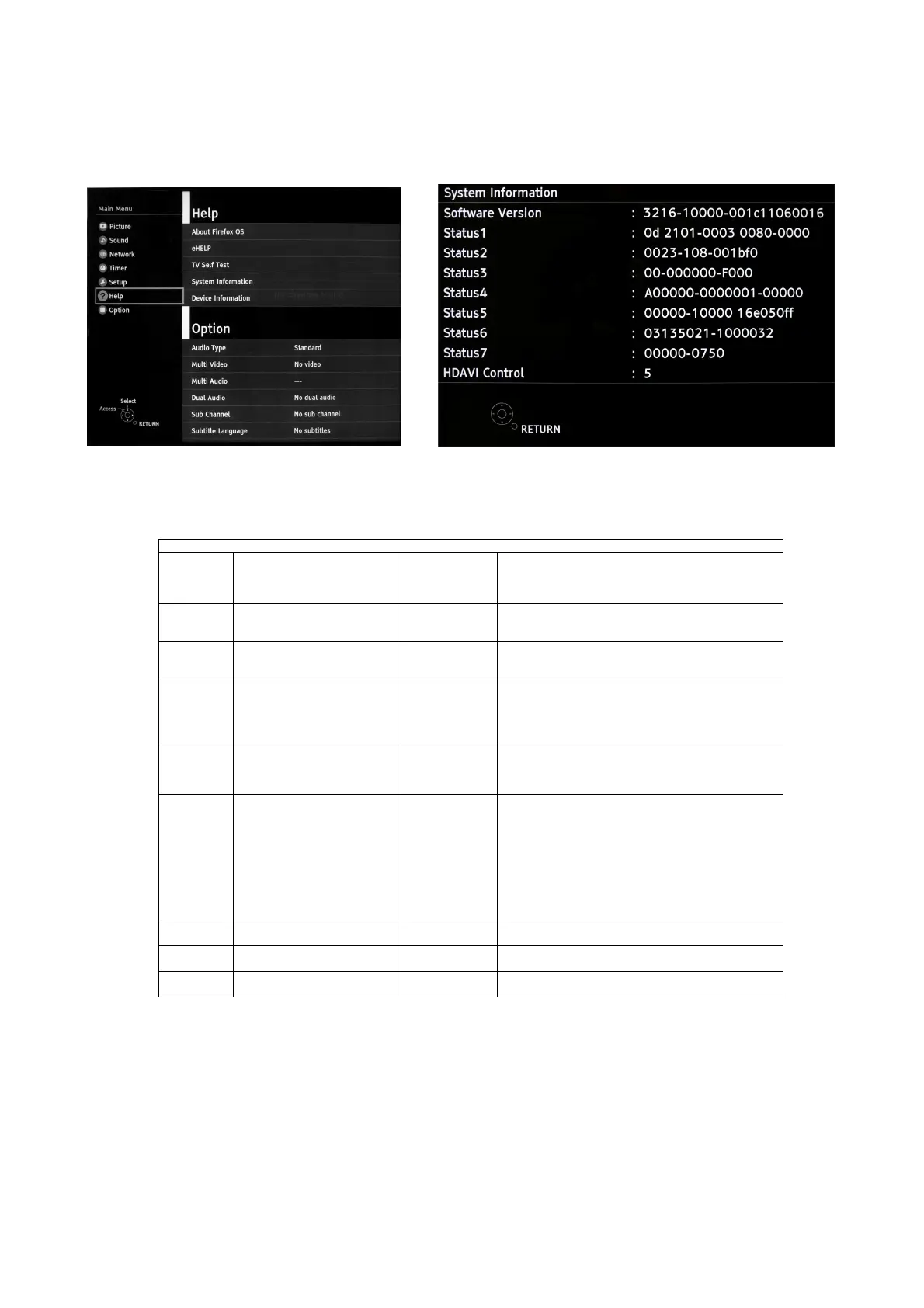
2. To select [ Help] and then to select [System Information].(see Fig.10, Fig.11)
*Sample only
How to exit
Press the [RETURN] button on the remote control.
System Information
SW version 3216-10000-001c11060016 3216
10000
001c111
060016
Peaks SW
STBY SW
FRC SW
FRC DATA
Status1 0d 2101-0003 0080-0000 0d
2101-0003
0080-0000
Outer model ID
Inner model ID
Panel inch size
Status2 0023-108-001bf0 0023
108
001bf0
LSI Package
LSI Release
Model data version
Status3 00-000000-F000 00
00
00
00
F
Number of bad block in NAND Flash (dec)
Peaks reboot counter
System crash counter
Emergency (SOS) counter
Peaks NAND Maker ID
Status4 A00000-0000001-00000 A
00000
0000001
00000
Power-On period (A<=100hrs, B<=200hrs, C>200hrs)
Total Power-On time (dec, max is 65535)
Power-On timer (dec, max is 1048575)
Fixed (always)
Status5 00000-10000 16e05Off 0
0
0
0
0
1
0000
16e05Off
SOS history (latest)
SOS history (last time)
SOS history (last but one)
SOS history (2
nd
time after shipping)
SOS history (1
st
time after shipping)
Self-check _0-never selfcheck
1-production selfcheck by “FF” or USCM
2-user selfcheck by pressing “OK”
Fixed (always)
Panel ID
Status6 03135021-1000032 03135021
1000032
Peaks EEPROM version
STM EEPROM version
Status7 00000-0750 00000
0750
STM ROMCOR version
AJAX_CE version
HDAVI
Control
5 5 VIERA Link version is displayed
Fig.10 Fig.11






 To Next Page