Service Hints
How to remove the backcover
Put the TV set only onto a work table with the screen panel down.
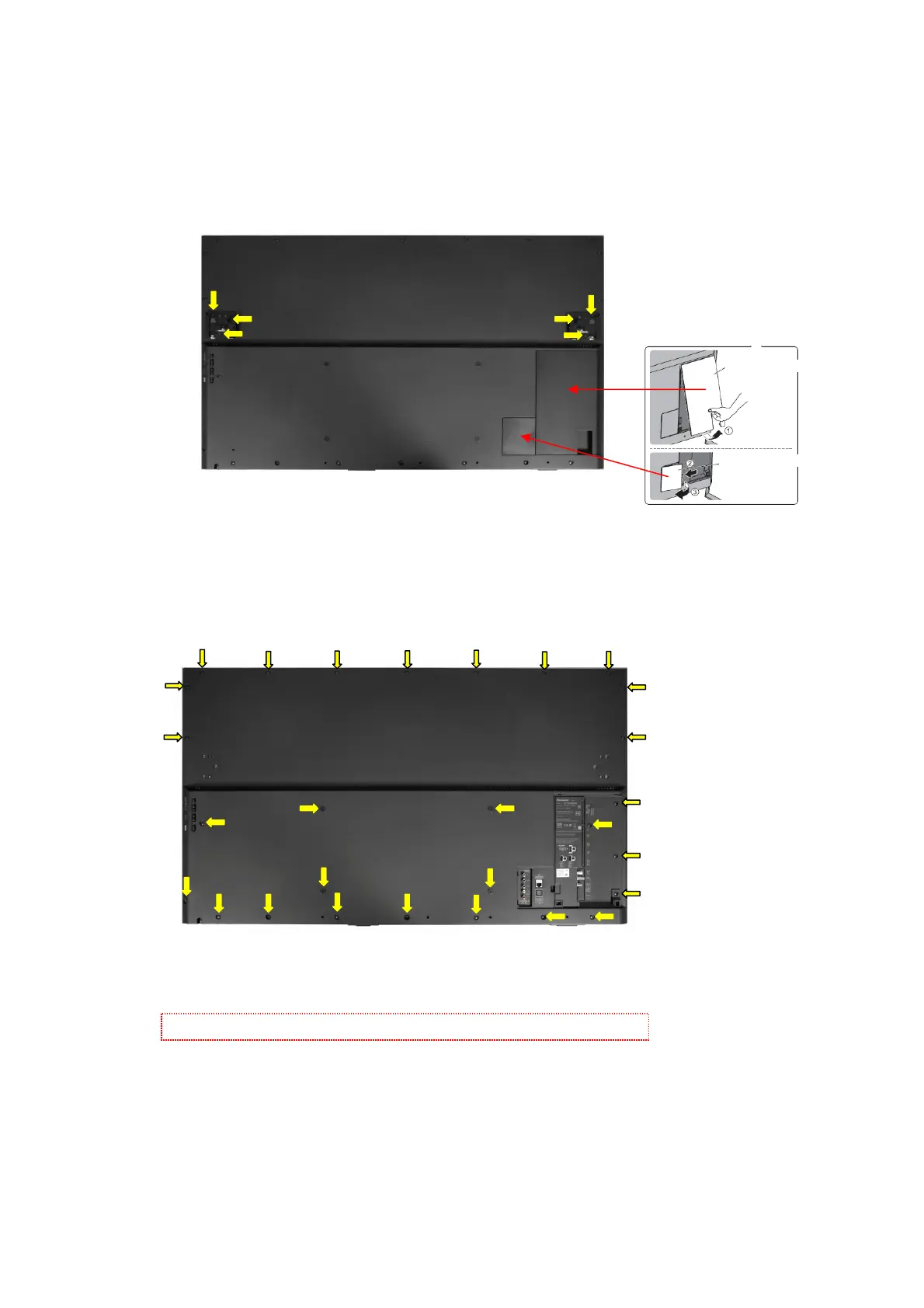
Remove the 6 fixing screws and Bottom Metal R, Bottom Metal L. (see Fig.8)
Remove the Cable Cover (Terminal) and Cable cover (rear). (see Fig.8)
Remove the 28 fixing screws and backcover. (see Fig.9)
Caution: Before removing cover, receiver must be disconnect from mains.
Fig.9
SCREWS
(2) THEC259J /11pcs/
(3) THTD037J /5pcs/
(4) THEC1509 /8pcs/
(5) THE5ZC036J /4pcs/
(2)
(2)
(2)
(2)
(2)
(5)
(3)
(3)
(2)
(2)
(2)
(2)
(2)
(3)
(2)
(3)
(3)
(4)
(4) (4)
(4)
(4)
(4)
(4)
(4)
(5)
(5)
(5)
Cable Cover (Terminal)
Cable Cover (Rear)
Fig.8
(1)
(1)
(1)
(1)
(1)
(1)
SCREWS
(1) XYN3+F8FJK /6pcs/




 To Next Page