27
Tuning Menu
SYS Select
This option allows you to switch the television system between the Australian and the New Zealand / Indonesian
system.
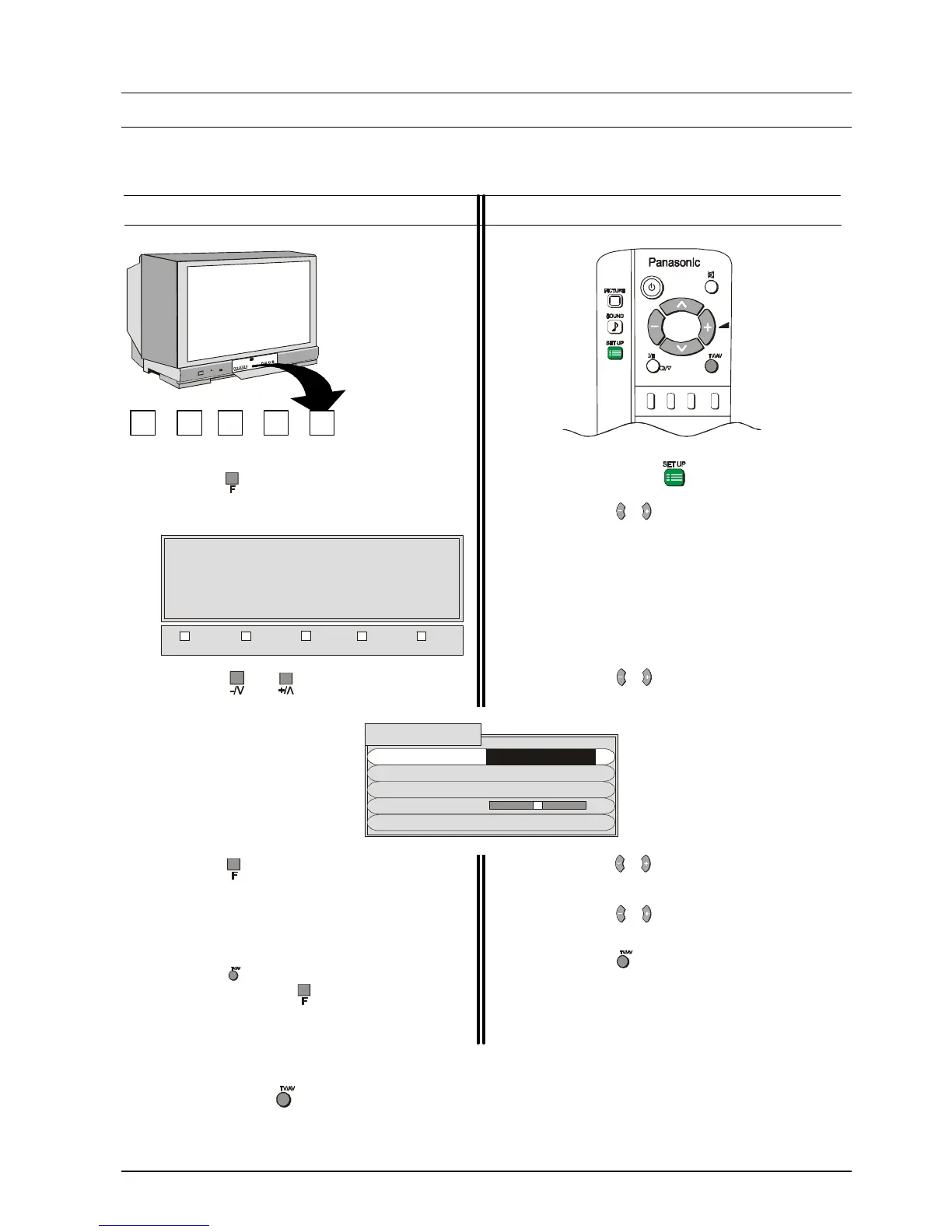
Using the Front Panel
STR F -/\/ +//\ TV/AV
1. Push the button repeatedly until the Tuning
Mode is reached.
2. Push the or Button to access the
Tuning Menu.
3. Push the button to select SYS SELECT.
4. Push the -/\/ or +//\ Button to switch between
AUSTRALIA and NZ/INDONES.
5. To return the television to normal operation
push the button on the remote control or
repeatedly push the button until the volume
display appears.
Using the Remote Control
1. Push the Set Up button.
2. Push the or button to access the Tuning
Menu.
3. Push the or button to select the Tuning
Menu.
4. Push the or button to select the SYS
SELECT.
5. Push the or button to switch between
AUSTRALIA and NZ/INDONES.
6. Push the button to return the television to
normal operation.
Push the button at any time to return the television to normal operation.
TUNING MODE






 To Next Page