38
Connecting Equipment to the TV
*** NOTE ***
Headphones and connecting cables for Antennas, VCRs, LDs DVDs, Amplifiers and
Speakers etc. are not supplied with this television.
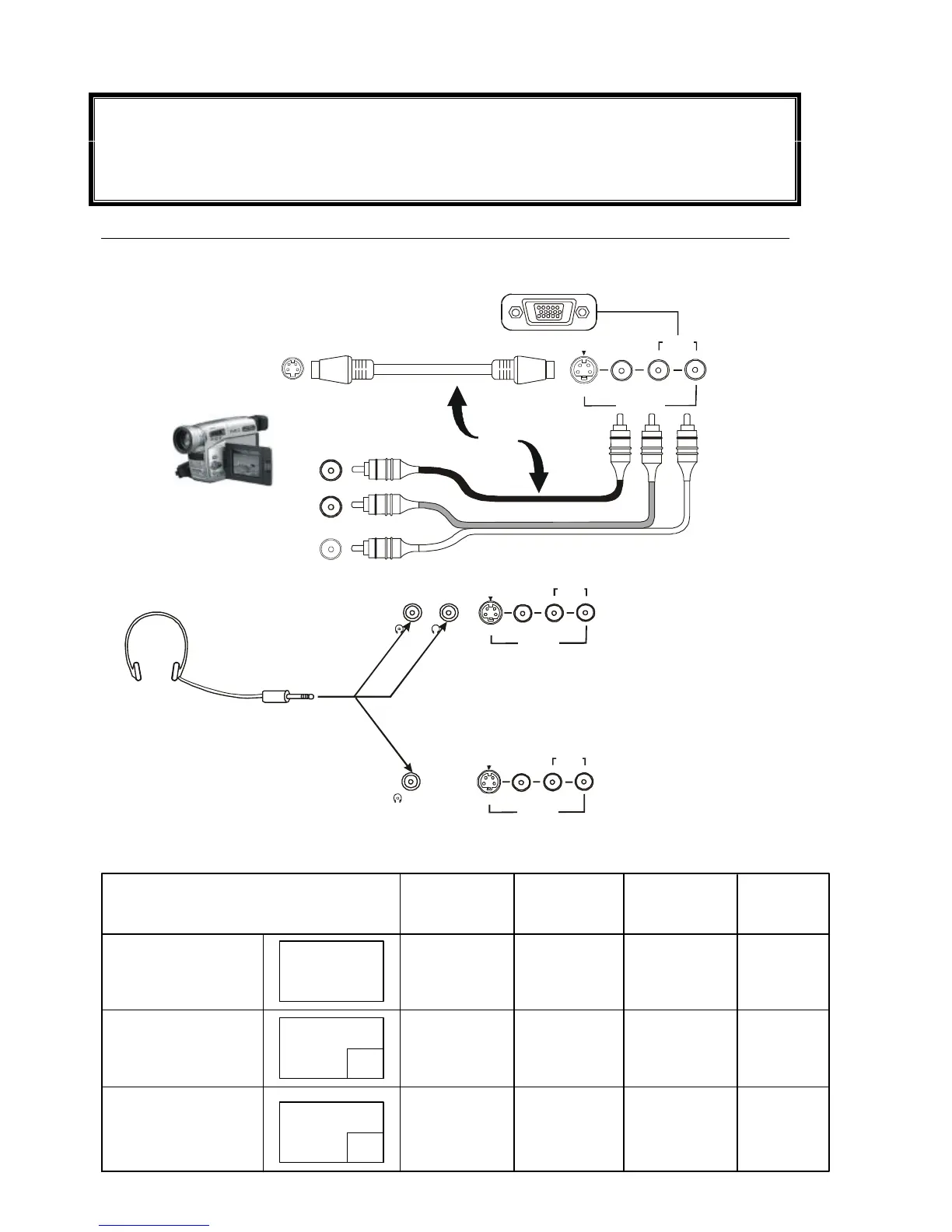
Front Panel Connections
The front input terminals allow quick and easy access for computer games, video cameras and other
equipment which is not usually permanently connected.
AV Equipment
Headphones
TX-86PW100A &
TX-76PW100A
Headphones
(Not Supplied) 3.5mm
Plug
TX-76PW50A
Screen Condition Speaker Main Sub Monitor
Sound Headphones Headphones Output
Single picture/ A A A A
Teletext A (Stereo) (Stereo) (Stereo) (Stereo)
Picture in Picture A A A B A
(Stereo) (Stereo) (Mono) (Stereo)
B
Picture in Picture B B B A B
CHANGE (Stereo) (Stereo) (Stereo) (Mono)
A






 To Next Page