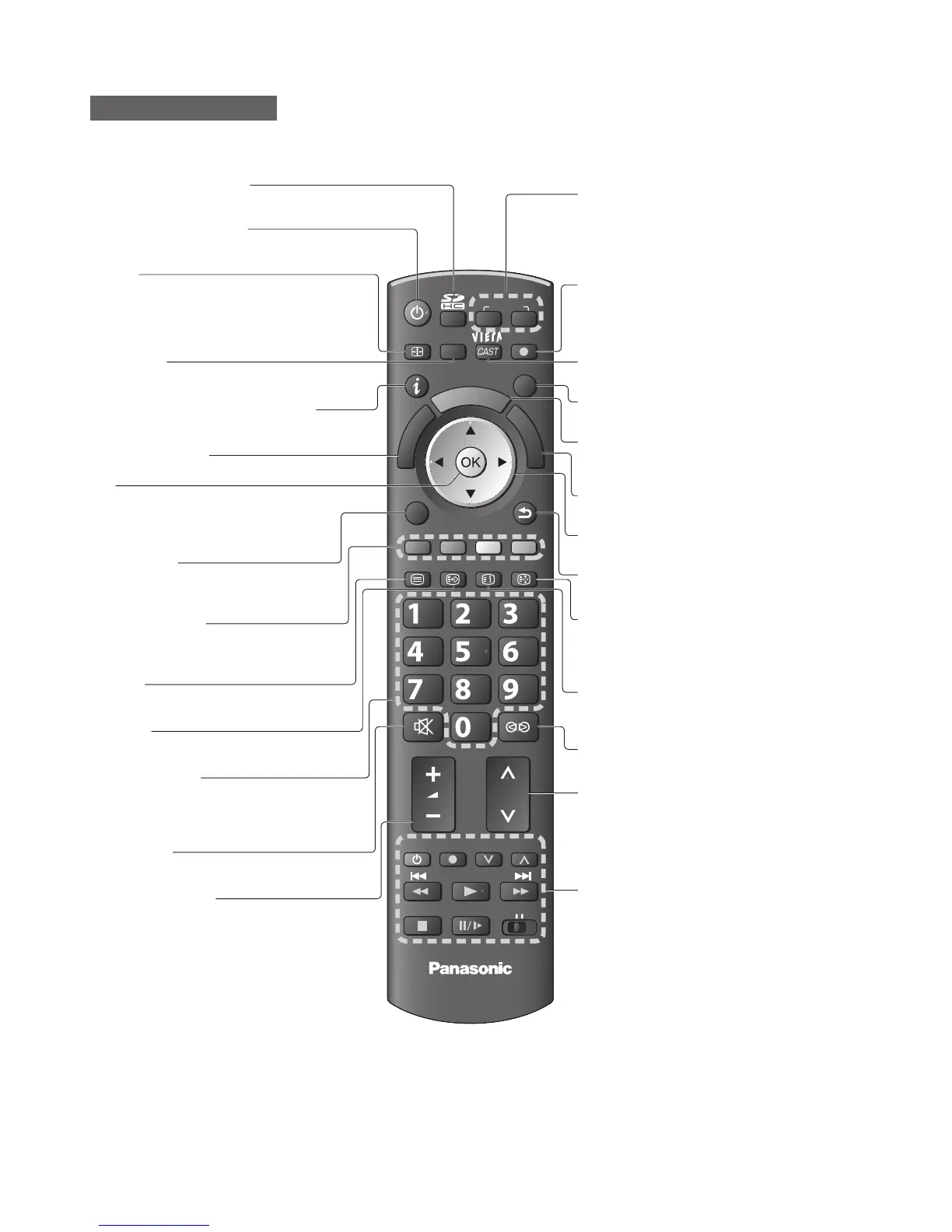
Identifying Controls ●
Accessories / Options ●
EXIT
ASPECT
OPTION
TEXT
REC
PROGRAMME
STTL
INDEX HOLD
BACK/
RETURN
MENU
INPUT
TV
G
U
I
D
E
V
I
E
R
A
T
O
O
L
S
V
I
E
R
A
L
i
n
k
DVD/VCR
TV
AVTV
abc def
jkl
ghi
mno
tuvpqrs
wxyz
DIRECT TV REC
7
Remote Control
Identifying Controls
Cursor buttons
Makes selections and adjustments●
Standby On / Off switch
Switches TV On or Off standby●
Sound Mute
Switches sound mute On or Off●
Aspect
Changes aspect ratio from Aspect Selection ●
list
Also possible by pressing this button
●
repeatedly until you reach the desired aspect
Channel Up / Down
Selects channel in sequence●
Connected equipment operations
Teletext
Switches to teletext mode●
OK
Confirms selections and choices●
Press after selecting channel positions ●
to quickly change channel
Volume Up / Down
Channel / Programme Information
Displays channel and programme ●
information
Index
Returns to the teletext index page ●
(teletext mode)
Coloured buttons
Used for the selection, navigation and ●
operation of various functions
Exit
Returns to the normal viewing screen●
Numeric buttons
Changes channel and teletext pages●
Sets characters●
When in Standby mode, switches TV On●
VIERA Link Menu
Accesses VIERA Link Menu●
Guide
Displays TV Guide●
Option Menu
Easy setting for viewing and ●
sound options
Main Menu
Press to access Picture, Sound and ●
Setup Menus
Subtitles
Displays subtitles●
Input mode selection
TV - switches DVB-S / DVB-C / DVB-T / ●
Analogue mode
AV - switches to AV input mode from Input
●
Selection list
VIERA IMAGE VIEWER
Switches to SD Card viewing mode●
Return
Returns to the previous menu / page●
Hold
Freeze / unfreeze picture●
Holds the current teletext page (teletext ●
mode)
VIERA CAST
Displays VIERA CAST home screen●
Direct TV Recording
Records programme immediately in ●
DVD Recorder / VCR with Q-Link or
VIERA Link connection
Surround
Switches Surround sound●
VIERA TOOLS
Displays some special feature icons and ●
accesses easily







 To Next Page