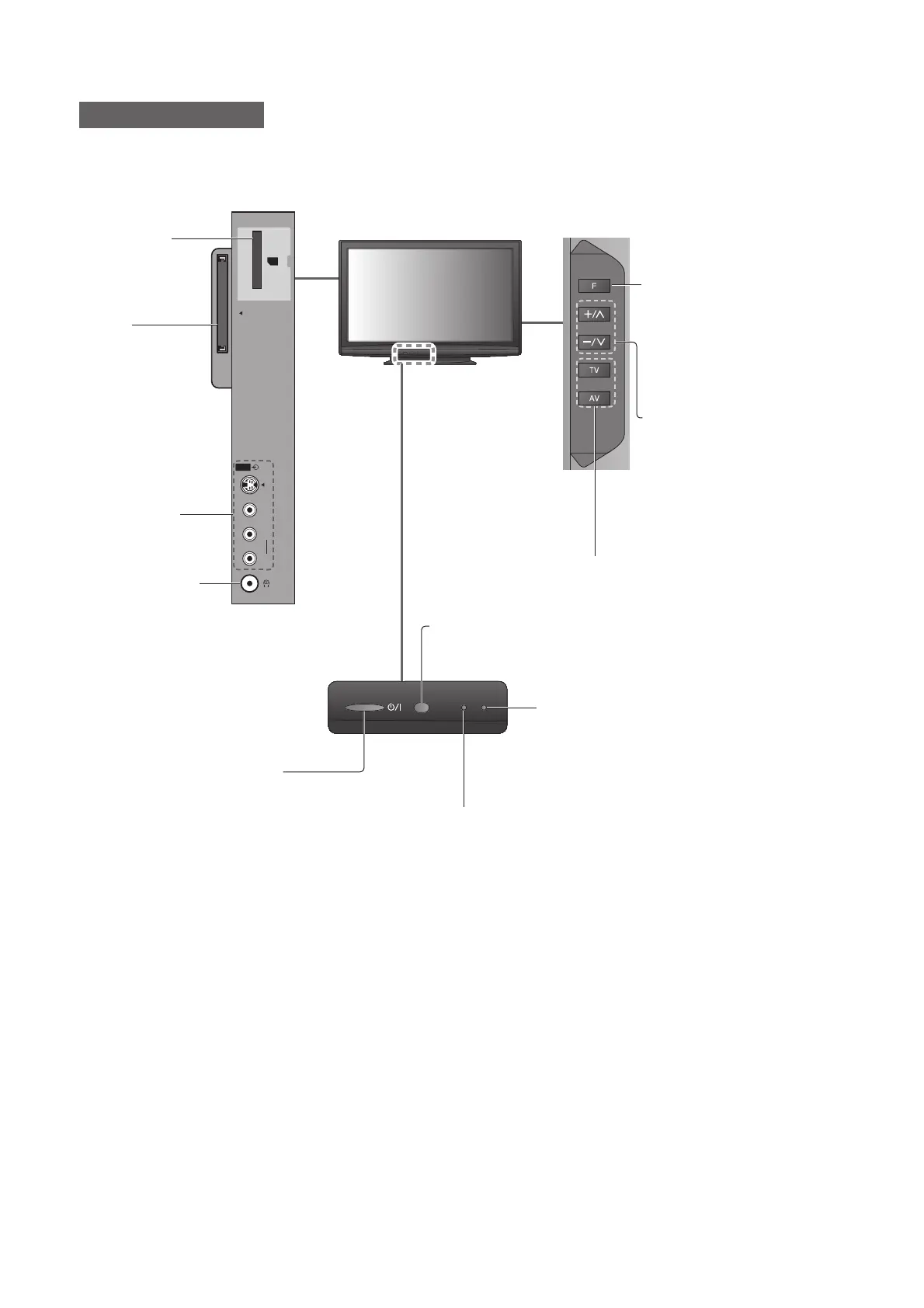
Common
Interface
SD CARD
AV3
S-V
V
L
R
8
Identifying Controls
TV
SD Card slot
(p. 42)
CI slot
(p. 37)
AV3 terminals
(p. 55)
Headphones jack
(p. 55)
Changes the input mode
Function select
Volume / Contrast / Brightness / ●
Colour / Sharpness /
Tint (NTSC mode) / Bass /
Treble / Balance / Auto Setup
(p. 30 and p. 31)
Recording LED
Standby for Direct TV Recording: orange●
Remote control signal receiver
Do not place any objects between the TV remote control signal ●
receiver and remote control.
Increases or decreases the
channel position by one.
When a function is already
displayed, press to increase or
decrease the selected function.
When in Standby mode,
switches TV On.
Power LED
Standby: red●
On: green
When using the remote control, indicates the TV has received a
●
command.
Mains power On / Off switch
Switch On to turn on the TV or turn the TV ●
to standby mode by the remote control





 To Next Page