Shipping Condition
51
Shipping Condition
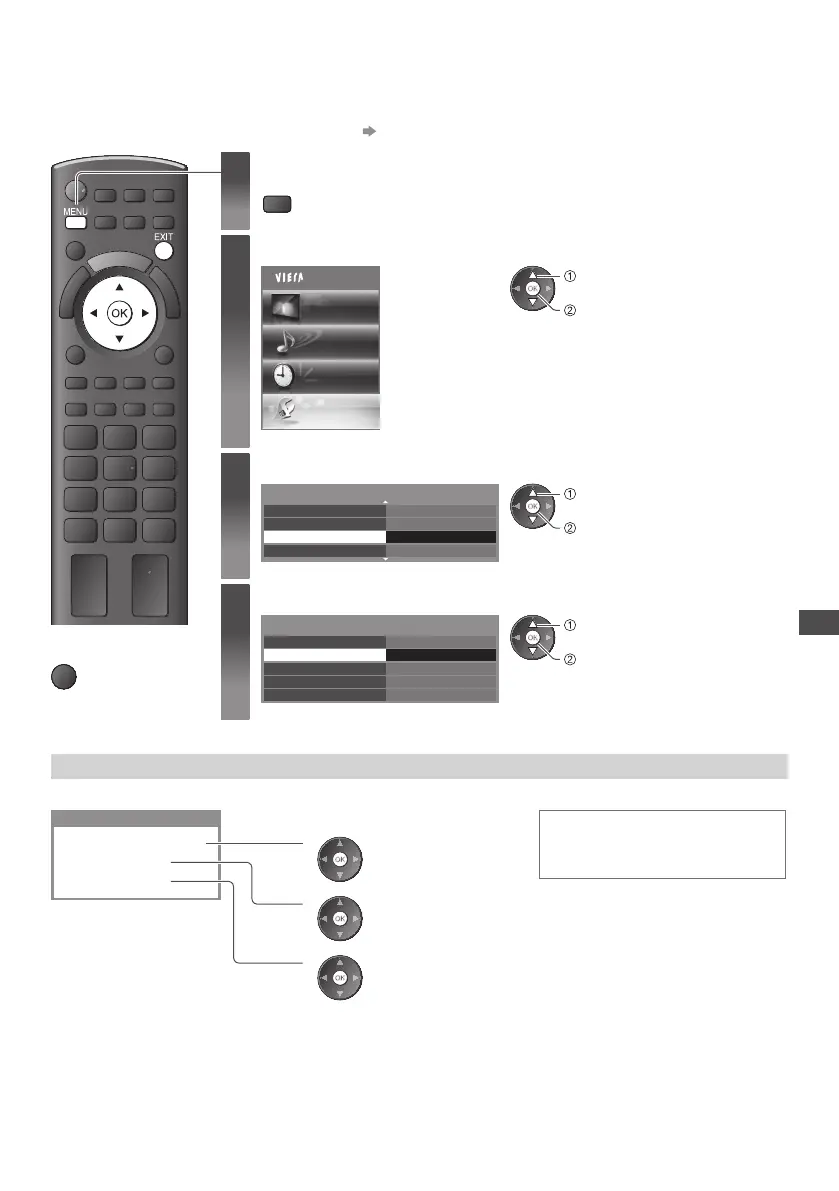
R esets the TV to its original condition, i.e. no channels tuned in.
All settings other than [USB HDD Setup] are reset (channels, picture, sound settings, etc.).
•
T o retune TV channels only, e.g. after moving house “Retuning from Setup Menu” (p.38, 39)
1
Display the menu
MENU
2
Select [Setup]
Main Menu
Picture
Sound
Timer
Setup
access
select
3
Select [System Menu]
2/2
DivX
®
VOD
Access
System Menu
O ther Settings
Advance(isfccc)
access
select
4
Select [Shipping Condition]
U SB Keyboard Layout
Shipping Condition
System Update
Software Licence
System Information
System Menu
Access
E nglish(UK)
access
select
■
To return to TV
EXIT
Restore Settings [Shipping Condition]
1 Check the message and initialise 2 Follow the on screen instructions
Shipping Condition
All tuning data will be erased
Are you sure ?
Are you sure ?
1
(Confirm)
2
(Confirm)
3
(Start [Shipping Condition])
Reset to Factory Shipping Condition
Completed.
Please switch o TV.
•
[Auto Setup] will automatically start
when Mains power On / Off switch is
next turned On. (p.13)









 To Next Page