Using Media Player
67
Recorded TV mode
(For USB HDD)
C ontents list of the USB HDD will be displayed.
BBC 1
12:00
ITV
13:30
BBC 2
Das Erste
News
Cinema
USB HDD 1
00:00
1
3
1
13:50
OPTION
Select
Play
D elete
EXIT
RETURN
Media Player
C hannel Title D ate
I nfo
R emaining Capacity 500GB (50%)
T hu 28/10
All
N ot Viewed
R ecorded TV
M on 10/1
Sat 15/1
C hapter List Select
Duration
N ot Viewed
R ecording
Protected
Grouped
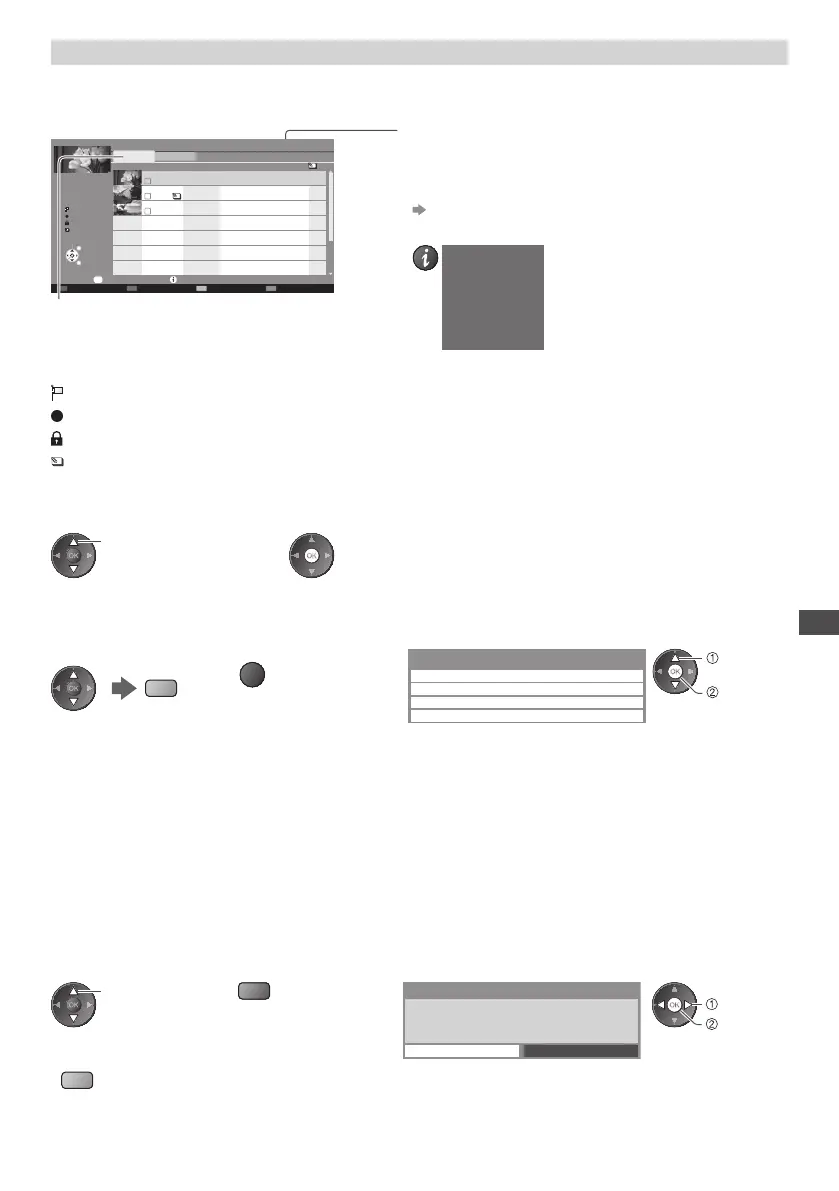
Example : Contents list
O ption Menu
[All] :
All the recorded contents are listed.
[Not Viewed] :
C ontents not played back are listed.
R emaining capacity of the HDD
•
T his value may not be accurate depending on the condition.
•
Y ou can also access the contents list directly by using VIERA
TOOLS.
“How to Use VIERA TOOLS” (p.29)
•
T o display the information of the highlighted content
DVB-T, BBC 1
Das Erste
00:20
Wed 27/10/2010 12:00
- Channel
- Date & Time
- Title
- Duration
: C ontent not played back (Once you playback the content, this icon will disappear.)
: C ontent under recording (You can playback this content even if under recording.)
: Protected content cannot be deleted.
: Two or more contents are grouped.
■ Playback the content from the list
1 Select the content 2 Start playback
select
■ To edit recording content
1 Select and tick the
content to edit
(blue)
2 Display the option menu
OPTION
3 Select the item and edit
Option Menu
Create Group
R elease Group
C hange Protect Status
Exclude from Group
edit
select
[Create Group] :
Two or more contents can be grouped. Select and tick all the desired contents, and then select [Create Group].
[Release Group] :
Select the created group you want to release, and then select [Release Group]. (To release several groups at once, tick all the
desired groups.)
[Exclude from Group] :
Select the group and press the OK button to display the grouped contents . To exclude only the specific content from the
group, select it and then select [Exclude from Group]. (To exclude several contents at once, tick all the desired contents.)
[Change Protect Status] :
Select the content you want to protect to delete, and then select [Change Protect Status]. Perform the same way to cancel the
protection. (To change the status of several contents at once, tick all the desired contents.)
■ Delete the selected content
1 Select the content 2 Delete the content 3 Confirm
select
(red)
Delete
Are you sure you want to delete?
N o
Y es
set
select
•
T o select two or more
contents
(blue)
Chapter List









 To Next Page