Advanced Picture Settings
53
Advanced Picture Settings
Y ou can adjust and setup the detailed picture settings for each input and Viewing Mode.
•
T o use this function completely, set [Advance(isfccc)] to [On] in the Setup Menu. (p.37)
■
To return to TV
EXIT
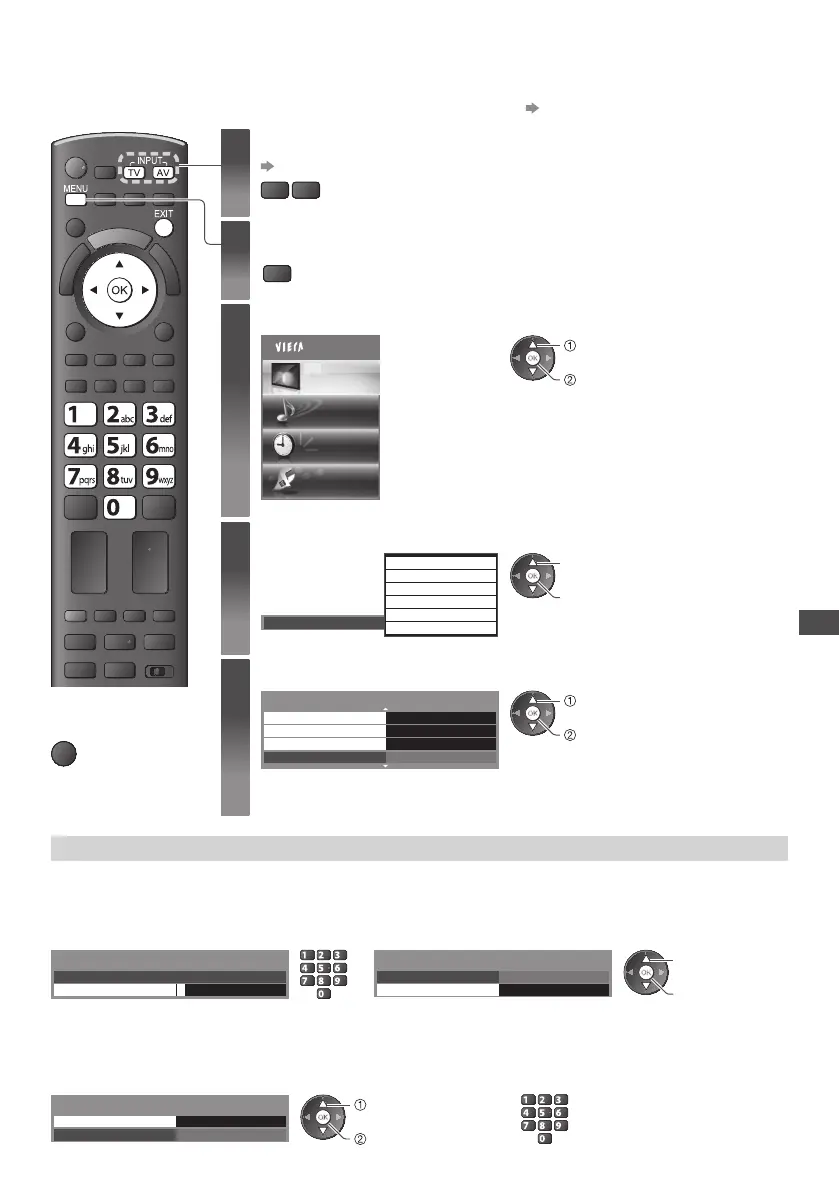
1
Select the input mode to adjust and setup
(p.18, 27)
TV
AV
2
Display the menu
MENU
3
Select [Picture]
Main Menu
Picture
Sound
Timer
Setup
access
select
4
Select [Viewing Mode] and set the mode
Dynamic
N ormal
C inema
True Cinema
Professional1
Professional2
V iewing Mode
access / store
select
5
Select one of the following functions
2/2
Advanced Settings Access
Access
Access
R eset
L ock Settings
C opy Adjustment
R eset to Defaults
access
select
•
[Copy Adjustment] is available when [Viewing Mode] in the Picture Menu is set to
[Professional1] or [Professional2].
Lock the picture setting [Lock Settings]
Advanced Settings can be locked for each Viewing Mode and input.
Additionally, [Contrast], [Brightness], [Colour], [Sharpness], [Tint] and [Reset to Defaults] in the Picture Menu can be locked for
[Professional1] and [Professional2].
1 Enter the PIN number (4 digits) 2 Select [Adjustment Lock] and set to [On]
* * * *
Please enter new PIN
PIN
Lock Settings-PIN Entry
abc def
jkl
ghi
mno
tuvpqrs
wxyz
C hange PIN
O n Adjustment Lock
Lock Settings
access / store
select
•
E nter the PIN number twice at first setting.
•
M ake a note of the PIN number in case you forget it.
■ To change the PIN number
1 . Select [Change PIN] 2. Enter a new PIN number twice
C hange PIN
O n
Access
Adjustment Lock
Lock Settings
access
select
abc def
jkl
ghi
mno
tuvpqrs
wxyz









 To Next Page