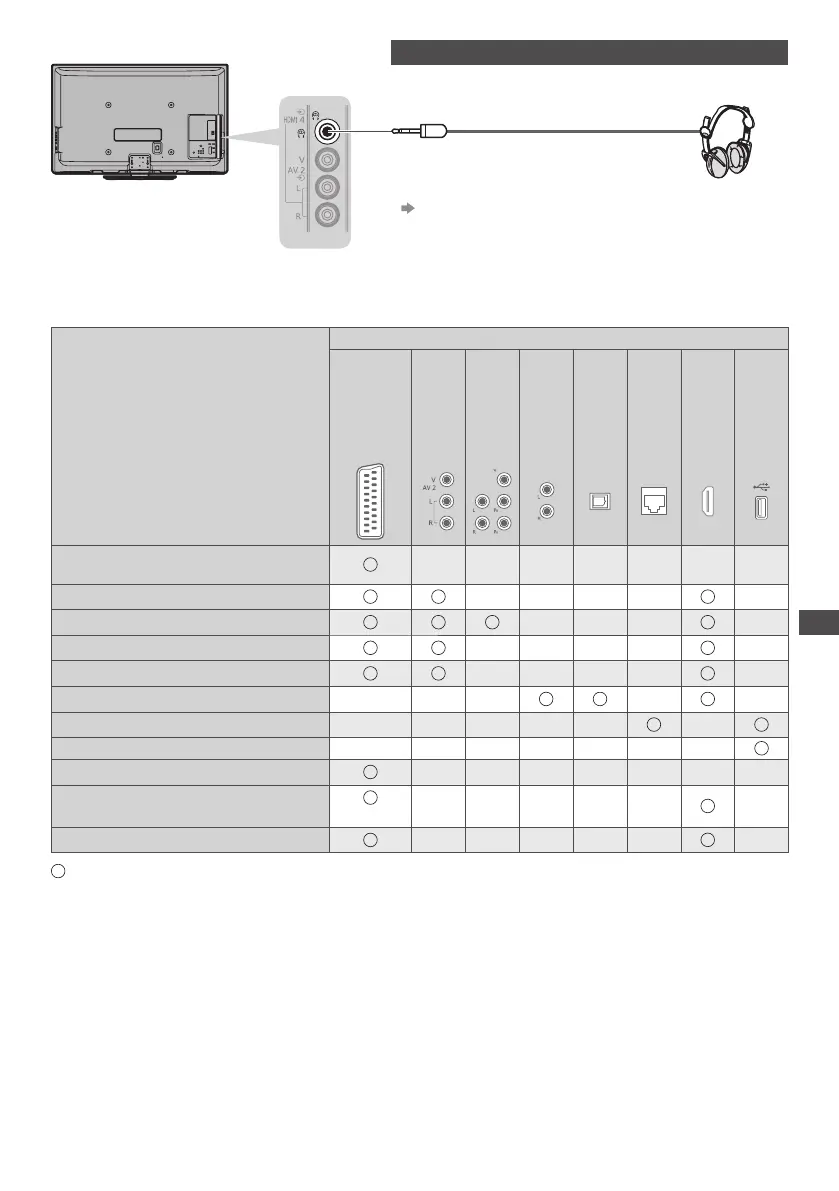
External Equipment
93
R ear of the TV
Side panel of
the TV
Headphones
(M3 stereo mini plug)
•
T o adjust volume
[Headphone Volume] (p.33)
Types of connectable equipment to each terminal
Recording/ Playback
(equipment)
Terminal
AV1
AV2
COMPONENT
AUDIO OUT
DIGITAL
AUDIO OUT
ETHERNET
HDMI 1 - 4
USB 1 - 3
T o record / playback videocassettes/ DVDs
(VCR / DVD Recorder)
T o watch satellite broadcasts (Set top box)
∗
1
T o watch DVDs (DVD Player)
T o watch camcorder images (Video camera)
T o play games (Game equipment)
T o use amplifier with speaker system
∗
2
T o use network services
U SB HDD Recording
∗
3
Q-Link
VIERA Link
(with HDMI)
D irect TV Recording
: Recommended Connection
∗
1 : Use HDMI1 for automatic input switching.
∗
2 : Use HDMI2 for connecting an amplifier. This connection is applicable when using an amplifier that has ARC (Audio Retur
n
Channel) function.
∗
3 : Use USB 3 port for connecting the USB HDD.









 To Next Page