English
10
Network
To enable the network service functions (VIERA Connect, etc.), you need to connect the TV to a broadband network
environment. If you do not have any broadband network services, please consult your retailer for assistance.
Prepare the internet environment for wired connection or wireless connection.
Setup of the network connection will start when first using the TV.
(p. 15)
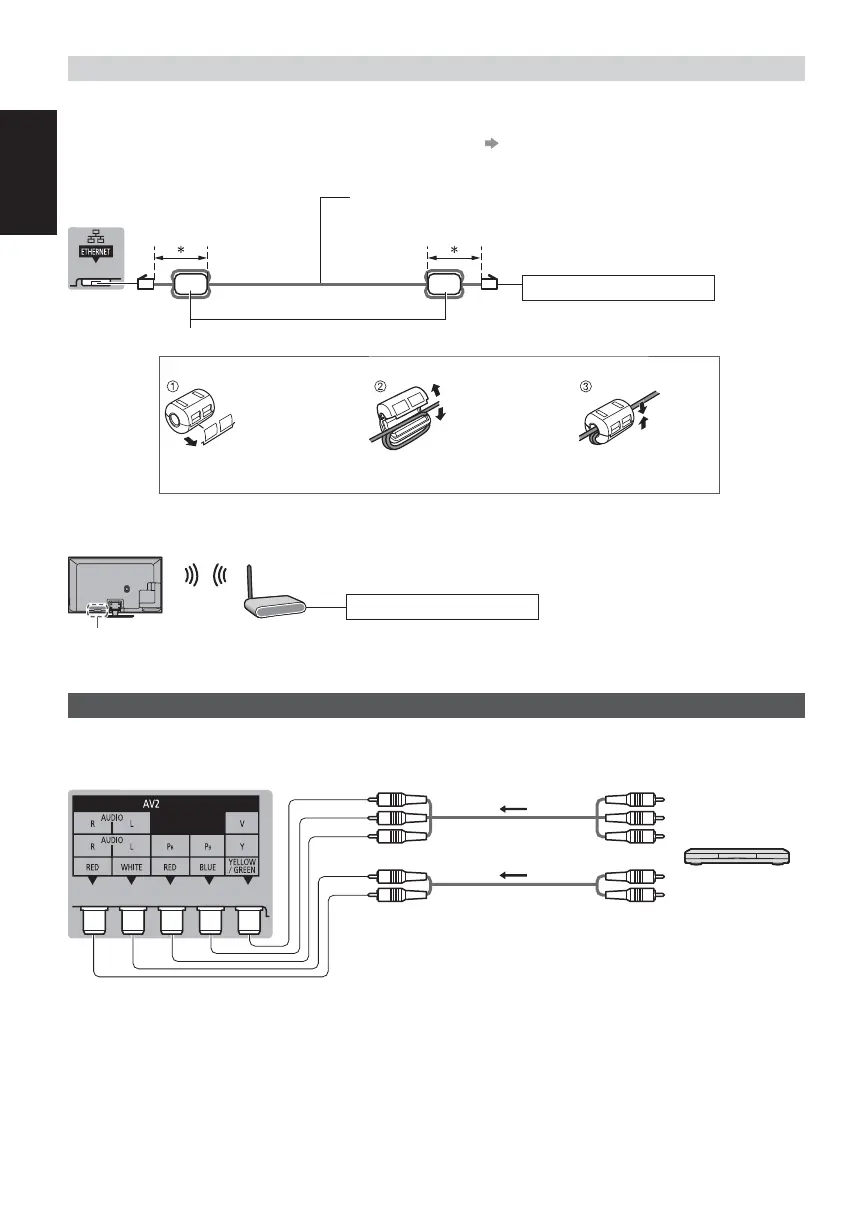
Wired connection
TV
Internet environment
*
Less than 10 cm
LAN cable (Unshielded)
Use the Unshielded Twist Pair (UTP) LAN cable.
Ferrite core - Large size (supplied)
Installing the Ferrite core
Pull back the tabs
(in two places)
Wind the cable twice Close
Wireless connection
Internet environment
Access point
Built-in wireless LAN
Other connections
DVD player
(COMPONENT equipment)
TV
DVD Player
(Listening)
(Viewing)













 To Next Page