English
1
14
15
18
20
21
22
23
24
16
25
2
4
5
19
10
3
17
6
7
8
9
11
12
13
13
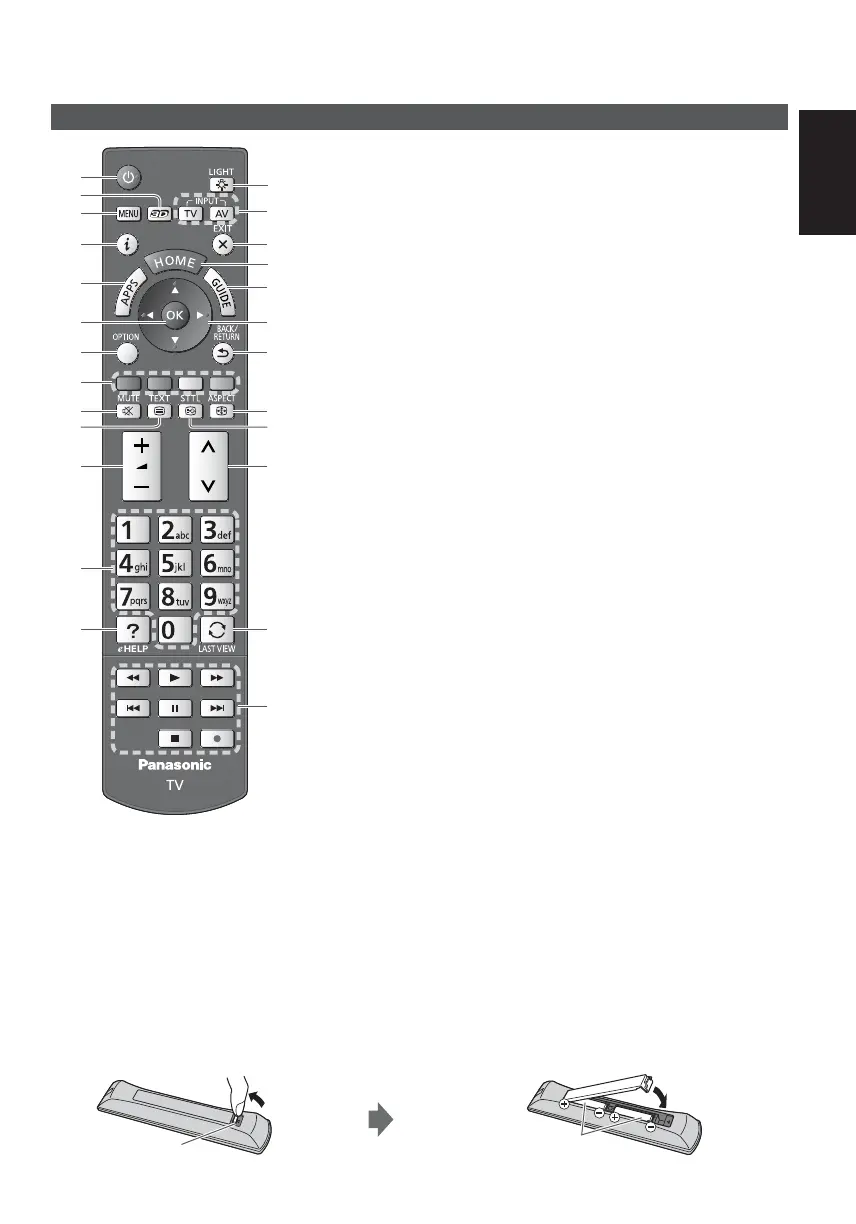
Identifying Controls
Remote Control
1
Standby On / Off switch
2
3D button
Switches the view between 2D and 3D.
3
[Main Menu]
Press to access Picture, Sound, Network, Timer,
Setup and Help Menus.
4
Information
Displays channel and programme information.
5
APPS
Displays [APPS List] (applications list).
6
OK
Confirms selections and choices.
Press after selecting channel positions to quickly
change channel.
Displays the Channel List.
7
[Option Menu]
Easy optional setting for viewing, sound, etc.
8
Coloured buttons
(red-green-yellow-blue)
Used for the selection, navigation and operation of
various functions.
9
Sound Mute On / Off
10
Teletext button
11
Volume Up / Down
12
Numeric buttons
Changes channel and teletext pages.
Sets characters.
When in Standby mode, switches TV on.
13
[eHELP]
Displays [eHELP] (Built-in Operating Instructions).
14
Light
Lights the buttons for about 5 seconds (except the
buttons “25”).
15
Input mode selection
TV - switches to DVB-S / DVB-C / DVB-T /
Analogue mode.
AV - switches to AV input mode from Input
Selection list.
16
Exit
Returns to [Home Screen].
17
HOME
Displays [Home Screen].
18
TV Guide
Displays Electronic Programme Guide.
19
Cursor buttons
Makes selections and adjustments.
20
Return
Returns to the previous menu / page.
21
Aspect
Changes aspect ratio.
22
Subtitles
Displays subtitles.
23
Channel Up / Down
24
Last view
Switches to previously viewed channel or input
mode.
25
Operations for contents, connected equipment,
etc.
Installing / Removing batteries
Pull open
Hook
Note the correct polarity
(+ or -)
Close













 To Next Page