English
7
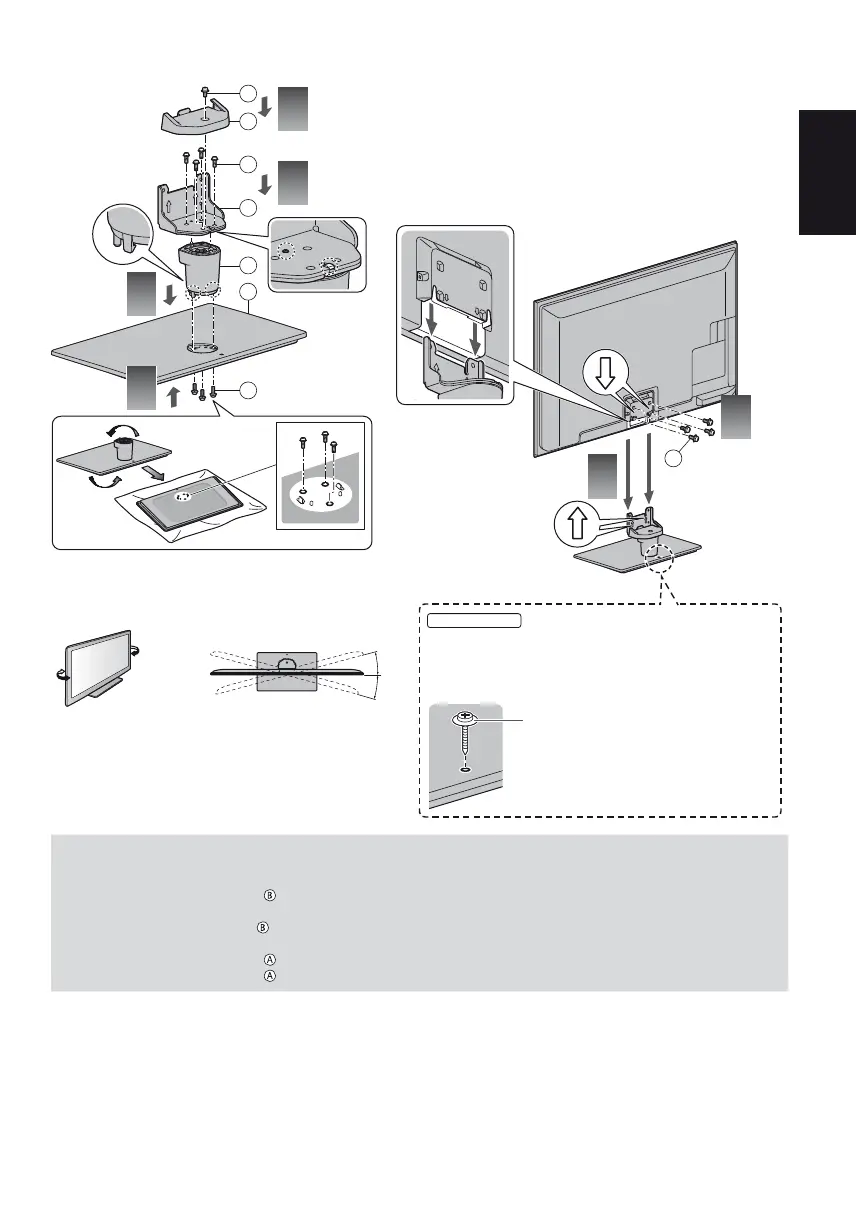
Assembling the pedestal
5
A
A
B
F
1
2
3
4
6
B
C
D
E
Adjusting the panel to your desired angle
Do not place any objects within the full rotation range.
15°
15°
(View from the top)
42-inch model
Secure the base as shown below to prevent the TV
from falling over.
The place where the base is secured should be thick
enough and made of hard material.
Commercially available screw
(not supplied)
Diameter: 3 mm
Length: 25 - 30 mm
Removing the pedestal from the TV
Be sure to remove the pedestal in the following way when using the wall-hanging bracket or repacking the TV.
1 Remove the assembly screws
from the TV.
2 Pull out the pedestal from the TV.
3 Remove the assembly screw from the cover.
4 Pull out the cover.
5 Remove the assembly screws from the bracket.
6 Remove the assembly screws from the back of the base and pull out the neck.













 To Next Page