English
11
5
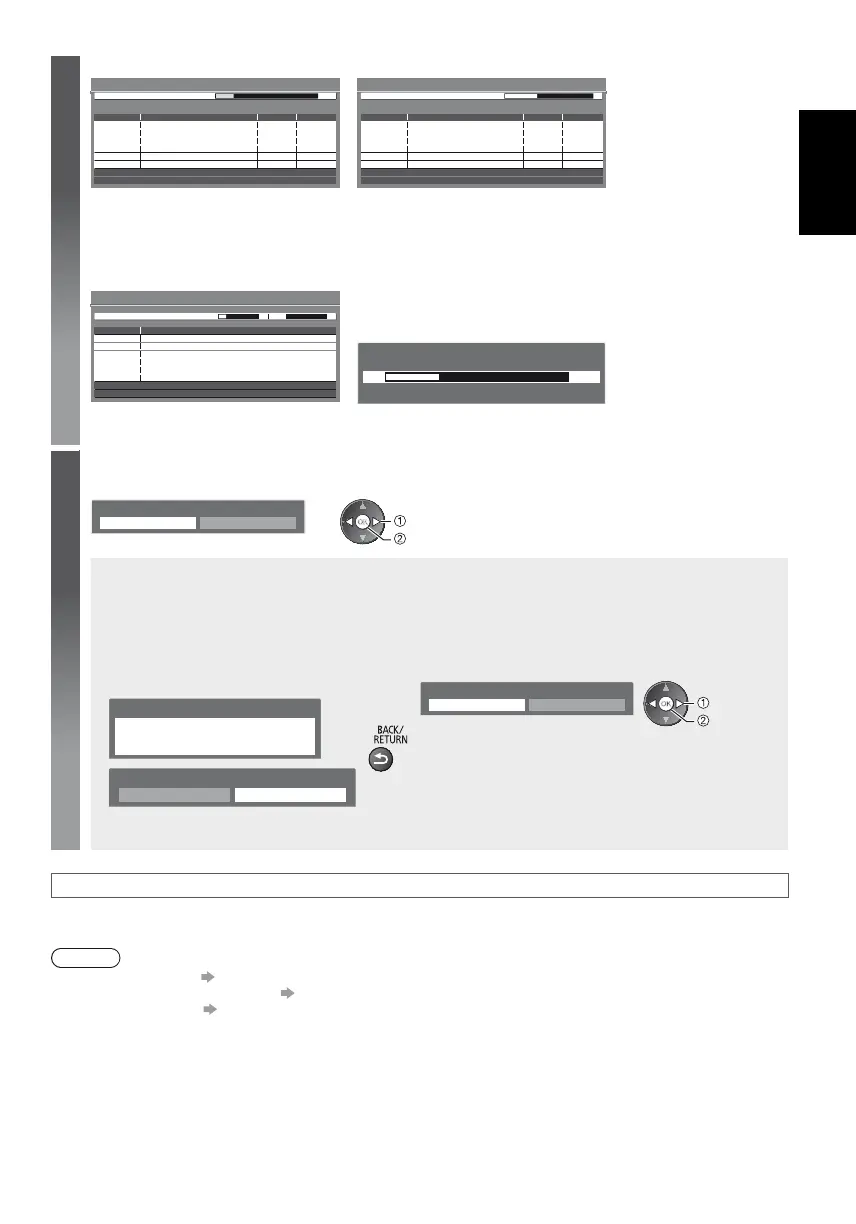
2 [DVB-C Auto Setup] 3 [DVB-T Auto Setup]
Searching
No.
1
2
3
Channel Name
CBBC Channel
BBC Radio Wales
E4
Type
Free TV
Free TV
Free TV
Quality
100
100
100
Free TV: 3 Pay TV: 0 Radio: 0
DVB-C Auto Setup
Progress
This will take about 3 minutes.
0%
100%
Searching
CH
62
62
62
Channel Name
CBBC Channel
BBC Radio Wales
E4
Type
Free TV
Free TV
Free TV
Quality
100
100
100
Free TV: 4 Pay TV: 0 Radio: 0
DVB-T Auto Setup
Progress
This will take about 3 minutes.
CH 5 69
62 Cartoon Nwk Free TV 100
Depending on the country you select, the channel selection screen
will be displayed after DVB-T Auto Setup if multiple channels have
the same logical channel number. Select your preferred channel or
exit the screen for automatic selections.
4 [Analogue Auto Setup] 5 Preset Download
If Q-Link, VIERA Link or similar technology compatible recorder
is connected, channel, language and country / region settings are
automatically downloaded to the recorder.
Sending Preset Data
Please wait!
0%
100%
Remote control unavailable
If downloading has failed, you can download later through the
Setup Menu.
Searching
CH
CH 29
CH 33
Channel Name
BBC1
Analogue: 2
Analogue Auto Setup
This will take about 3 minutes.
Scan CH 2 CC 1 4178
6
Select [Home]
Select [Home] viewing environment to use in your home environment.
Please select your viewing environment.
Home Shop
select
set
[Shop] viewing environment (for shop display only)
[Shop] viewing environment is the demonstration mode to explain main features of this TV.
Select [Home] viewing environment to use in your home environment.
You can return to viewing environment selection screen at the stage of Shop confirmation screen and
Automatic Demo Off / On selection screen.
1 Return to viewing environment selection
screen
2 Select [Home]
Please select your viewing environment.
Home Shop
select
set
Shop
You have selected shop mode
Automatic Demo
Off
On
To change viewing environment later on, you will need to initialise all settings by accessing Shipping
Condition.
Auto Setup is now complete and your TV is ready for viewing.
If tuning has failed, check the connection of the RF cable, and then, follow the on-screen instructions.
Note
To retune all channels
[Auto Setup] in the Setup Menu (p. 17)
To add the available TV mode later [Add TV Signal] in the Setup Menu (p. 17)
To initialise all settings [Shipping Condition] in the Setup Menu (p. 18)











 To Next Page