English
16
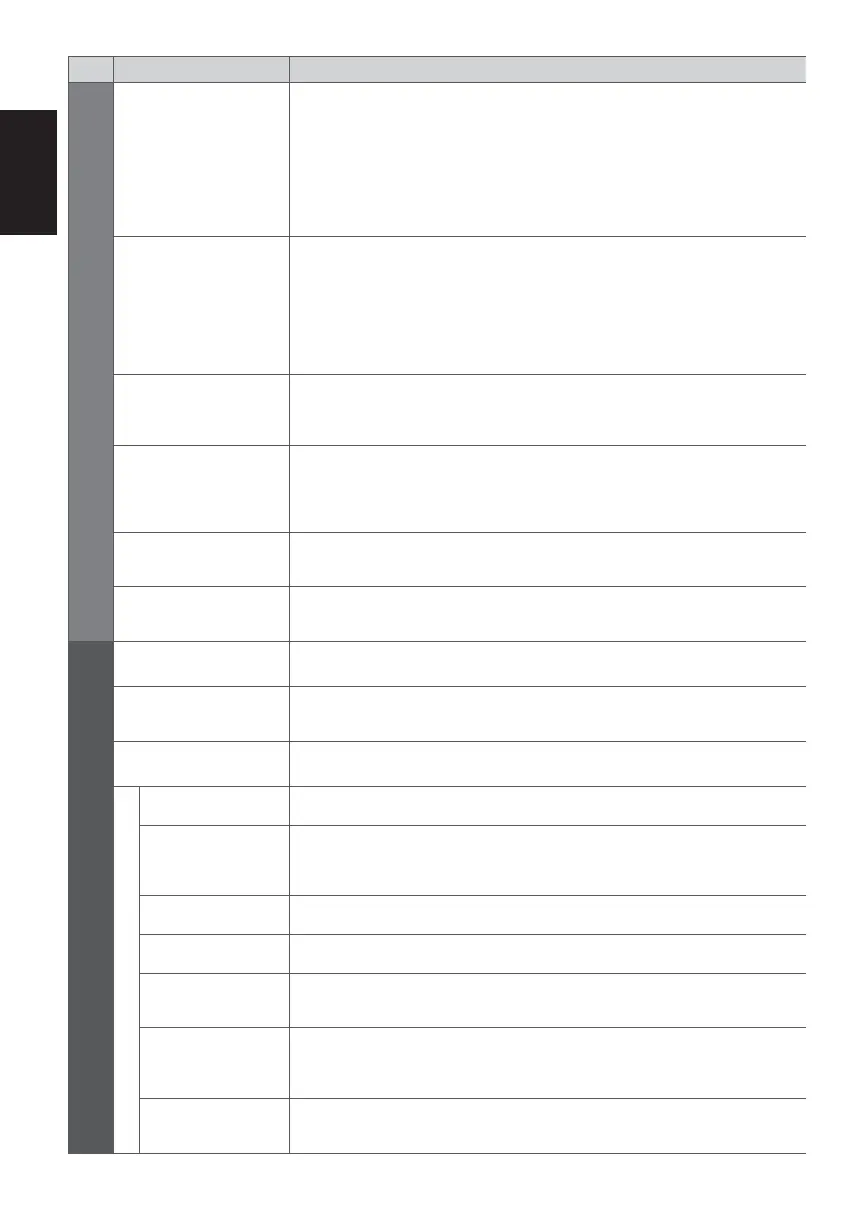
Menu
Item Adjustments / Configurations (alternatives)
Sound
Audio Preference
Selects the initial setting for audio tracks
[Auto] / [Multichannel] / [Stereo] / [MPEG]
[Auto]: Automatically selects the audio tracks if programme has more than two
tracks. The priority is given in the following order - Dolby Digital Plus, HE-
AAC, Dolby Digital, MPEG.
[Multichannel]: The priority is given to multi-channel audio track.
[Stereo]: The priority is given to stereo (2ch) audio track.
[MPEG]: The priority is given to MPEG.
SPDIF Selection
SPDIF: A standard audio transfer file format
Selects the initial setting for digital audio output signal from DIGITAL AUDIO OUT
and HDMI2 (ARC function) terminals [Auto] / [PCM]
[Auto]: Dolby Digital Plus and Dolby Digital are output as Dolby Digital Bitstream.
HE-AAC (48 kHz) multi-channel is output as DTS. MPEG is output as
PCM.
[PCM]: Digital output signal is fixed to PCM.
PCM Optical Level
Adjusts the audio level of PCM output from DIGITAL AUDIO OUT and HDMI2
(ARC function) terminals as the initial setting
[-12] / [-10] / [-8] / [-6] / [-4] / [-2] / [0] (dB)
HDMI1 / 2 Input
Selects to fit the input signal [Digital] / [Analogue]
[Digital]: When sound is carried via the HDMI cable connection
[Analogue]: When sound is not carried via the HDMI-DVI adaptor cable
connection
SPDIF Delay
Adjusts the delay time of the sound output from DIGITAL AUDIO OUT and HDMI2
(ARC function) terminals if the sound does not synchronise the image
Reset to Defaults
Press the OK button to reset the current Sound Mode, [Balance], [Headphone
Volume] and [Surround] to the default settings
Setup
Timer Programming Sets a timer to record or remind forthcoming programmes
Off Timer
Sets the duration of time until the TV automatically goes into Standby mode
[Off] / [15] / [30] / [45] / [60] / [75] / [90] (minutes)
Eco Navigation Automatically sets the TV to the most suitable energy-saving mode
Link Settings
VIERA Link Sets to use VIERA Link functions [Off] / [On]
AV1 out
Chooses the signal to be transmitted from the TV to Q-Link
[TV] / [AV2] / [Monitor]
[Monitor]: Image displayed on screen
Power on Link Sets to use Power on Link function [Off] / [On]
Power off Link Sets to use Power off Link function [Off] / [On]
Standby Power
Save
Controls the connected equipment to reduce power consumption in Standby
[Off] / [On]
Intelligent Auto
Standby
Makes non-watched or non-used connected equipment go into Standby mode to
reduce the power consumption
[Off] / [On (With reminder)] / [On (No reminder)]
Download
Downloads channel, language and country / region settings to Q-Link or
VIERA Link compatible equipment connected to the TV











 To Next Page