English
15
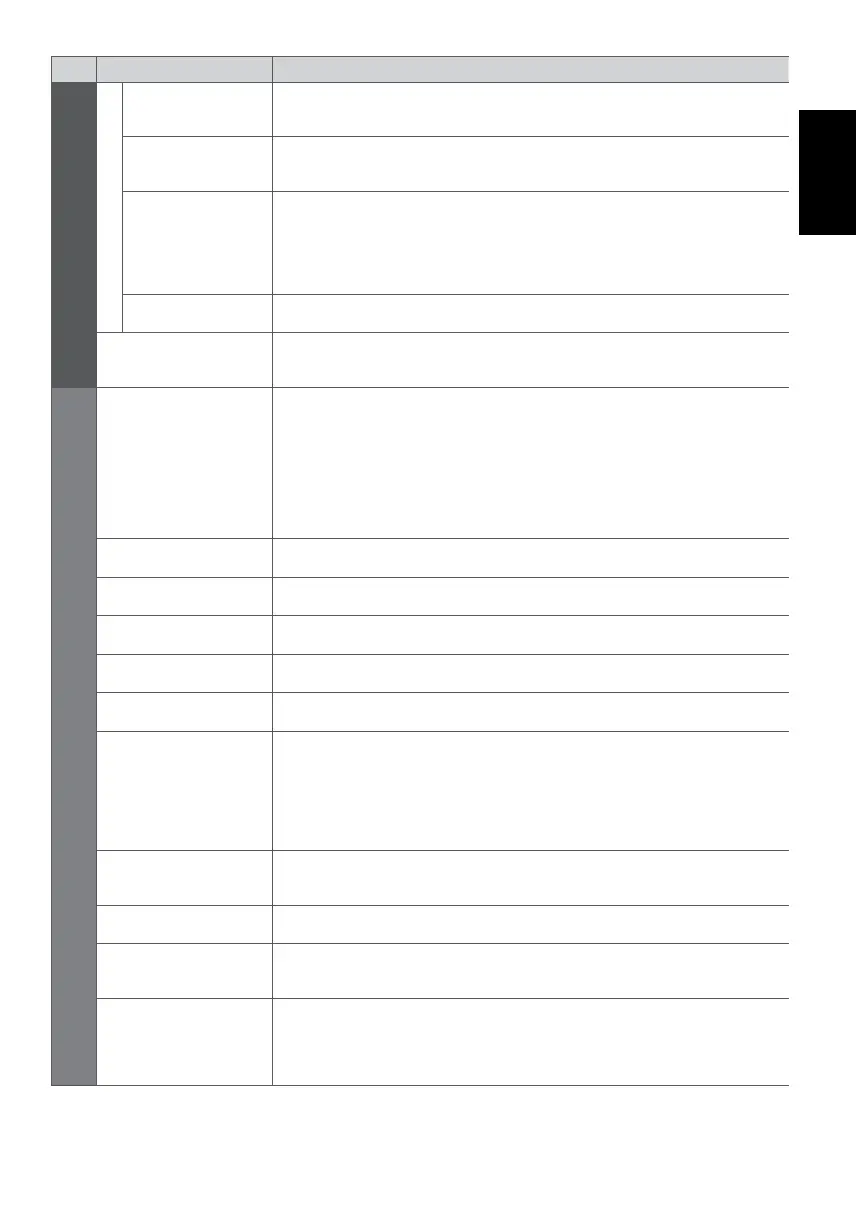
Menu
Item Adjustments / Configurations (alternatives)
Picture
Advanced Settings
AV Colour System
Selects optional colour system based on video signals in AV mode
[Auto] / [PAL] / [SECAM] / [M.NTSC] / [NTSC]
DVI Input Setting
Changes the black level of the image for HDMI input mode with DVI input signal
manually [Normal] / [Full]
Pixel Orbiter
Selects the mode for wobbling of the image to prevent panel “image retention”
[Auto] / [On]
[Auto]:
Automatically works only for the appropriate images and you rarely recognise
the wobbling.
Scrolling Bar Displays scrolling bar pattern to assist elimination of panel “image retention”
Reset to Defaults
Press the OK button to reset the current Picture Viewing Mode of the selected
input to the default settings
Sound
Mode
Selects your favourite sound mode [Music] / [Speech] / [User]
[Music]:
Improves sound quality for watching music videos, etc.
[Speech]:
Improves sound quality for watching news, drama, etc.
[User]:
Adjusts the sounds manually by using the equaliser to suit your favourite sound
quality.
Bass Adjusts level to enhance or minimise lower, deeper sound output
Treble Adjusts level to enhance or minimise sharper, higher sound output
Equaliser Adjusts the frequency level to suit your favourite sound quality
Balance Adjusts volume level of right and left speakers
Headphone Volume Adjusts the volume of the headphones
Surround
Surround sound settings [Off] / [V-Audio] / [V-Audio Surround]
[V-Audio]:
Provides a dynamic enhancer of width to simulate improved spatial effects.
[V-Audio Surround]:
Provides a dynamic enhancer of width and depth to simulate improved spatial
effects.
Auto Gain Control
Automatically regulates large sound level differences between channels and
inputs [Off] / [On]
Volume Correction Adjusts the volume of individual channel or input mode
Speaker Distance to
Wall
Compensates for the low frequency sound due to the distance between the
speakers and the wall [Over 30cm] / [Up to 30cm]
MPX
Selects multiplex sound mode (if available)
[Stereo]: Use this normally.
[Mono]: When stereo signal cannot be received.
[M1] / [M2]: Available while mono signal is transmitted.











 To Next Page