English
18
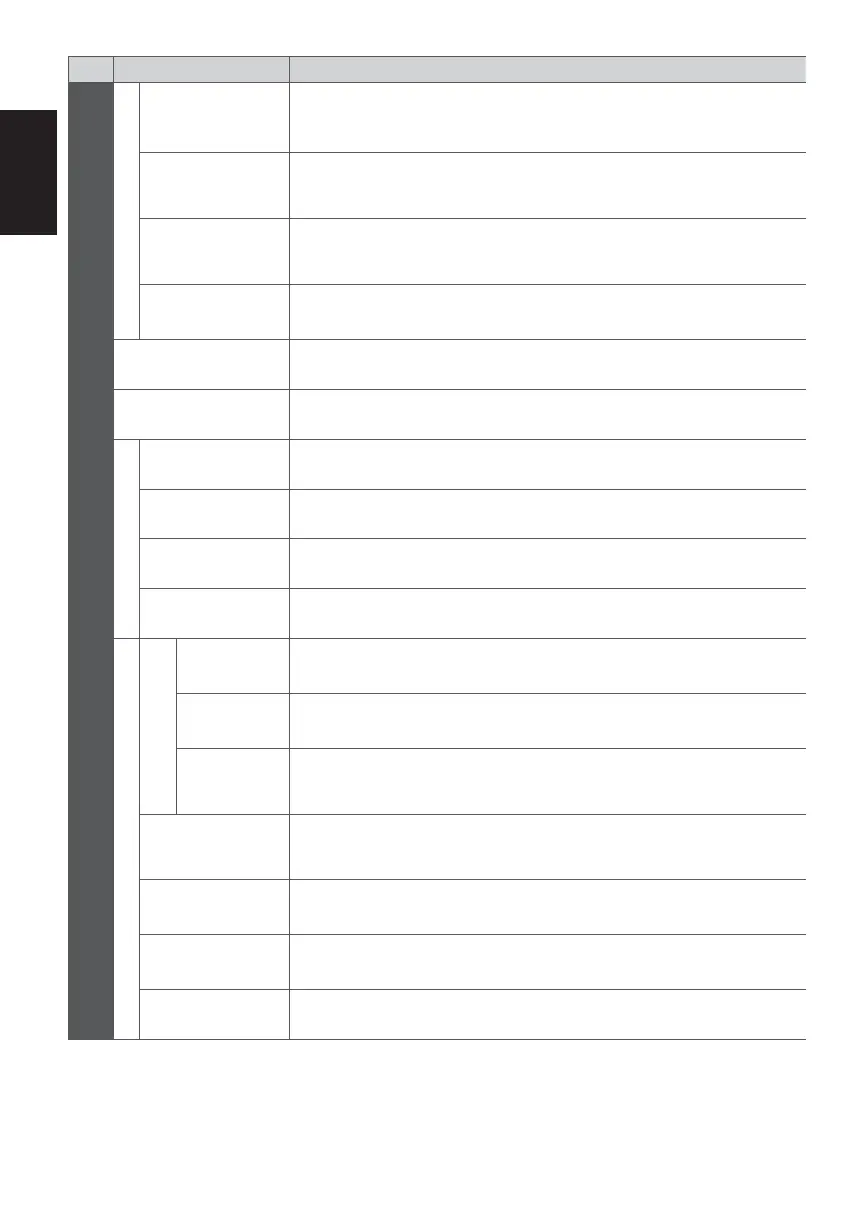
Menu
Item Adjustments / Configurations (alternatives)
Setup
Display Settings
Input Labels
Accesses the input labels list to select the label of each input mode or set to skip
unconnected one for easier identification and selection in [TV Selection], [Input
Selection] or banner
Banner Display
Timeout
Sets how long the Information banner stays on screen
[0 (No display)] / [1] / [2] / [3] / [4] / [5] / [6] / [7] / [8] / [9] / [10] (seconds)
Playing Time
Display
Set to [On] to display a continuous record of time spent using Game mode in the
top right of the screen every 30 minutes [Off] / [On]
Radio Mode
Sets the timer for turning off the screen automatically when a radio channel is
selected [Off] / [5] / [10] / [15] / [20] (seconds)
Common Interface Sets to watch encrypted channels, etc.
DivX® VOD Displays DivX VOD registration code
System Menu
Shipping Condition Resets all settings to the original condition
System Update Downloads new software to this TV
Software Licence Displays the software licence information
System Information Displays the system information of this TV
Other Settings
GUIDE Plus+ Settings
Update
Performs the update of the GUIDE Plus+ schedule and advertising information for
the GUIDE Plus+ system (only available in some countries)
Postcode
Sets your postcode to display advertisements in the GUIDE Plus+ system (only
available in some countries)
System
Information
Displays the system information of the GUIDE Plus+ system (only available in
some countries)
Power on
Preference
Automatically selects the input when the TV is turned on [TV] / [AV]
Auto Standby
Sets the duration of time that the TV will remain on when no operation is
performed [Off] / [2] / [4] (hours)
Power Save
Reduces brightness of the picture to economise on power consumption
[Off] / [On]
Time Zone Adjusts the time data
The settings in [Tuning Menu] are applicable only for the selected TV mode. The menu name varies depending on the
TV mode. ([DVB-C Tuning Menu] / [DVB-T Tuning Menu] / [Analogue Tuning Menu])
A different menu will be displayed in the mode of Media Player.
Only available items can be selected.











 To Next Page