35
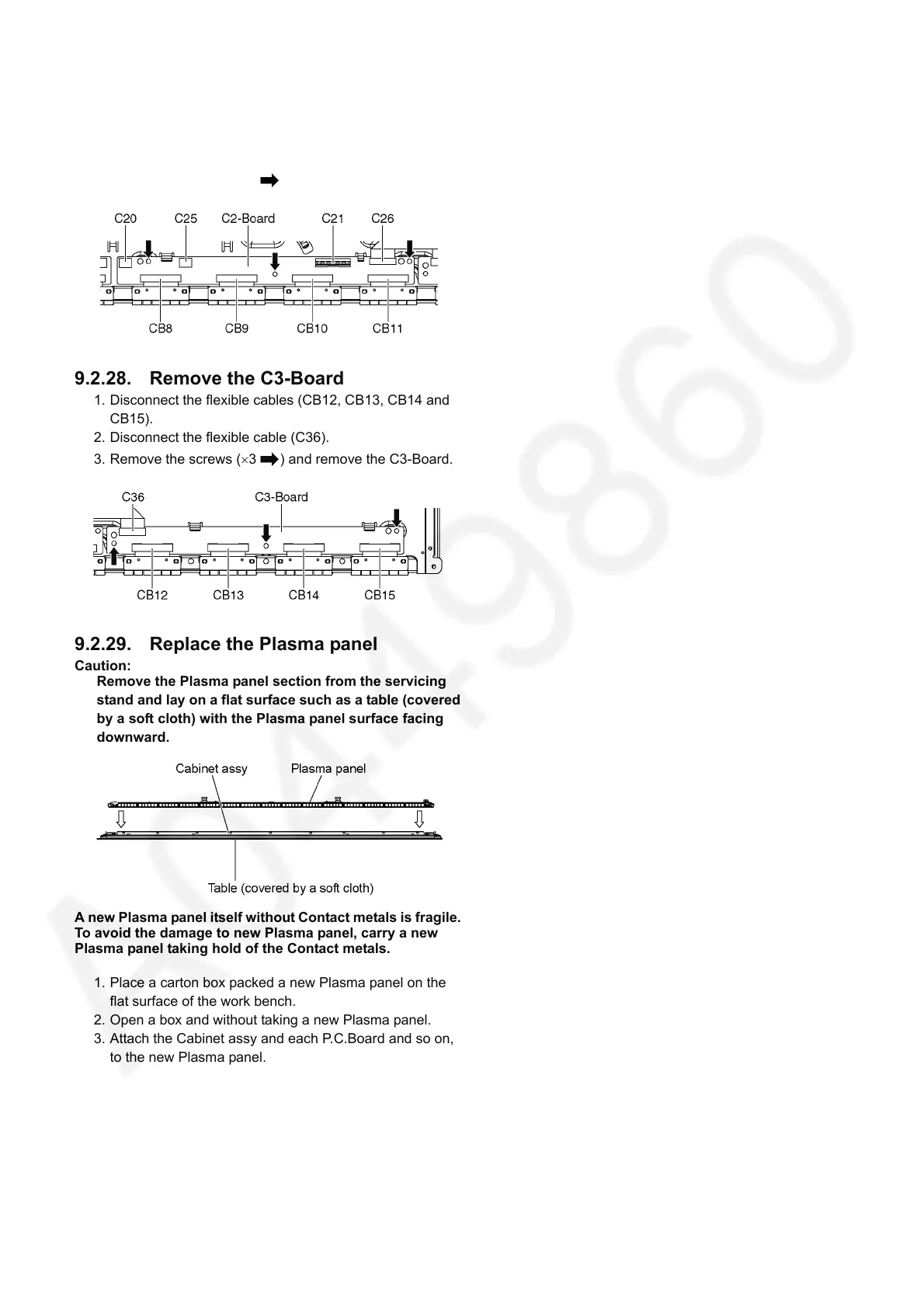
9.2.27. Remove the C2-Board
1. Disconnect the flexible cables (CB8, CB9, CB10 and
CB11).
2. Disconnect the flexible cables (C21 and C26).
3. Disconnect the connectors (C20 and C25).
4. Remove the screws (×3 ) and remove the C2-Board.
9.2.28. Remove the C3-Board
1. Disconnect the flexible cables (CB12, CB13, CB14 and
CB15).
2. Disconnect the flexible cable (C36).
3. Remove the screws (×3 ) and remove the C3-Board.
9.2.29. Replace the Plasma panel
Caution:
Remove the Plasma panel section from the servicing
stand and lay on a flat surface such as a table (covered
by a soft cloth) with the Plasma panel surface facing
downward.
A new Plasma panel itself without Contact metals is fragile.
To avoid the damage to new Plasma panel, carry a new
Plasma panel taking hold of the Contact metals.
1. Place a carton box packed a new Plasma panel on the
flat surface of the work bench.
2. Open a box and without taking a new Plasma panel.
3. Attach the Cabinet assy and each P.C.Board and so on,
to the new Plasma panel.








 To Next Page