English
23
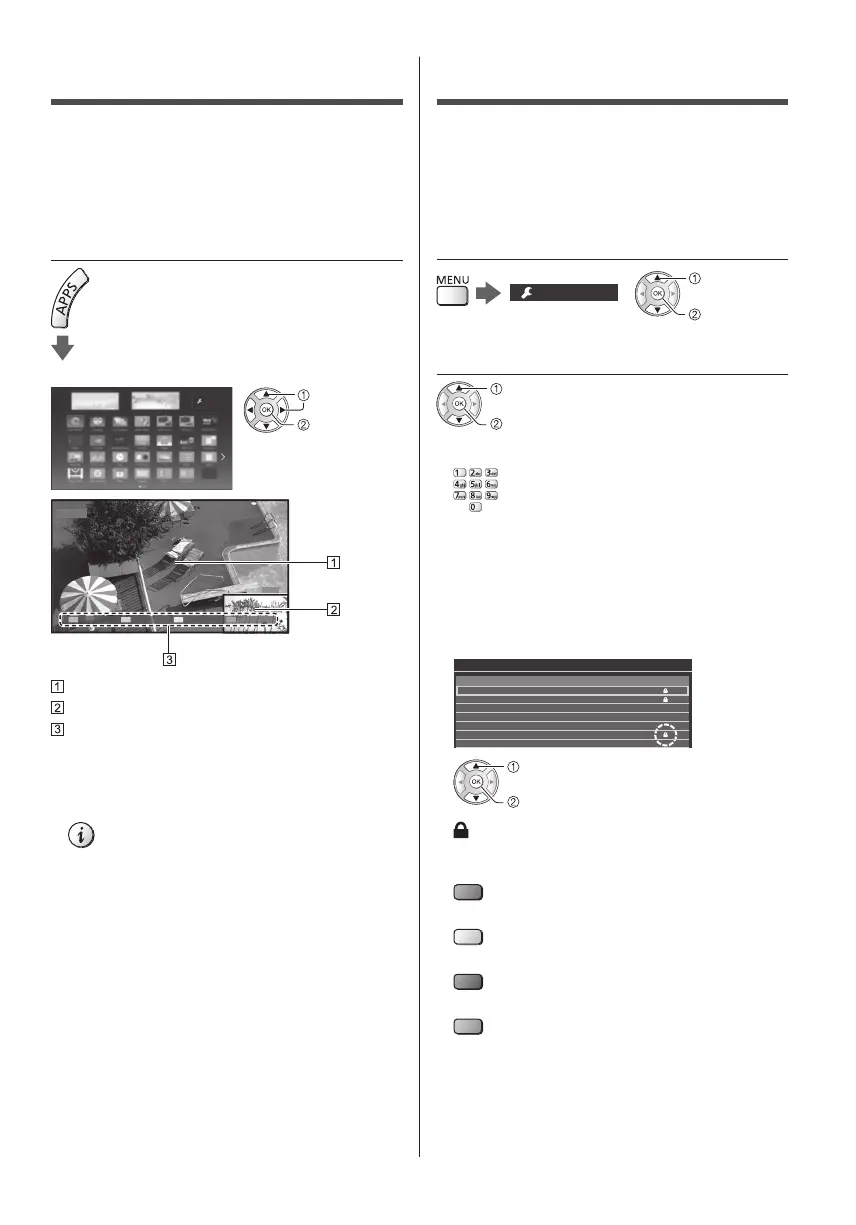
Multi Window
Displays the digital TV programme and external input
(AV / COMPONENT / HDMI) at once.
●
For details, refer to [eHELP] (Functions > Multi
Window).
1 Display [APPS List] and select [Multi
Window]
Example: [APPS List]
select
access
1 DVB-T
EXIT
PandP Swap
AV1
Main screen
Sub screen
Colour bar
●
Remote control operations apply to the main screen.
●
You can change the view by using the coloured
buttons while the colour bar is displayed.
If the colour bar is not displayed
Child Lock
You can lock specific channels / AV input terminals to
restrict access to them.
When the locked channel / input is selected, a message
appears. Enter the PIN number to watch.
●
For details, refer to [eHELP] (Functions > Child Lock).
1 Display the menu and select [Setup]
Setup
select
access
2 Select [Child Lock]
select
access
1 Enter the PIN number (4 digits)
●
Enter the PIN number twice at first setting.
●
Make a note of the PIN number in case you forget
it.
●
“0000” may be stored as the default PIN number
depending on the country you select.
2 Select [Child Lock List] and set the channel / input to
be locked
101 BBC 1 Wales
7 BBC THREE
14 E4C
VCR
1 BBC1
*****2
HDMI1 AV
Child Lock List - TV and AV Sorting 123...
Name Input
DVB-C
DVB-T
DVB-T
Analogue
Analogue
Analogue
External
Type
Free TV
Free TV
Free TV
Analogue
Analogue
Analogue
Lock
select
lock / unlock
: Appears when the channel / input is locked
●
To lock all
(green)
●
To cancel all locks
(yellow)
●
To sort channel names in alphabetical order
(red)
●
To jump to the head of the next channel / input group
(blue)




 To Next Page