•
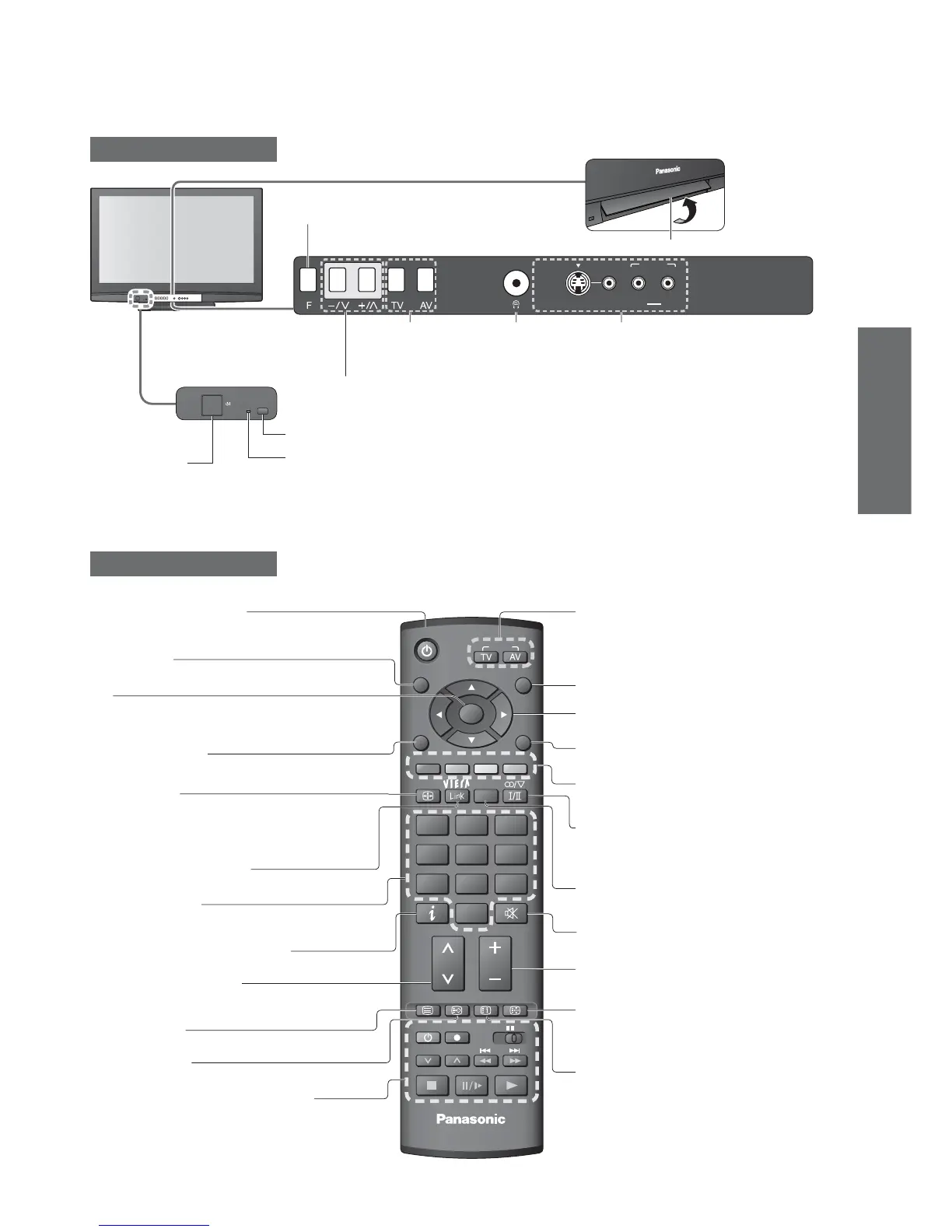
Identifying Controls
•
Basic Connection
Identifying Controls
Cursor buttons
•
Makes selections and adjustments
Standby On / Off switch
•
Switches TV On or Off standby
Sound Mute
•
Switches sound mute On or Off
Guide (p. 17)
•
Displays TV Guide
Programme Up / Down
•
Selects programme in sequence
•
When in Standby mode, switches TV On
Numeric buttons
•
Changes programme and teletext pages
•
When in Standby mode, switches TV On
OK
•
Confi rms selections and choices
•
Press after selecting programme positions to
quickly change programme (DVB) (p. 14)
Volume Up / Down
Programme Information
(p. 15)
•
Displays programme information
Index (p. 19)
•
Returns to the teletext index page
(teletext mode)
Coloured buttons
•
Used for the selection, navigation and
operation of various functions
Return
•
Returns to the previous menu
VCR / DVD Panasonic equipment
operations (p. 21)
Teletext (p. 18)
•
Switches to teletext mode
VIERA Link Menu (p. 37)
•
Press to access VIERA Link Menu directly
Main Menu (p. 22)
•
Press to access VIERA Link, Picture,
Sound and Setup Menus
Option Menu (p. 15)
•
Easy setting for viewing and sound
options
Aspect (p. 16)
•
Changes aspect ratio from
Aspect Selection list
•
Also possible by pressing this button
repeatedly until you reach the desired aspect
Subtitles (p. 14)
•
Displays Subtitles
Input mode selection
•
TV -
switches DVB / Analogue mode (p. 14)
•
AV - switches to AV input mode from Input
Selection list (p. 20)
Exit
•
Returns to the normal viewing screen
Stereo / Bilingual Sound Selection
(p. 43) (Analogue)
•
Changes the sound track, if programme
has multiple audio tracks (DVB)
Hold
•
Freeze / unfreeze picture (p. 14)
•
Holds the current teletext page (teletext
mode) (p. 19)
Remote Control
TV
Lift door to open
Increases or decreases the programme position by one. When a
function is already displayed, press to increase or decrease the
selected function. When in Standby mode, switches TV On.
Changes the
input mode
Function select
•
Volume / Contrast / Brightness / Colour /
Sharpness / Tint (NTSC mode) / Bass /
Treble / Balance / Auto Tuning (p. 30)
Headphones
jack
(p. 40)
AV4
terminals
(p. 40)
Mains power
On / Off switch
•
Switch On to turn on the TV
or turn the TV to standby
mode by the remote control
Remote control signal receiver
Power LED
•
Standby: red
On: green
•
When using the remote control, indicates the TV has received a command.




 To Next Page